


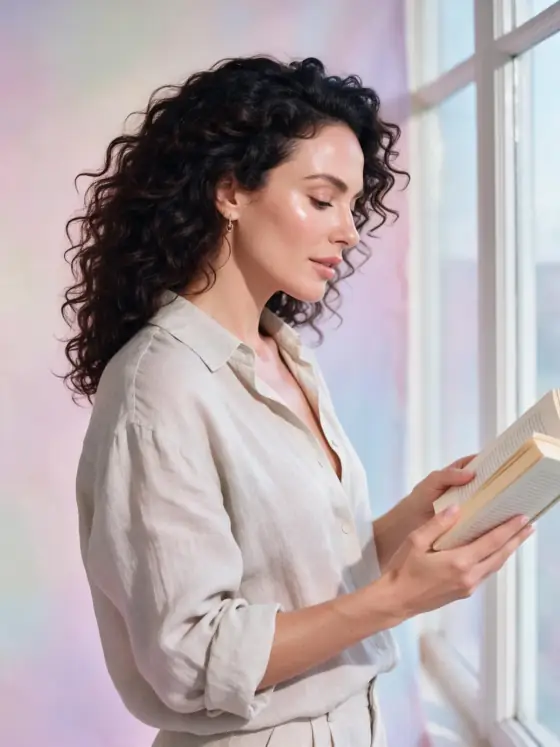

Korean-style AI Portrait Generator: Dewy Studio
Bright, soft beauty light on a pastel backdrop.
- From a description only
- Best shape: 4:5 · 3:4
Works on
- Seedream 5.0 Pro
- Qwen Image 3.0
- Nano Banana 2.1
- Seedream 5.0 Flash
About Dewy Studio
Dewy Studio is the bright, polished look of Seoul beauty campaigns: soft wrap-around light with almost no shadow, a dewy luminous finish on every surface, a seamless pastel backdrop and styling so minimal that the light becomes the whole story. It reads as fresh and expensive at the same time.
The style only describes the studio — light, finish, backdrop, framing. You describe the subject. That matters, because a lot of “K-style” generators quietly change the face they are given. This one does not: the template contains no words about faces, features or bodies, so whoever you write is who you get, just lit like a cover.
Subjects to paste as they are: “a woman in a white knit top holding a glass serum bottle”, “a man in a pale grey suit with a single pearl earring”, “three perfume bottles on a curved white plinth”. Clean clothing and shiny materials give the light something to work with.
Finishes that work on top: Soft glow is the natural partner. Film grain adds an editorial edge if the result feels too clean. Avoid Black & white; the pastel backdrop is part of the look.
Tips
- Write the styling you want in plain words: “a woman in an oversized white shirt holding a glass serum bottle” gives the style something clean to light.
- Keep backgrounds out of your subject. The style supplies a seamless pastel backdrop; describing a room competes with it.
- For product shots, name the material — glass, pearl, ceramic, satin. The dewy finish looks best on surfaces that can shine.
- Pair with Soft glow for a dreamier campaign look, or leave it plain for sharp, clean e-commerce images.
- For a cleaner product shot, describe the object alone and add “on a seamless pastel backdrop” only if you want to choose the color.
What the style adds
Your words go where it says “your subject”. Everything else is added for you.
your subject, clean high-key studio portrait, soft diffused beauty lighting, dewy luminous finish, soft pastel seamless backdrop, minimal styling, glossy magazine look
Models and price
- Seedream 5.0 Pro36 credits
- Qwen Image 3.030 credits
- Nano Banana 2.148 credits
- Seedream 5.0 Flash29 credits
One 1K image from a description. The button always shows the exact price before you spend anything.
How to use Dewy Studio
- Describe itWrite who or what should be in the picture. A small action and a clear place work best.
- Pick a shapeKeep the suggested ratio and model, or change them in the bar at the bottom.
- Paint itPress “Paint it”. The price is on the button before you spend anything.
Questions about Dewy Studio
Can I use Dewy Studio on my own photo?
Not yet. This style works from a description: write what you want to see and the style adds the look.
How much does one Dewy Studio image cost?
29 credits for one 1K image on Seedream 5.0 Flash. 2K costs more, and the button shows the exact price before you run it.
Does this style change the face or the skin?
No. It describes light, finish, backdrop and styling only. Nothing in the template touches faces, features, skin or body shape, and it never changes who the subject is.
What does “glass skin” mean here?
It is a lighting and finish term: surfaces look dewy and luminous rather than matte. The effect comes from the soft light and glossy finish, not from altering the person.
Can I use it for products?
Yes, and it works very well. Cosmetics, jewelry, glassware and fruit all look good under the soft high-key light.
Is it only for skincare brands?
No. It works for any image that should feel fresh and bright: personal-brand portraits, jewelry, glassware, fruit and simple product shots all look good in it.
Similar styles
 Old Hollywood
 High Fashion
 Mono Studio
 Flash Editorial
Bring it to life
Effects that turn a still in this look into a short video.
 The Turn
 Live Portrait