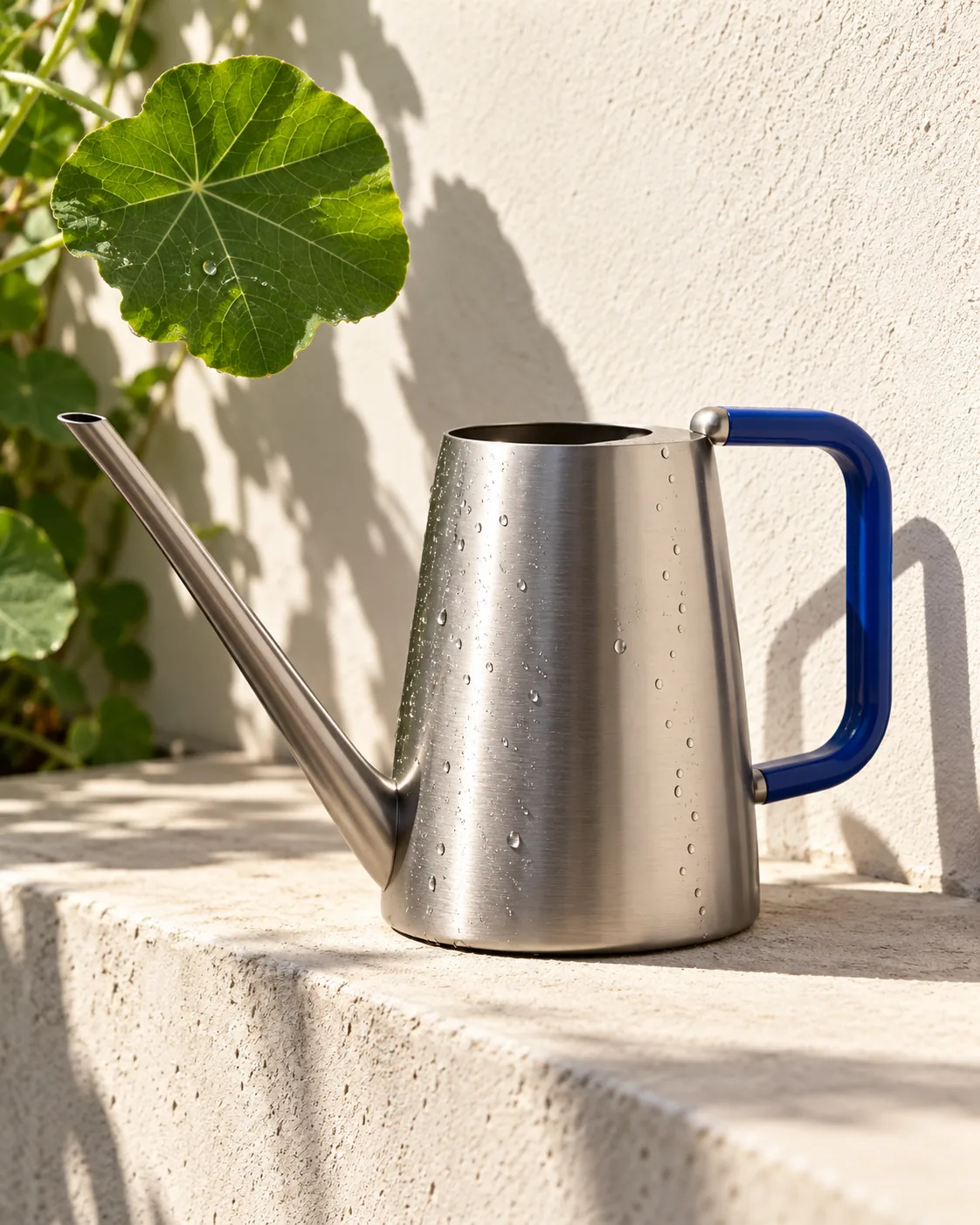
Titanium Watering Can, made with GPT Image 2.5 Sunburst
Example made with GPT Image 2.5 Sunburst

Text to imageProducts & food

GPT Image 2.5 Sunburst product photo promptTitanium Watering Can

The exact text-to-image prompt behind this picture, made with GPT Image 2.5 Sunburst.

Prompt

Vertical 4:5 portrait frame. A compact brushed titanium watering can with a long narrow spout stands on a cream concrete ledge, its cobalt handle casting an angular shadow across the wall. A single broad nasturtium leaf enters from the frame edge, with a few water droplets on the metal. Bright morning sunlight, 90mm industrial product photography, cool silver and fresh green, quietly functional garden luxury, no logos, no text.

Prompts are kept in their original English to help reproduce the example. Copy one as it is, or adapt it for your project.

Opens GPT Image 2.5 Sunburst with this prompt and the settings below filled in.

135 tested GPT Image prompts →

Settings

Mode
Text to image
Aspect ratio
4:5
Quality
high
Price
From 2 credits

The exact price shows before you generate.

Make your own version

  1. For a different mood, rewrite only the light: Bright morning sunlight.
  2. 90mm industrial product photography sets the whole feel of the shot. Swap it for another camera style to change the vibe.
  3. The prompt ends with no text. Leave that in, or the model may add random lettering.

Product prompt guide

How this product shot is built

A brushed titanium watering can with a long narrow spout, photographed on a cream concrete ledge in hard morning light. GPT Image 2.5 Sunburst handles it well because the prompt fixes one object, one surface, one accent leaf and one light direction. The result reads as a calm, premium garden-tool ad in a vertical 4:5 frame.

  1. Hero product and surfaceA compact brushed titanium watering can with a long narrow spout stands on a cream concrete ledge

    This names the object, its metal finish, its shape and where it sits. Drop 'brushed' and the metal turns into a glossy chrome look. Change 'cream concrete' and the soft, matte contrast disappears.

  2. Color accent and shadowits cobalt handle casting an angular shadow across the wall

    The cobalt handle is the only saturated color on the can, so it pulls the eye. The angular shadow adds graphic structure to the plain wall. Without it the wall looks flat and empty.

  3. Organic props and detailA single broad nasturtium leaf enters from the frame edge, with a few water droplets on the metal.

    One leaf adds the green and a natural curve without crowding the can. 'Single' keeps the prop small. The droplets show the can is a real, working tool and give the light small highlights to catch.

  4. Light and lensBright morning sunlight, 90mm industrial product photography

    Bright sun gives crisp shadows and a clear sheen on the brushed metal. '90mm' suggests a flattering, slightly compressed view with little distortion of the spout. Remove it and the framing may look wider and less like a studio shot.

  5. Palette, mood, exclusionscool silver and fresh green, quietly functional garden luxury, no logos, no text.

    The palette keeps the image to silver, green and the cobalt accent. 'Quietly functional garden luxury' sets a restrained tone. 'No logos, no text' stops the model from inventing fake engraving or labels on the can.

What to change for your own product

To shoot your own product in this set-up, keep the structure and swap the nouns. Change one slot at a time so the lighting and mood stay consistent.

Product
The prompt uses a compact titanium watering can with a long narrow spout. Replace it with your item and its key shape, such as 'a slim matte steel water bottle with a flat cap'.
Material
Here it is brushed titanium with a cobalt handle. Name your own finish and one accent color, for example 'frosted glass with a copper lid'.
Backdrop
A cream concrete ledge and a wall. Swap in another plain surface like pale oak, white plaster or slate, and keep it simple so the product stays dominant.
Props
One nasturtium leaf and a few droplets. Choose one prop that fits your product, such as a single lemon slice or a sprig of rosemary, and keep it at the frame edge.

Ready-made variations

Matte steel water bottle

Use this for a drinkware ad. It keeps the layout but moves to a bottle and a mint sprig.

Prompt

Vertical 4:5 portrait frame. A slim matte steel water bottle with a flat black cap stands on a pale oak ledge, its cap casting an angular shadow across a white plaster wall. A single mint sprig enters from the frame edge, with a few water droplets on the metal. Bright morning sunlight, 90mm industrial product photography, cool silver and soft green, quietly functional outdoor luxury, no logos, no text.

Ceramic skincare jar

Use this to adapt the set-up to skincare, with warmer metal and a gentler plant.

Prompt

Vertical 4:5 portrait frame. A compact frosted glass skincare jar with a brushed copper lid stands on a cream stone ledge, its lid casting a soft angular shadow across the wall. A single eucalyptus leaf enters from the frame edge, with a few water droplets on the glass. Bright morning sunlight, 90mm product photography, warm copper and pale sage, quiet bathroom luxury, no logos, no text.

Dusk campaign look

Use this to show the same product in an evening campaign with a darker, warmer mood.

Prompt

Vertical 4:5 portrait frame. A compact brushed titanium watering can with a long narrow spout stands on a dark slate ledge, its cobalt handle casting a long angular shadow across the wall. A single broad nasturtium leaf enters from the frame edge, with a few water droplets on the metal. Low golden evening sunlight, 90mm industrial product photography, silver and deep green, moody garden luxury, no logos, no text.

Model and settings

Keep the 4:5 ratio, since it suits a product page or social feed and leaves room for the tall spout. Keep quality on high so the brushed metal grain and the droplets stay crisp. If you need a wide banner, change the ratio and describe more empty wall on one side. For a different product, leave the settings alone and edit only the prompt.

  • FLUX.2 ProPick FLUX.2 Pro if you want strongly photoreal metal and precise color control, for example matching the exact cobalt of your handle with a hex value.
  • Nano Banana 2.1Choose Nano Banana 2.1 if you later add a label or engraved wording to the can, since it is known for sharp text and 4K output.

When the product shot goes wrong

The metal looks glossy like chrome instead of brushed.
Keep 'brushed titanium' and add 'fine linear grain, satin finish, no mirror reflections'.
The spout comes out short, bent or doubled.
Repeat the shape near the start: 'one long, narrow, straight spout, a single spout only'. Keep the can fully in frame.
The leaf grows large and steals focus from the can.
Keep 'single' and add 'small leaf at the edge, slightly out of focus, the can fills most of the frame'.
Fake logos or engraved letters appear on the can.
Keep 'no logos, no text' at the end and add 'plain unmarked metal surface, no engraving'.

Questions about this product prompt

Why does this prompt say 90mm?

A 90mm lens look is common in product photography because it shows objects with little distortion. For a tall, narrow spout this keeps proportions believable. Removing it can lead to a wider, more dramatic angle.

Can I use this prompt for a different metal, like copper or brass?

Yes. Replace 'brushed titanium' with your metal and keep the finish word, such as 'brushed copper'. Adjust the palette line too, for example 'warm copper and fresh green', or the colors will clash.

How do I get the water droplets to look natural?

Keep the phrase 'a few water droplets on the metal'. The word 'few' stops the model from drenching the can. If you want more, write 'a light scatter of fine droplets' rather than 'wet'.