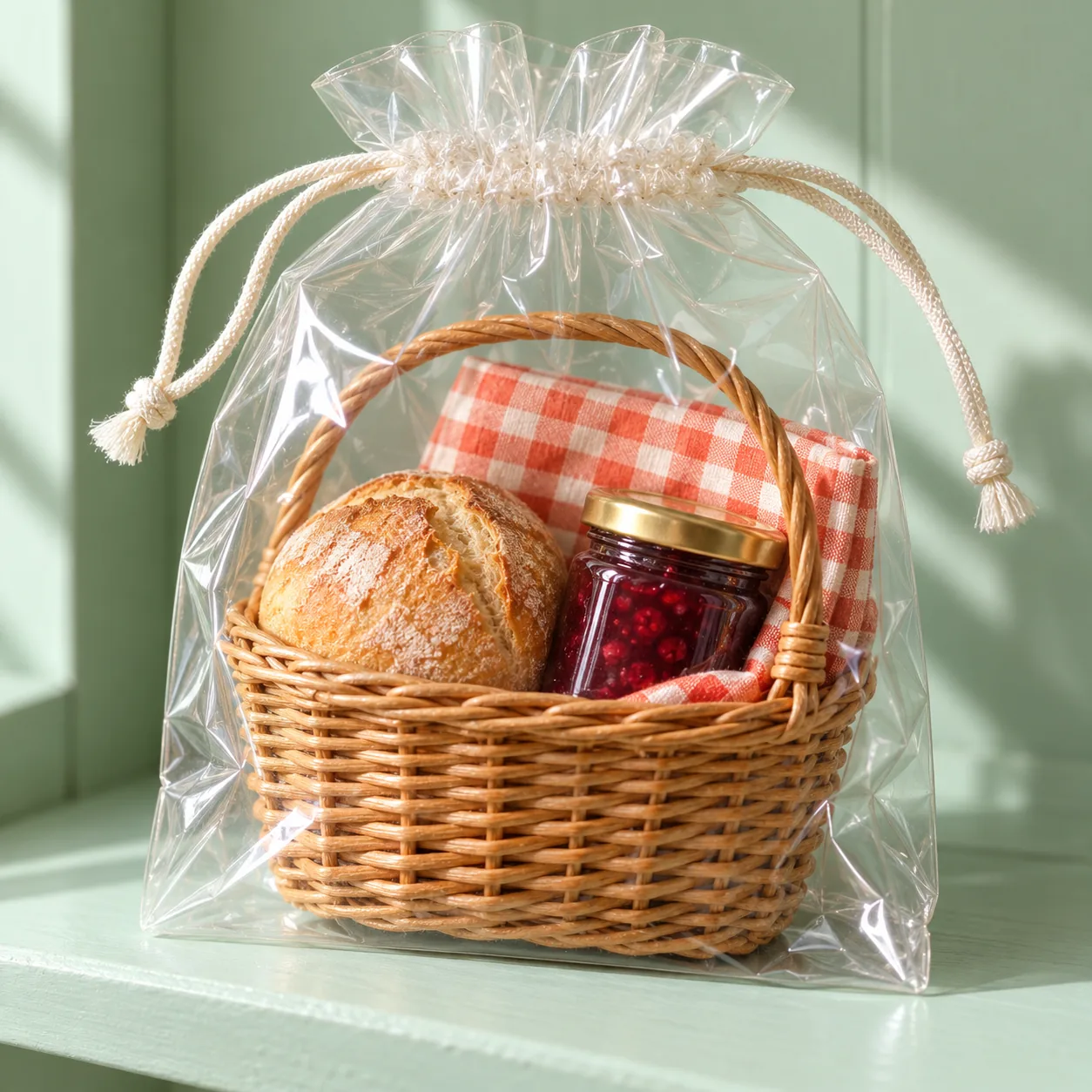
Pocket Picnic Pack, made with GPT Image 2.5 Sunburst
Example made with GPT Image 2.5 Sunburst

Text to imageProducts & food

GPT Image 2.5 Sunburst food photo promptPocket Picnic Pack

The exact text-to-image prompt behind this picture, made with GPT Image 2.5 Sunburst.

Prompt

Square 1:1 frame. A clear reusable drawstring pouch contains a perfectly arranged miniature picnic: a small wicker basket, a whole round bread roll, a sealed berry preserve jar and a folded coral gingham cloth. The pouch stands upright on a pale mint shelf, its translucent cord loosely curled. Soft directional studio light, macro product photography, realistic cellophane reflections and woven texture, delightful collectible scale, no logos, no text.

Prompts are kept in their original English to help reproduce the example. Copy one as it is, or adapt it for your project.

Opens GPT Image 2.5 Sunburst with this prompt and the settings below filled in.

135 tested GPT Image prompts →

Settings

Mode
Text to image
Aspect ratio
1:1
Quality
high
Price
From 2 credits

The exact price shows before you generate.

Make your own version

  1. For a different mood, rewrite only the light: Soft directional studio light.
  2. macro product photography sets the whole feel of the shot. Swap it for another camera style to change the vibe.
  3. The prompt ends with no text. Leave that in, or the model may add random lettering.

Where this idea comes from

Inspired by an idea from @azed_ai, collected in xianyu110/awesome-nanobananapro-prompts under MIT. PopNow wrote this prompt and made the example above.

Product prompt guide

How this product shot is built

A clear drawstring pouch holding a tiny picnic set (wicker basket, bread roll, berry jam jar and coral gingham cloth) standing on a pale mint shelf. It works because every object is named with its material and color, the container is see-through so all items show, and the light and macro wording push GPT Image 2.5 Sunburst toward a polished collectible-toy photo.

  1. Canvas shapeSquare 1:1 frame.

    Sets a centered square composition, good for a single upright pouch and for social grids. Remove it and the model may choose a taller or wider shape that leaves empty space around the product.

  2. Container and conceptA clear reusable drawstring pouch contains a perfectly arranged miniature picnic

    The transparent pouch is the hook: it lets the viewer see everything inside. 'Perfectly arranged' stops the items from piling up randomly. Change 'clear' to 'opaque' and the picnic disappears.

  3. Item lista small wicker basket, a whole round bread roll, a sealed berry preserve jar and a folded coral gingham cloth

    Four items with material, state and color keep the scene readable. 'Sealed' and 'whole' avoid open or broken shapes. Adding more items makes each one smaller and muddier.

  4. Placement and backdropThe pouch stands upright on a pale mint shelf, its translucent cord loosely curled.

    Upright posture keeps the pouch full and the contents visible. The mint shelf contrasts softly with the coral cloth. The curled cord adds a small, natural detail without distracting.

  5. Light, finish, exclusionsSoft directional studio light, macro product photography, realistic cellophane reflections and woven texture, delightful collectible scale, no logos, no text.

    Directional light gives gentle highlights on the plastic, while macro and texture words sharpen the wicker and gingham. 'No logos, no text' prevents invented jar labels, which models often garble.

What to change for your own product

To shoot your own product in this set-up, swap the contents and keep the clear-container, shelf and light structure unchanged.

Product
This prompt uses a miniature picnic of four items. Replace it with your own set, such as 'three travel-size skincare tubes' or 'a mini sewing kit', and keep it to about four named objects.
Material
The prompt names wicker, cellophane-like plastic and gingham cloth. Name the real materials of your product, such as brushed metal, frosted glass or matte rubber, so the reflections look right.
Backdrop
A pale mint shelf is the background. Choose a color that contrasts with your product, for example soft peach under blue packaging, and keep it plain.
Light
Soft directional studio light suits glossy plastic. For a harder, more dramatic look write 'single hard side light with a crisp shadow'; for even catalog shots write 'large softbox, minimal shadows'.

Ready-made variations

Travel skincare kit

Same set-up for a beauty product; use it for a travel-size or gift-set listing.

Prompt

Square 1:1 frame. A clear zip pouch contains a neatly arranged travel skincare set: a small white pump bottle, a short frosted glass jar, a slim cream tube and a folded peach washcloth. The pouch stands upright on a pale lilac shelf. Soft directional studio light, macro product photography, realistic plastic reflections and soft cotton texture, no logos, no text.

Mini sneaker care pack

Moves the idea to footwear accessories, with a neutral shelf so the yellow cloth stands out.

Prompt

Square 1:1 frame. A clear drawstring pouch contains a tidy miniature sneaker care kit: a small bristle brush, a tiny white canvas sneaker, a sealed cleaning bottle and a folded yellow microfiber cloth. The pouch stands upright on a pale grey shelf, its cord loosely curled. Soft directional studio light, macro product photography, realistic reflections and fabric texture, no logos, no text.

Cafe treat pouch

A food-focused version with warmer light, suited to a cafe gift or menu promotion.

Prompt

Square 1:1 frame. A clear reusable pouch contains a perfectly arranged miniature coffee break: a small ceramic cup, a whole butter croissant, a sealed jar of honey and a folded cream linen napkin. The pouch stands upright on a warm sand shelf. Warm directional studio light, macro food photography, realistic glossy reflections and flaky texture, collectible scale, no logos, no text.

Model and settings

Keep the 1:1 ratio, since the single upright pouch fills a square cleanly and works for shop tiles and social posts. Keep quality on high: the wicker weave, gingham pattern and plastic reflections are fine details that lower quality tends to smear. For a banner or product page header, change the ratio to 16:9 and add 'extra empty shelf space on the right' so the pouch is not stretched or cropped.

  • FLUX.2 ProPick FLUX.2 Pro when you want a more strictly photoreal look, or need to match the shelf and cloth to exact brand colors using hex values.
  • Nano Banana 2.1Choose Nano Banana 2.1 if you later add a short printed label or tag to the pouch and need sharp text, or want a 4K export.

When the product shot goes wrong

Jar or pouch gets invented labels and garbled letters
Keep 'no logos, no text' in the prompt and add 'plain unlabeled jar lid and blank pouch surface'.
The pouch looks crumpled or loses its upright shape
Add 'pouch full and firm, standing straight with smooth sides' and avoid words like 'soft' or 'floppy' near the pouch.
Contents are too small or blur together
Write 'the picnic items fill most of the pouch' and keep the list to four items. Remove extra props from the shelf.
Reflections on the plastic are messy or hide the items
Replace 'realistic cellophane reflections' with 'gentle single soft highlight on the plastic, items clearly visible' and keep the light soft.

Questions about this product prompt

Why does the prompt say 'no logos, no text'?

Image models often add made-up lettering to jars, pouches and shelves, and it usually comes out garbled. Excluding it keeps the miniature set clean and ready to use as a mockup. If you want a label later, add exact words in quotes.

How do I make the items look miniature?

The words 'miniature', 'small' and 'delightful collectible scale' tell the model to treat the items as tiny objects. Macro photography adds the close-up depth that sells the scale. Dropping them tends to produce a full-size basket instead.

Can I use this prompt to make an ad for a real product?

Yes, as a concept image. Replace the picnic items with your product type and materials, keep the clear pouch and mint shelf, and generate a few options. For exact packaging, label or logo accuracy, use a photo of the real product instead.