The easiest Christmas family photo ideas at home are a posed portrait by the tree, a relaxed sofa picture in matching pajamas, a tree-decorating moment and a group beside the fireplace. Start with one arrangement that keeps every face visible, then use either a self-timer or an existing family snapshot to make the picture.
This guide focuses on adult families: parents with their grown-up children, adult siblings and several generations of adults. We generated one fictional family of four and used that single source for four Seedream 5.0 Pro edits on October 26, 2026. The AI Christmas photo page offers all four scenes shown here; each example below uses its scene prompt rather than an unrelated holiday recipe.
How do you prepare a family photo at home?
- Choose one gathering spot. Pull a sofa or two chairs toward a window. Place seated relatives in front and standing relatives behind, with heads offset so nobody disappears.
- Give everyone the same light. Put the camera near the window side of the room and avoid a bright window directly behind the group. Turn off a strongly colored lamp if it changes some faces but not others.
- Coordinate a small palette. Cream, forest green and burgundy are easy to mix. Keep patterns on one or two people so every sweater does not compete with the faces.
- Leave room at the edges. Include shoulders, hands and a little space above heads. Check the whole group after each self-timer shot, not only the person closest to the camera.
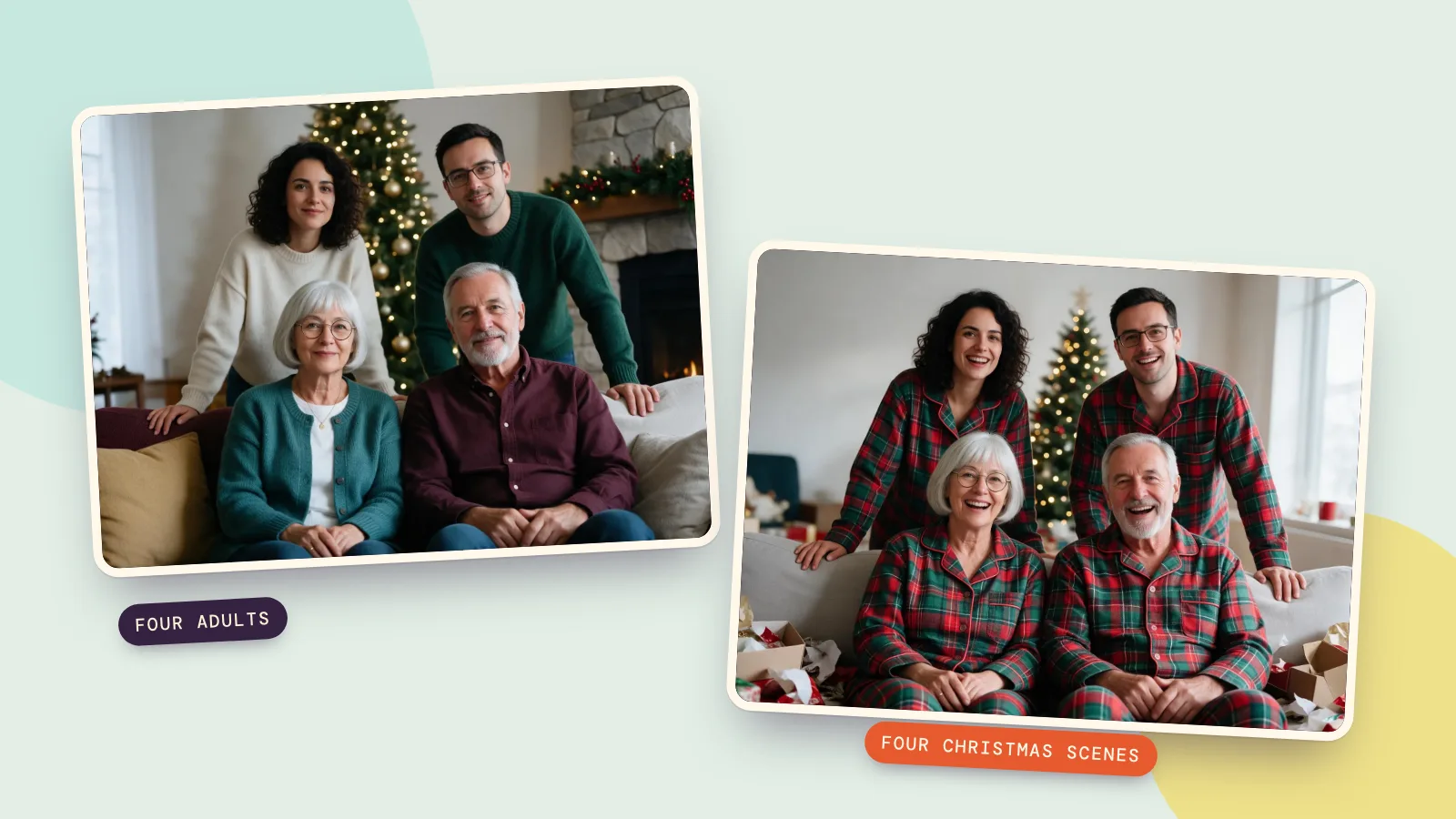
Our starting image shows two parents seated with their adult daughter and son behind them. It was made with Seedream 5.0 Pro at 2K for 72 credits. You do not need to generate a source if you already have a group photo everyone agrees you may use.

Which Christmas family photo ideas work for a group?
These four ideas keep the attention on relatives sharing one space. They cover the family scenes left out of our solo, couple and pet photoshoot ideas, rather than repeating that guide's cocoa window, market, cabin or pet costumes. A whole group benefits from a simpler arrangement and more room around each face.
1. A classic portrait with parents seated
Choose Family portrait in Family & friends. For an actual shoot, seat the parents and arrange grown-up siblings behind the gaps between their heads. Put the tree to one side so branches do not cross anyone's face, and keep one photograph where everyone is looking at the lens before trying playful poses.
Our edit keeps all four adults in the same arrangement. The prompt asks for coordinated red, green and cream outfits; the result also retains the mother's teal cardigan, so clothing does not follow every requested color exactly. It adds the tall tree and garlands at the fireplace. Those surroundings are generated, so this is an imagined Christmas portrait rather than a photograph of a real family gathering.

Turn this photo into a bright, warm Christmas photo: place the people from the photo in a classic family Christmas portrait in an elegant living room, everyone posed close together in front of a tall decorated tree and a fireplace with garlands, warm and bright. Dress them in coordinated outfits in deep red, forest green and cream. Keep every person exactly the same: same face and features, skin tone, hairstyle, glasses and age, with a natural, happy expression. Realistic photo, bright festive lighting, joyful mood, no text, no logos.
2. Matching pajamas on the sofa
Choose Matching pajamas in Family & friends. This is the informal group option: adults sitting together after opening presents, with wrapping paper lower in the frame. At home, settle everyone before adding a few gift boxes; a floor full of objects makes it harder to spot awkward hands or an accidentally cropped person.
The preset changes outfits to red and green plaid flannel pajamas. Our source has all four relatives clearly visible, and the recipe asks to preserve each person's age, glasses and hairstyle. Pajamas here are simply ordinary festive clothing; you can choose Keep mine if the group would prefer their original clothes.

Turn this photo into a bright, warm Christmas photo: place the people from the photo in Christmas morning on a living room sofa, laughing together surrounded by opened presents, wrapping paper and a glowing tree. Dress them in matching red and green plaid flannel Christmas pajamas. Keep every person exactly the same: same face and features, skin tone, hairstyle, glasses and age, with a natural, happy expression. Realistic photo, bright festive lighting, joyful mood, no text, no logos.
3. Decorating the tree together
Choose Trimming the tree in At home. This gives the group something to do rather than asking for four identical smiles. For a real shoot, let one adult hang an ornament while the others stand close and watch; keep the ornament below eye level so an arm does not hide a face.
This is the one preset in our four-example test that starts with Keep mine. The cream, teal, navy and burgundy clothes from the source therefore belong in the edit. In our result, the model added the decorated tree but kept the original seated pose: nobody actually hangs an ornament. It works as a group portrait by the tree, but it does not demonstrate the requested action. If an activity matters, start from a photo with a similar pose and inspect hands and branches carefully.

Turn this photo into a bright, warm Christmas photo: place the people from the photo in a cozy living room, hanging a shiny glass ornament on a tall freshly decorated Christmas tree full of warm fairy lights, wrapped presents under the tree. Keep their own clothes exactly as in the photo. Keep every person exactly the same: same face and features, skin tone, hairstyle, glasses and age, with a natural, happy expression. Realistic photo, bright festive lighting, joyful mood, no text, no logos.
4. A family group beside the fireplace
Choose By the fireplace in At home. Arrange the group beside the hearth rather than across its opening, with the camera at the seated adults' eye level. A garland and stockings provide enough decoration; you do not need candles or extra props close to people's hands.
The preset requests festive knitwear in deep red, forest green or cream. It uses the same source and 4:3 frame as the other three edits, so you can compare the four faces without changing the reference. Check whether the fireplace setting leaves enough space around everyone before choosing it for a printed family card.
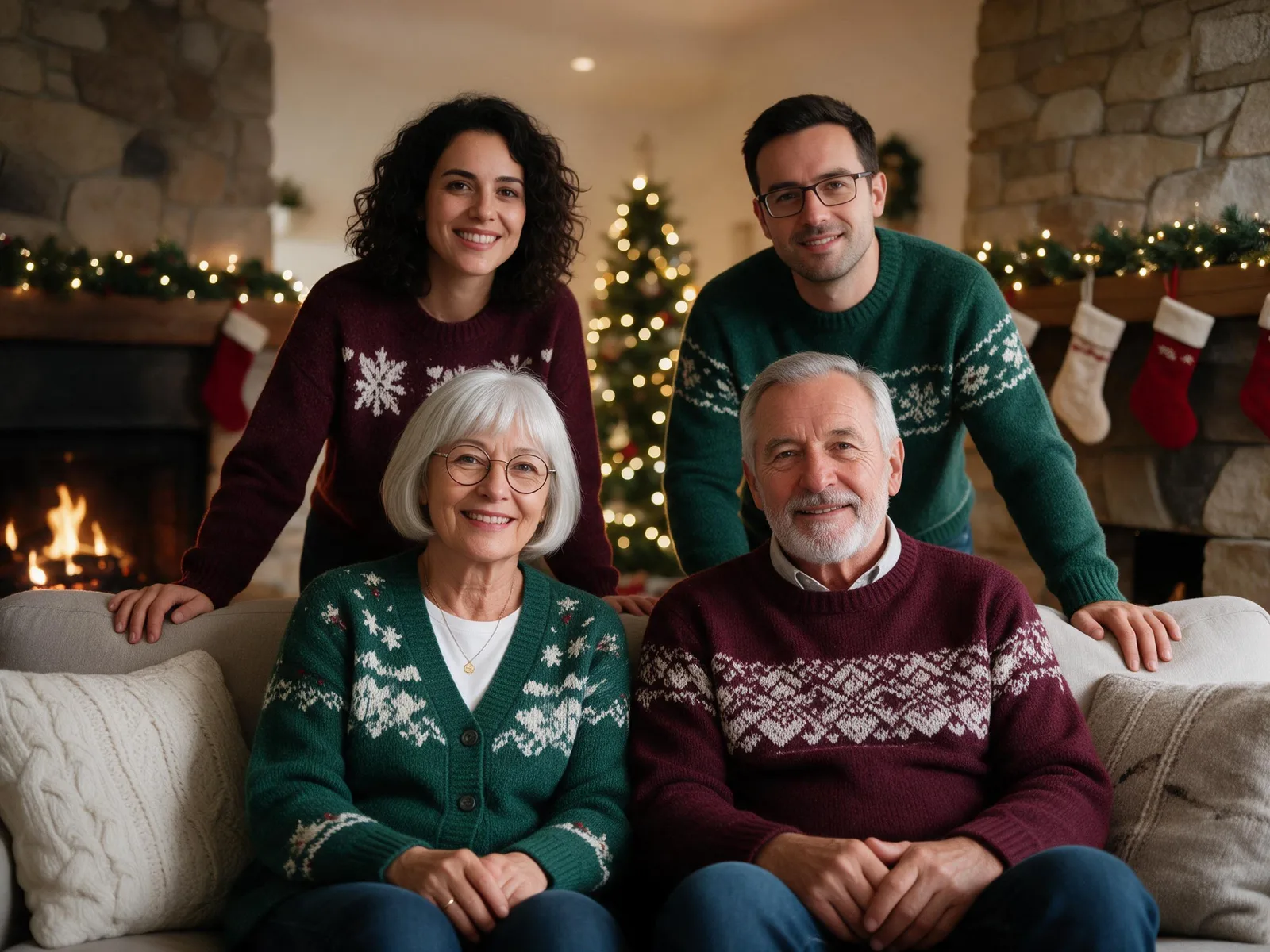
Turn this photo into a bright, warm Christmas photo: place the people from the photo in a warm living room beside a crackling stone fireplace hung with knitted stockings and a pine garland with warm white lights, a decorated Christmas tree glowing in the background. Dress them in cozy festive knitwear in deep red, forest green or cream. Keep every person exactly the same: same face and features, skin tone, hairstyle, glasses and age, with a natural, happy expression. Realistic photo, bright festive lighting, joyful mood, no text, no logos.
How do you make these group photos from one snapshot?
- Add your group photo. On the Christmas page, use Your photo and choose a clear image with all the relatives already together. Our test used exactly one reference for each scene.
- Choose the named scene. Pick one of the four above. The scene supplies the setting and the instruction to keep every person's face, skin tone, hairstyle, glasses and age.
- Check outfit, size and quality. We used 4:3 and HD (2K), with Festive for three scenes and Keep mine for the tree scene. The page starts on Same as photo; select 4:3 if your original has a different shape.
- Make one version first. Select Make my Christmas photo, then check all four faces, hands and the head count before asking for more versions or downloading.
Each of our four HD edits costs 72 credits, and the set costs 288 credits, excluding the source. Standard (1K) is available for 36 credits per edit. The prompt cards open the image generator with the exact tested model and parameters; add your own group reference there to use them.
If you add a detail under Add your own touch, make it practical: a wider composition, no extra people, or more space above the group. Avoid asking for several different actions at once. Keep the original source ready and return to it for each scene, so an imperfect detail from one edit does not become the next edit's reference.
How should you compare models and prepare a card?
For a same-prompt comparison, use Compare with the same group photo and scene instructions. Judge each relative separately: an attractive tree does not compensate for one unfamiliar face. Our four examples test Seedream 5.0 Pro only, so they do not establish which model is best for every family.
Before printing, choose the final crop and check its pixel dimensions. A 6 by 4 inch landscape print at 300 pixels per inch needs 1800 by 1200 pixels; a 4:3 image will need trimming to fit that 3:2 shape. Keep people away from the edges and ask the print shop to show the crop. Adding a greeting after the portrait is finished also gives you control over spelling.
The same family snapshot can anchor the rest of the holiday season. Use the Thanksgiving card maker for an autumn greeting or the New Year card maker for a fresh card after Christmas. Review each new result independently, even when the source photo has already worked well.
FAQ
What should an adult family wear for Christmas photos?
Choose two or three colors that sit well together, such as cream, forest green and burgundy. Matching pajamas are an option, not a requirement. On the Christmas page, Festive requests scene-specific outfits and Keep mine asks the model to retain the source clothes.
Can I use a photo from an earlier gathering?
Yes, if everyone agrees and each face is clear enough to recognize. A sharp older group photo is more useful than a recent one with tiny or hidden faces. The output imagines a new holiday scene; it does not show that the gathering actually happened there.
Will everyone's face stay exactly the same?
The scene prompts ask for that, but image editing can still alter details. Compare every person with the original, including glasses, hairstyle and apparent age. If one face drifts, try a clearer group reference or a simpler scene before spending on more versions.
Which scene should I try first?
Start with Family portrait for a formal group picture or Matching pajamas for a relaxed sofa scene. Use Trimming the tree when you want an activity, and By the fireplace when the hearth should define the setting. Start with one version and inspect it before making several.
How much do the four family pictures cost?
At our tested Seedream 5.0 Pro HD settings, four edits cost 288 credits in total. One Standard edit costs 36 credits. A generated source portrait is a separate image; uploading your existing group photo does not require generating that source.