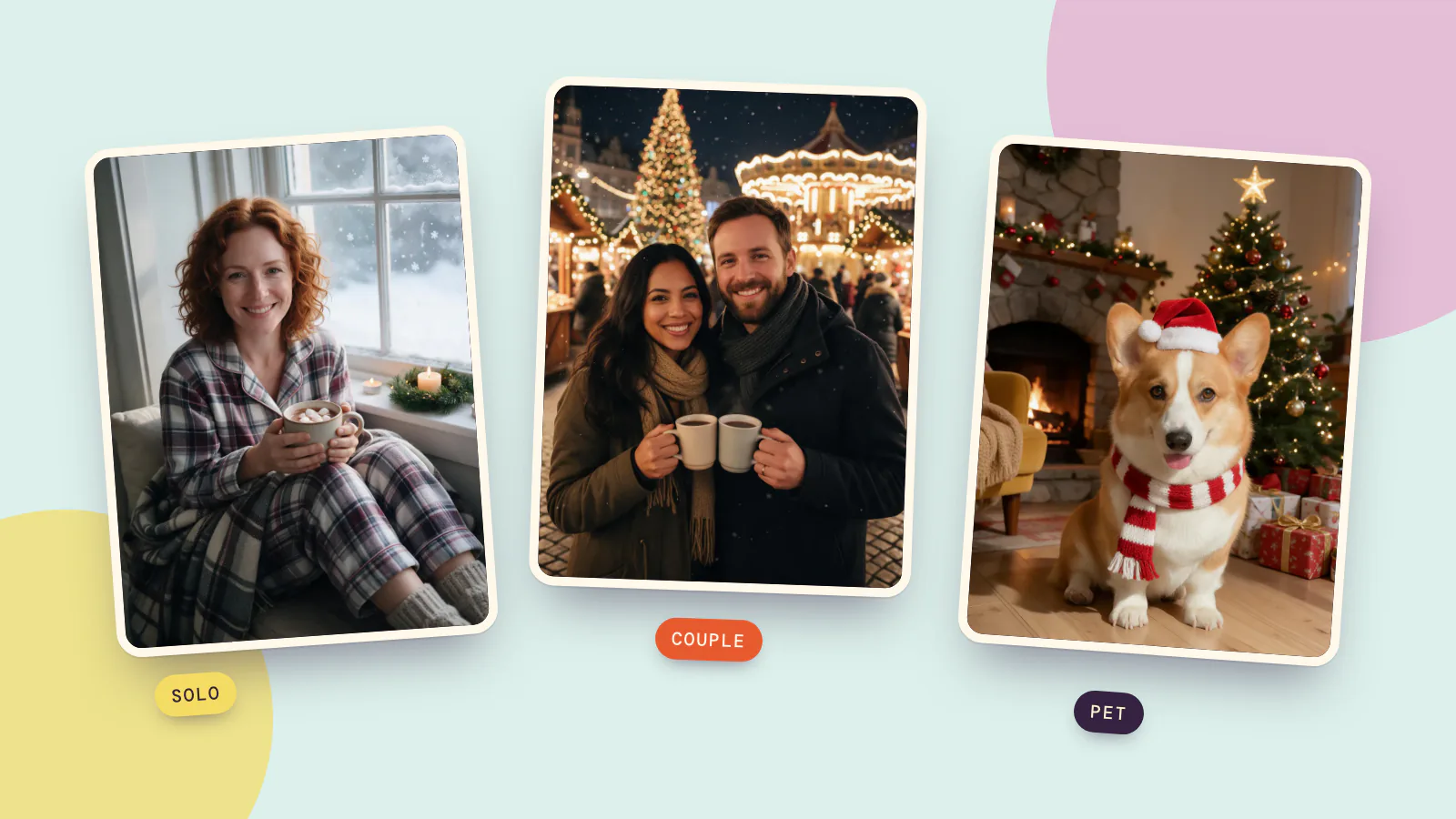
A good Christmas photoshoot comes down to three choices: one clear setting, outfits that belong in it, and warm light that makes the decorations glow. Below are ten ideas, four for one person, three for a couple and three for a pet, each with the set, outfit, props and light you need to shoot it for real.
Every idea also has a matching scene on PopNow's AI Christmas photo page, for when there is no snow, no cabin and no time. You add one photo you already have, pick the scene, and the picture is rebuilt around you with your face kept as it is. We made six of the ten that way on October 19, 2026, using made-up people and pets generated for this test, so nobody's real photo is on this page. Each Christmas picture you see is the first result, not the best of several.
Solo Christmas photoshoot ideas
A solo shoot is the easiest to plan: one person, one prop, and a friend or a tripod with a self-timer. These four work at home or nearby.
1. Cocoa by a frosty window
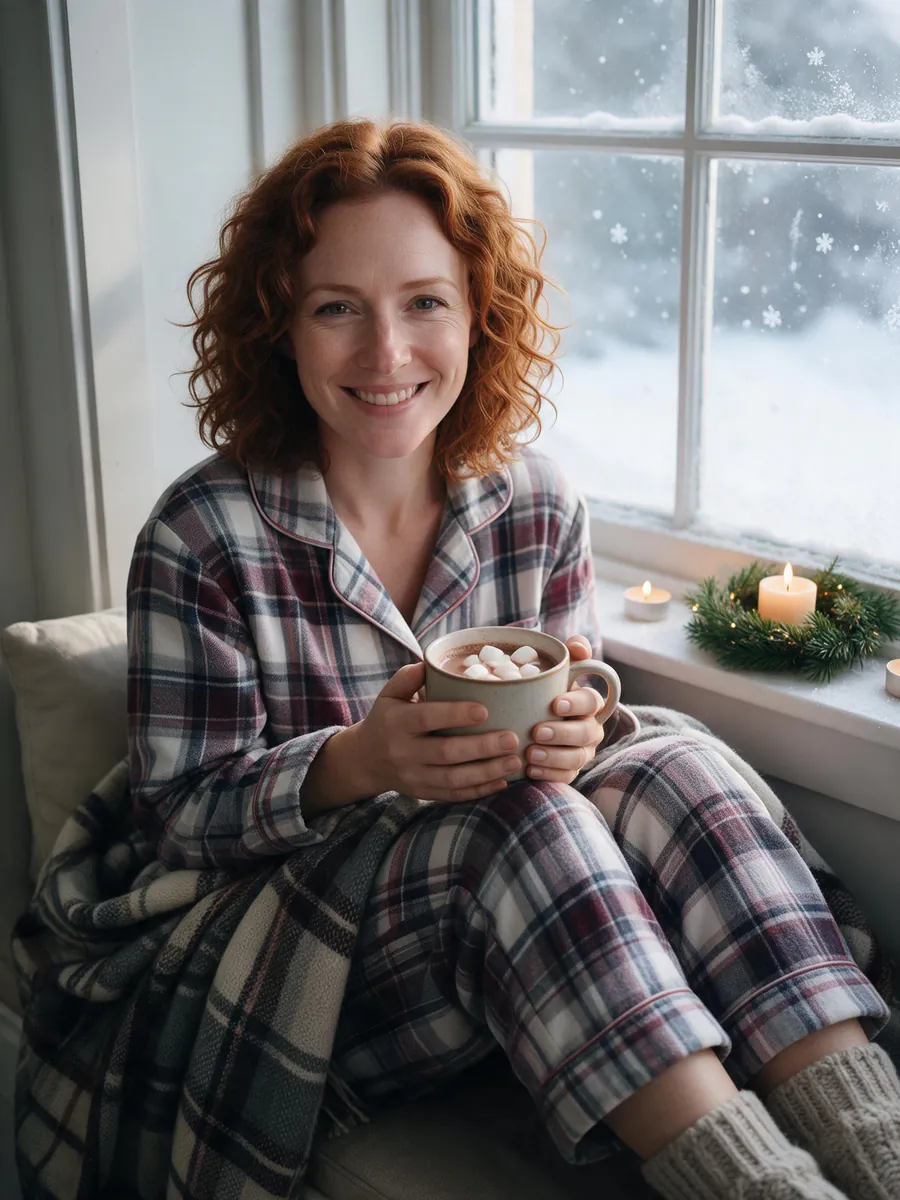
- Set: a window seat or an armchair pulled up to a window, a plaid blanket, two or three candles and a small wreath on the sill.
- Outfit: flannel pajamas and thick knit socks.
- Props: one big mug of cocoa with marshmallows on top. Hold it with both hands so they have something to do.
- Light: daylight from the window, falling on the side of your face. Switch off the ceiling light; it flattens everything.
- Pose: knees up, blanket over your legs, look at the camera or out at the snow.
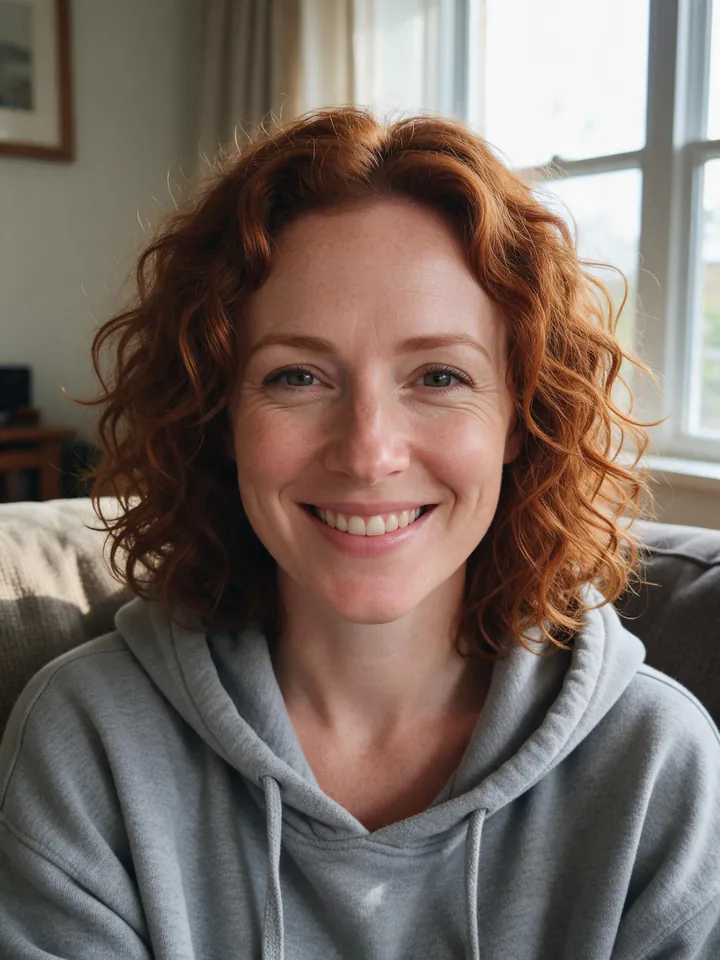
To make it from one photo, pick Cocoa morning in the At home group. We used a plain photo on the sofa in a grey hoodie:
 Original photo
 Cocoa morning
She kept her curls, her freckles and her smile. The scene swapped the hoodie for pajamas and wool socks because the outfit was left on Festive, and her hands around the mug came out with the right number of fingers, which is the first thing we check in any picture with hands.
2. Under the big tree at an ice rink
- Set: an outdoor rink with a big lit tree, which many city squares put up in December.
- Outfit: a puffy jacket, mittens and a pom-pom beanie.
- Light: go at blue hour, roughly the half hour after sunset, when the sky is still deep blue and the tree lights are already on. Later, the sky turns black and the tree becomes a bright blob.
- Camera: have your friend crouch a little so the tree rises behind your head, not out of it. Skaters moving in the background are fine; a little blur makes it feel alive.
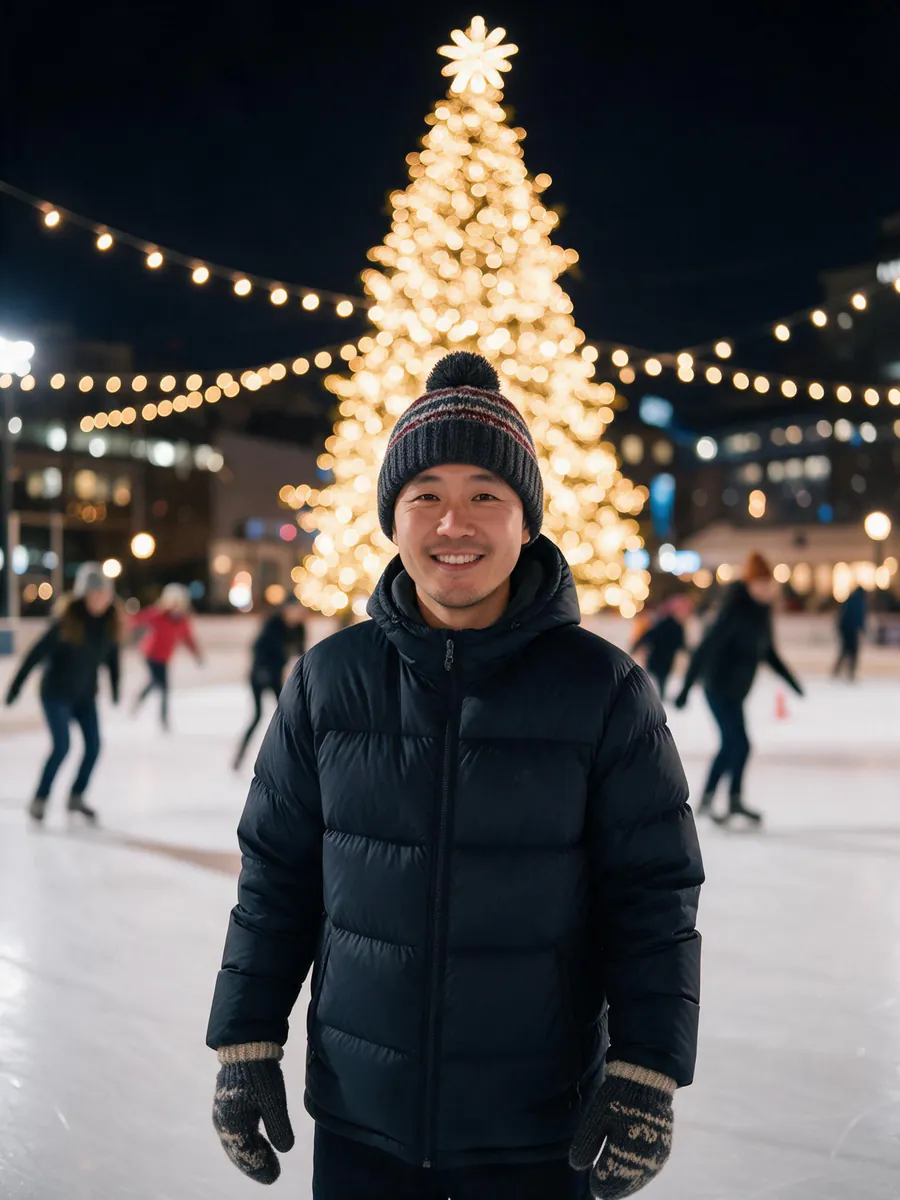
From one photo, the scene is Ice skating in Snow & outdoors. Our starting photo was taken on a city street on a grey afternoon:
 Original photo
 Ice skating
His face, stubble and smile carried over, and the scene added the jacket, beanie and mittens it asks for. The scene is set at night, so the sky is black; for a bluer sky you can try writing "at blue hour" in Add your own touch.
3. First snow on an old-town street
- Set: a street with lights strung across it and glowing shop windows.
- Outfit: a long wool coat, a chunky scarf and a beanie.
- Light: stand where a streetlamp is behind you or to one side. Falling snow shows up best when light hits it from behind.
- Pose: walk slowly toward the camera, or look up and catch a snowflake.
The matching scene is First snow: a snowy old town on Christmas Eve at blue hour, with the coat, scarf and beanie added when the outfit is on Festive.
4. Fairy lights in your own room
- Set: the room you already have. A string of warm white fairy lights does the work.
- Outfit: a soft knit sweater in cream, deep red or forest green.
- Trick: hold part of the light string close to the camera lens and shoot past it. With portrait mode on, the near lights turn into soft glowing circles around you.
- Light: the fairy lights for glow, plus one lamp to the side so your face is not lost in the dark.
On the page this is Deck the halls in Cards & fun. It keeps the place in your photo and adds pine garlands, red ribbons and string lights to it, so your own living room or desk becomes the Christmas set.
Couple Christmas photoshoot ideas
For two people, the easiest way to look natural is to give yourselves something to do together: hold mugs, walk, lean on a door frame. Coordinate your colors instead of matching outfits exactly.
1. A Christmas market at night
- Set: wooden stalls with twinkling lights, a big tree and, if there is one, a lit carousel.
- Outfit: winter coats and scarves in two colors that sit well together, such as camel and charcoal.
- Props: two warm mugs. Clinking them gives you a real reason to laugh.
- Camera: stand to one side of the busiest lights so they glow behind you rather than straight behind your heads.
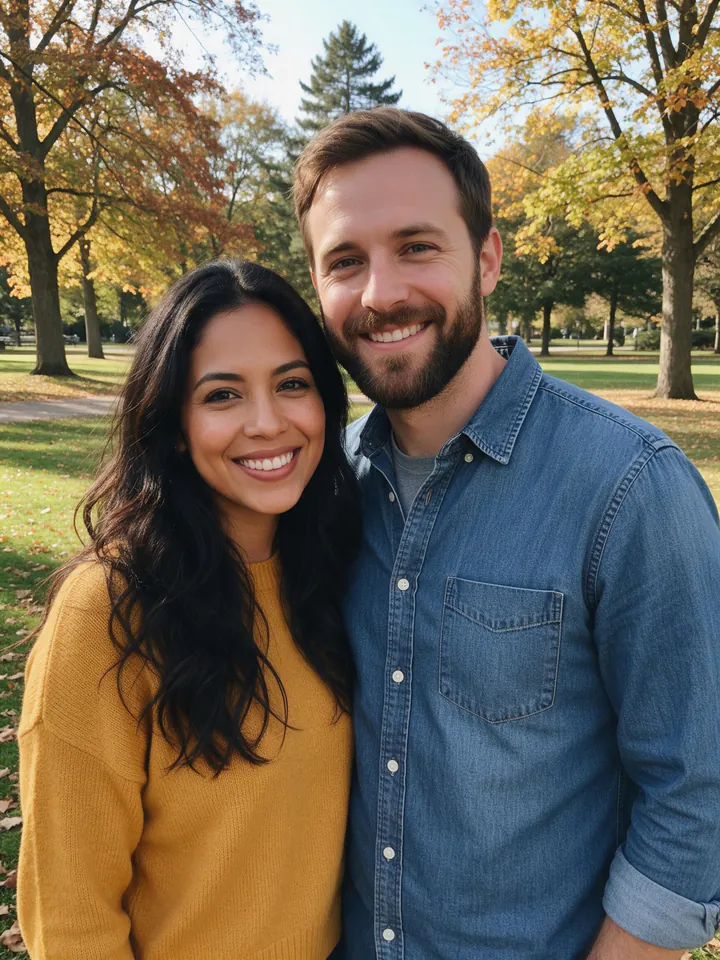
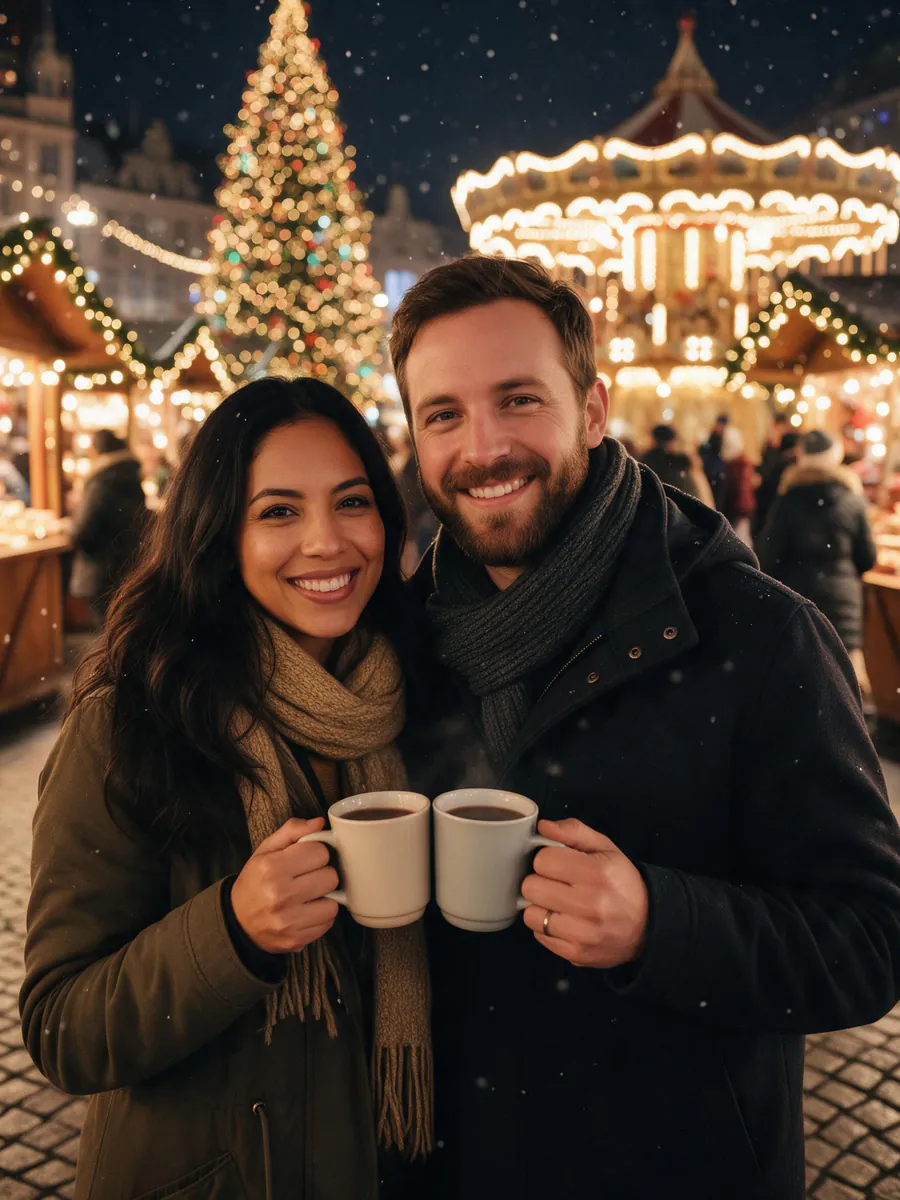
On the page, pick Christmas market in Snow & outdoors. Our couple started in an autumn park in daylight:
 Original photo
 Christmas market
Daylight park to night market in one step. Her long wavy hair and his beard stayed, both kept their smiles, and the scene gave them coats, scarves and the two mugs.
2. A snowy cabin porch
- Set: any porch with a wreath on the door and a lantern or two. A rented cabin is ideal, but a front door at home works.
- Outfit: warm jackets, scarves and knit hats.
- Light: early evening, right after the porch lights come on, while there is still some light in the sky.
- Pose: stand close in front of the door, one arm around each other, and look at the camera.
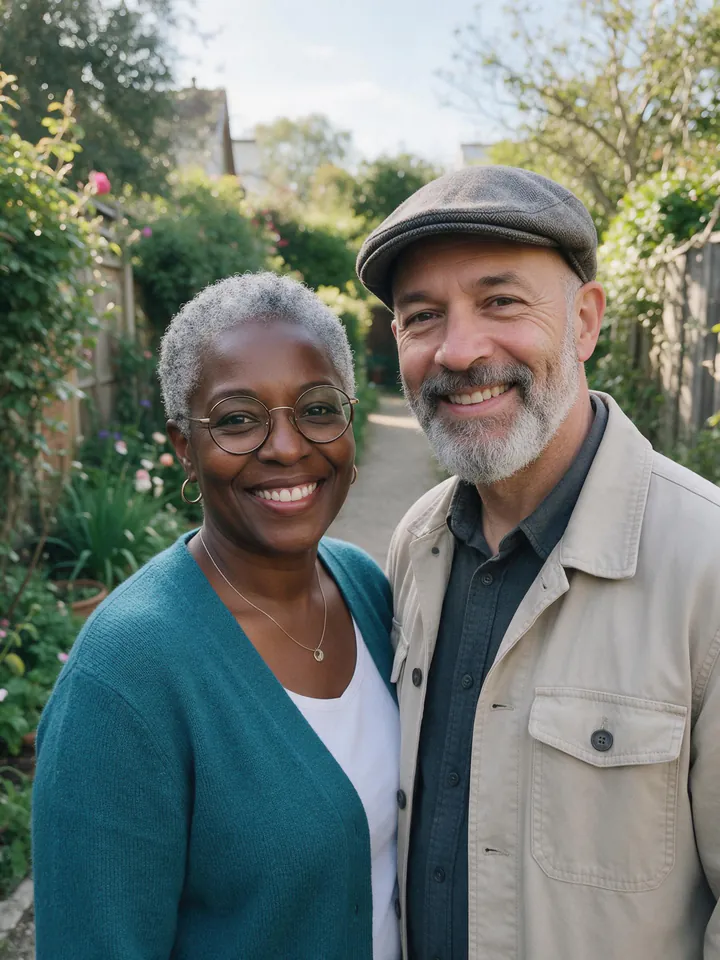
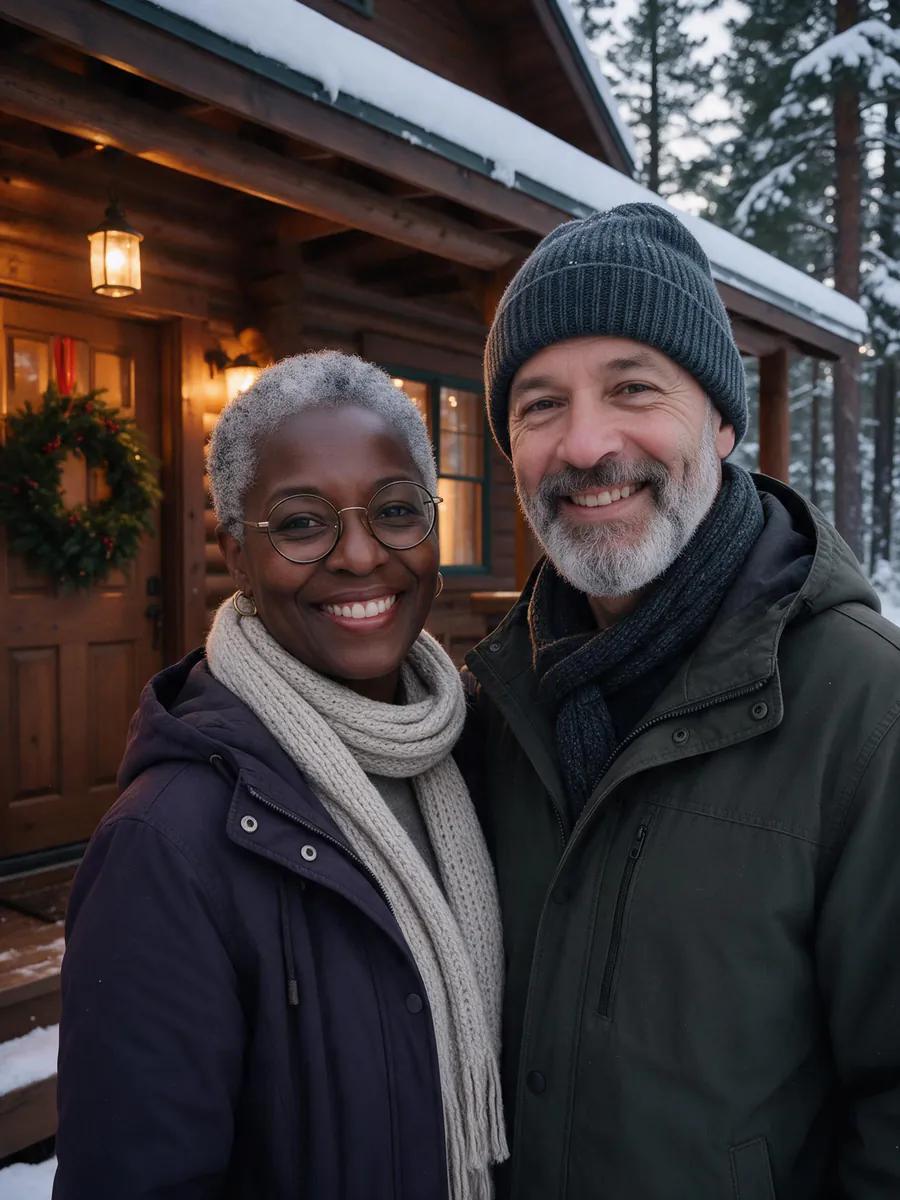
The matching scene is Snowy cabin. We tried it with an older couple photographed on a garden path:
 Original photo
 Snowy cabin
Her round glasses and short grey hair carried over exactly, and so did his grey beard. His flat cap became a knit hat, because the Festive outfit dresses everyone for the scene. If a hat or a jacket is part of who you are, switch the outfit to Keep mine and your own clothes stay.
3. A vintage card for two
- Set: a plain wall or a doorway, nothing modern in the frame.
- Outfit: vintage winter clothes: a wool coat, a beret, a knitted scarf.
- Edit: warm, slightly faded colors and a little grain.
Or skip the edit: the Vintage card scene paints the two of you as a 1950s gouache Christmas card with a snowy village, holly and a red ribbon border, and prints the greeting you type, up to 40 characters, spelled exactly as written. It starts in a 3:4 card shape, ready to print and mail.
Pet Christmas photoshoot ideas
Pets give you about two minutes of patience, so set everything up before you bring them in. Keep treats in the hand above the camera so they look toward the lens, and use burst mode.
1. Santa hat and scarf by the tree
- Set: the tree with a few wrapped presents underneath.
- Props: a small pet Santa hat with a soft strap and a loose knitted scarf. Never leave a pet alone with tinsel, glass ornaments or light cords.
- Camera: get down to your pet's eye level. A photo taken from standing height mostly shows the top of a head.
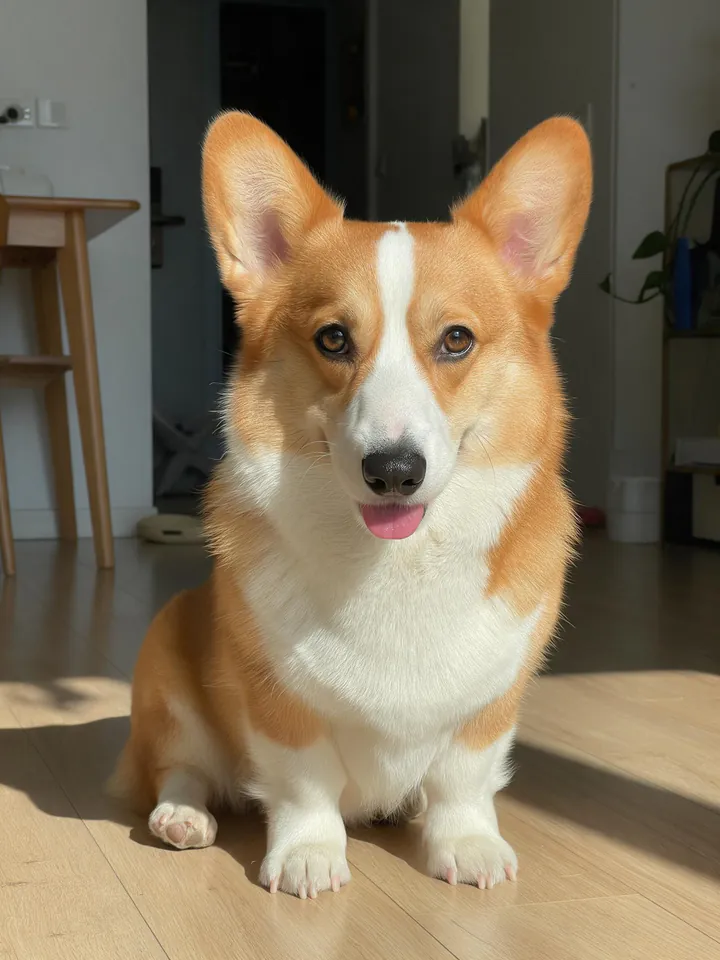
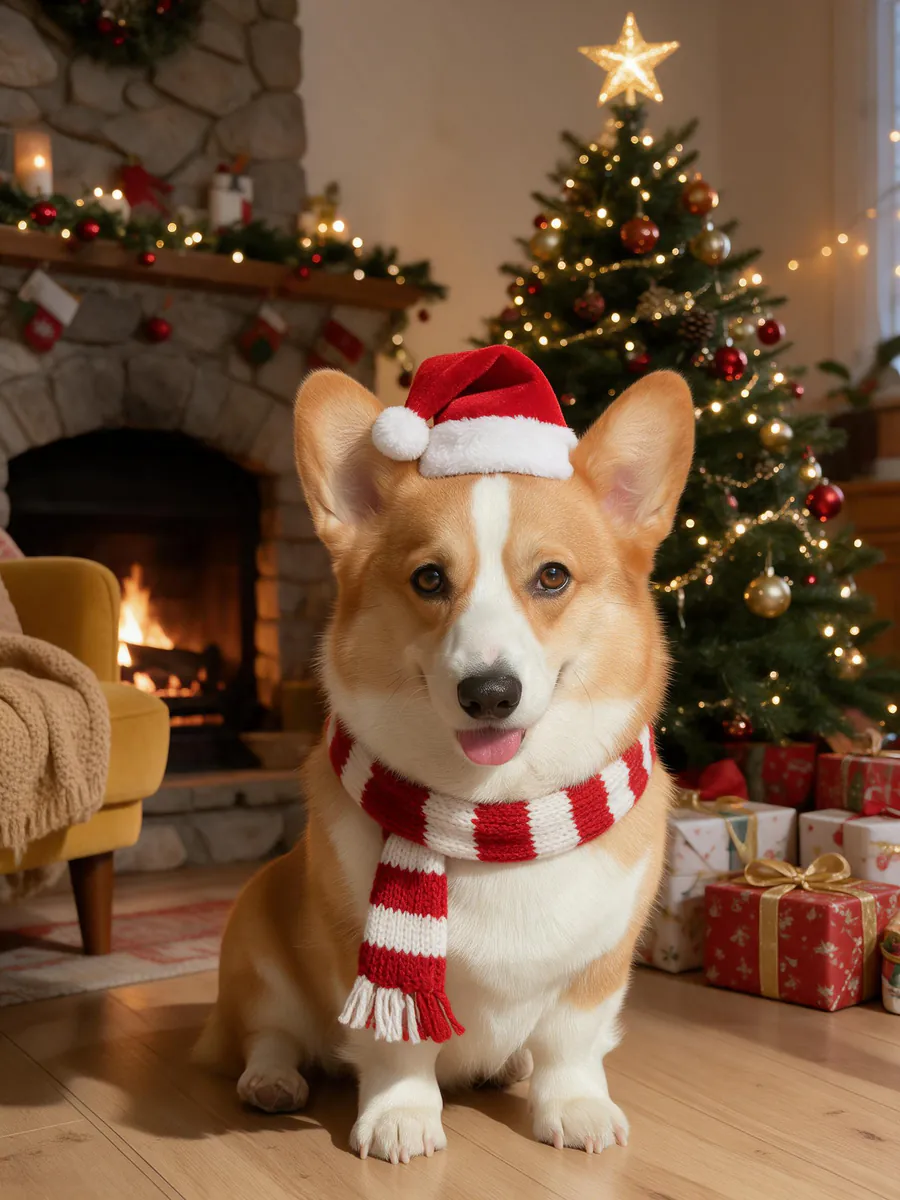
The matching scene is Pet in a Santa hat. You don't need the hat or the tree, just a clear photo of your pet:
 Original photo
 Pet in a Santa hat
The white blaze down the corgi's face, the big ears and the little tongue all stayed. Here is the exact prompt the page sent for it. Pet scenes ask the model to keep the breed, face, fur colors, markings and eyes:
Turn this photo into a bright, warm Christmas photo: place the pet from the photo in a cozy living room in front of a glowing Christmas tree with wrapped presents, wearing a tiny red Santa hat and a small red-and-white knitted scarf. Keep the pet exactly the same: same breed, face, fur colors, markings and eyes. If a person is in the photo, keep their face and identity exactly the same. Realistic photo, bright festive lighting, joyful mood, no text, no logos.
2. Cuddled up with you by the fire
- Set: the sofa, a soft blanket, the tree or the fireplace behind you.
- Outfit: a cozy sweater for you, a small bow on the collar for your pet (loose, and only for the photo).
- Camera: a tripod and the self-timer, or a friend with burst mode on. Shoot while your pet is calm, after a walk works well.
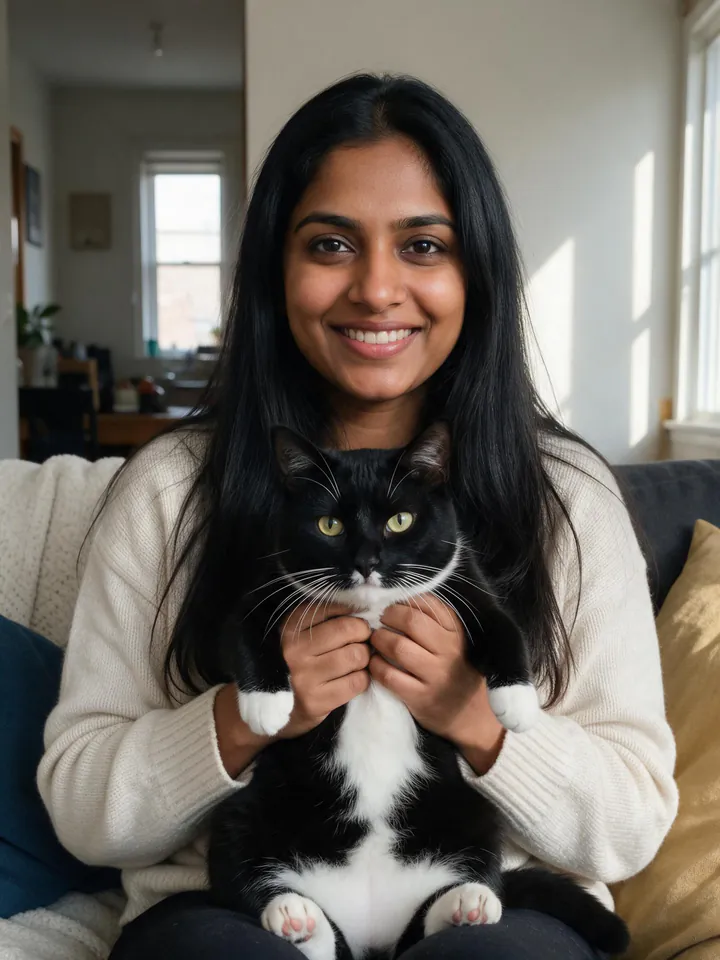
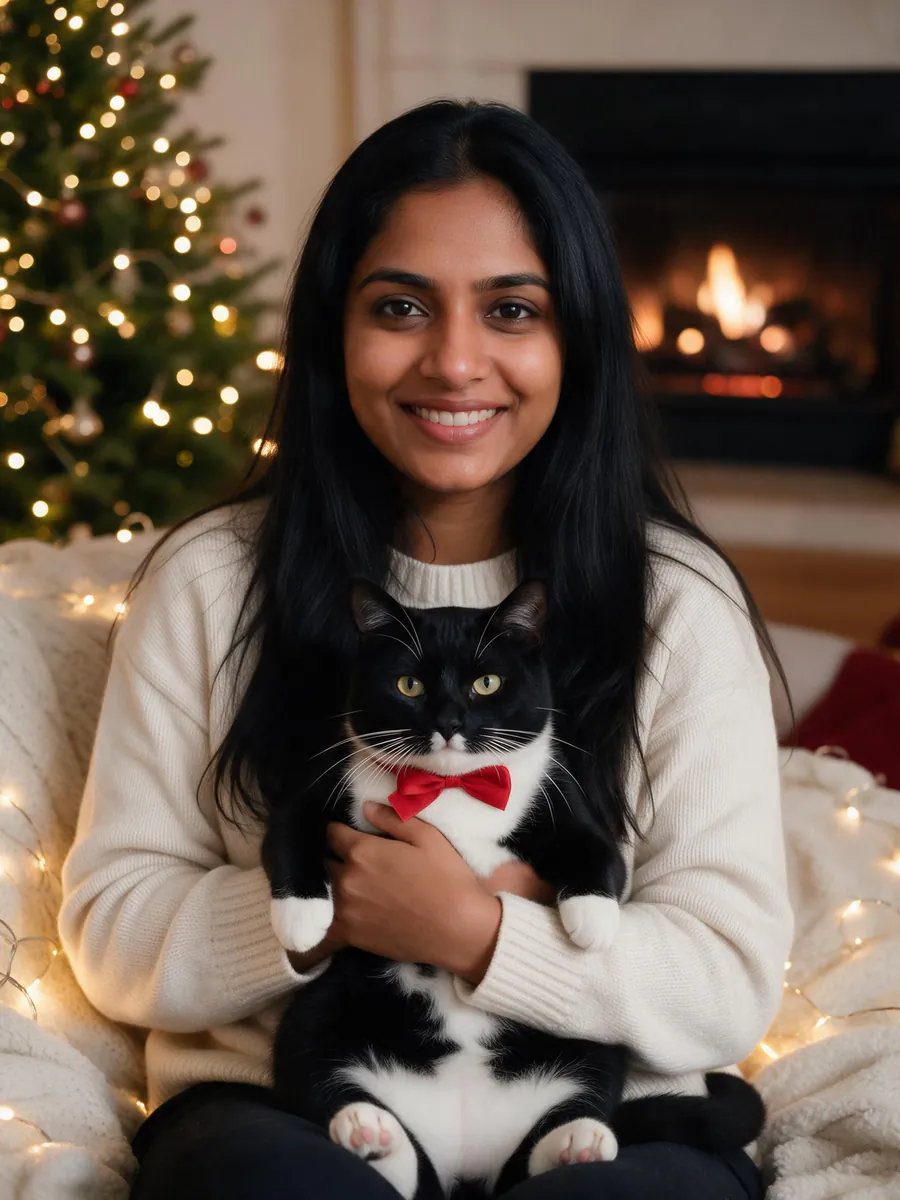
On the page this is Me and my pet in the Pets group, for photos where you and your pet are already together:
 Original photo
 Me and my pet
The cat kept its tuxedo pattern, white paws and yellow-green eyes and gained a red bow. She kept her face, her long hair and, as it turned out, a cream sweater very much like her own: the scene asks for "a cozy festive sweater", and the model decided hers already was one.
3. A pet in a gift box
- Set: a sturdy open box, some tissue paper and a loose ribbon, next to the tree.
- How: put a treat inside and let your pet climb in on its own. Shoot from low, the moment their head pops over the edge.
We didn't make this one for the guide, but you can ask for it: pick Pet in a Santa hat and type "sitting in an open gift box with a red ribbon" in Add your own touch. Whatever you write there is added to the scene as one extra sentence.
How to do a Christmas photoshoot with one photo
When the real shoot isn't going to happen, this is the whole process on the AI Christmas photo page:
- Pick a photo. A clear face looking at the camera or a little to the side, in soft even light. Sunglasses, masks, hands over faces and tiny faces far away all make the result less like you.
- Add it to the page. If someone is missing from the photo, use Add people or a pet to add up to three more photos; everyone ends up in one picture.
- Pick a scene. There are 17, in five groups: At home, Snow & outdoors, Family & friends, Pets, and Cards & fun.
- Choose the outfit. Festive dresses everyone for the scene; Keep mine keeps your own clothes.
- Choose size and quality. The size starts as Same as photo; 4:5 and 3:4 suit printed cards. HD (2K) is the default and costs 11 credits per picture; Standard (1K) costs 6 credits. You can make 1, 2 or 4 versions at once.
- Make it and check it. Each of our six took one to two minutes. Look at faces and hands before you download. If you like the result, Make it a video turns it into a 5-second clip with falling snow and twinkling lights for 28 credits.
You never have to write a prompt on the page; the scene writes it. This is what it sent for the Christmas market couple, so you can see the three parts: the scene, the outfit, and the sentence that keeps every face the same.
Turn this photo into a bright, warm Christmas photo: place the people from the photo in a busy European Christmas market at night, wooden stalls with twinkling lights, a giant decorated tree and a carousel glowing behind, holding warm mugs, light snow in the air. Dress them in winter coats and scarves. Keep every person exactly the same: same face and features, skin tone, hairstyle, glasses and age, with a natural, happy expression. Realistic photo, bright festive lighting, joyful mood, no text, no logos.
All six Christmas pictures in this guide together cost 65 credits in HD. You pay per picture with credits, there is no subscription, and if a picture fails to generate the credits go back to your balance.
Card season doesn't end at Christmas. The same photo-in, card-out idea works for Thanksgiving cards in November and New Year cards once the tree comes down.
Tips for a natural look
These hold for a real shoot and for one made from a photo:
- Light from one side. Window light or a lamp beside you gives faces shape. For the photo-based route, an evenly lit face in the original gives the cleanest result.
- One idea per picture. A mug, a scarf, a tree. Five props make a cluttered photo, and five extra details in "Add your own touch" make a confused one.
- Real smiles. In a real shoot, talk and laugh between shots and use burst mode. In a photo-based one, start from a photo where you are actually smiling; the scenes keep a natural, happy expression rather than inventing a new one.
- Coordinate, don't copy. Two or three colors from one palette (deep red, forest green, cream) look more relaxed than identical outfits.
- Expect a wider frame. Our head-and-shoulders photos came back as wider pictures with hands, mugs and coats the model had to add. Check hands and small objects before you print.
- Make more than one. Ask for 2 or 4 versions and keep the one where everyone looks most like themselves.
FAQ
Can I use an old photo?
Yes, as long as the face is clear. A scan of a print works fine. If the old photo is scratched, faded or blurry, run it through restore old photo first and use the restored version, because the less detail a face has, the less the model can keep.
Will it look like me?
In all six of our tests the faces, hair, skin tone and glasses carried over, and the scenes are written to keep each person's face, skin tone, hairstyle, glasses and age. What does change, on purpose, is clothing and hats when the outfit is set to Festive. A clear, well-lit, front-facing photo gives the closest likeness; if one version is off, make another.
Can I put my dog in it?
Yes, three ways. Use Pet in a Santa hat for a photo of just your dog, Me and my pet for a photo where you are already together, or add your dog's photo with Add people or a pet so you and your dog from two separate photos end up in one Christmas picture. Typing "a dog by the tree" in Add your own touch also works, but that dog is invented, not yours.
What size should I print a Christmas photo?
At 300 pixels per inch, a 4 by 6 inch print needs 1,200 by 1,800 pixels, a 5 by 7 needs 1,500 by 2,100, and an 8 by 10 needs 2,400 by 3,000. Our HD pictures came out at 1,776 by 2,368 pixels, enough for a sharp 4 by 6 or 5 by 7. For 8 by 10, choose the 4:5 size and run the result through the image upscaler. The shapes differ slightly (4 by 6 is 2:3, 5 by 7 is 5:7), so leave a little space around faces for the print shop to trim.