To make AI dancing videos from one photo, open the dance generator, choose a move, add a clear photo and generate a short video. The photo supplies the person and setting; a preset video supplies the movement. Start with a full-body photo so the model can see the feet as well as the face.
We tested three actual presets on October 26, 2026, using one fictional adult and Seedance 2.0 Mini at 720p for five seconds each. All three use the same starting picture and the same instructions, so you can see what changes when only the dance changes. These examples are silent; music is a separate step on the page.
How do you make a photo dance in PopNow?
- Choose a move. Open Dance and browse Moves. There are 35 presets across Street, K-pop style, Party, Retro & Latin, Just for fun, Celebrate, Stage and Duets. Tap a card to select it; the starting selection is Finger hearts.
- Add your person. In Setup, add the photo under Who dances, or choose an existing sample. For an uploaded photo, confirm that you have the right to use it and that every person is an adult who agreed to be animated.
- Choose the length and model. Quick try starts with Seedance 2.0 Mini at 480p and produces a four-second preview. Full dance uses the whole preset, usually about five seconds, and initially selects Kling 3.0 for a solo dance. We changed Full dance to Seedance 2.0 Mini and selected 720p for these examples.
- Keep the first test simple. Leave Add a note off unless you need a change to the setting or outfit. Keeping the same photo makes it easier to judge whether the move worked.
- Check the price, then generate. The quick button says Try it; the full version says Make it dance. Both are generation requests that use credits. Watch the result before making another version.
- Add music if you want it. Listen to the chosen track, check Snap to the beat, then use Download with music. Keep the tab open while the browser mixes the file.
The preview is a separate generated clip, not a free excerpt of an already finished video. If it looks right, Make it final lets you start a full version with the same photo and move. A full run can still differ from its preview because it is generated again.
What kind of starting photo works best?
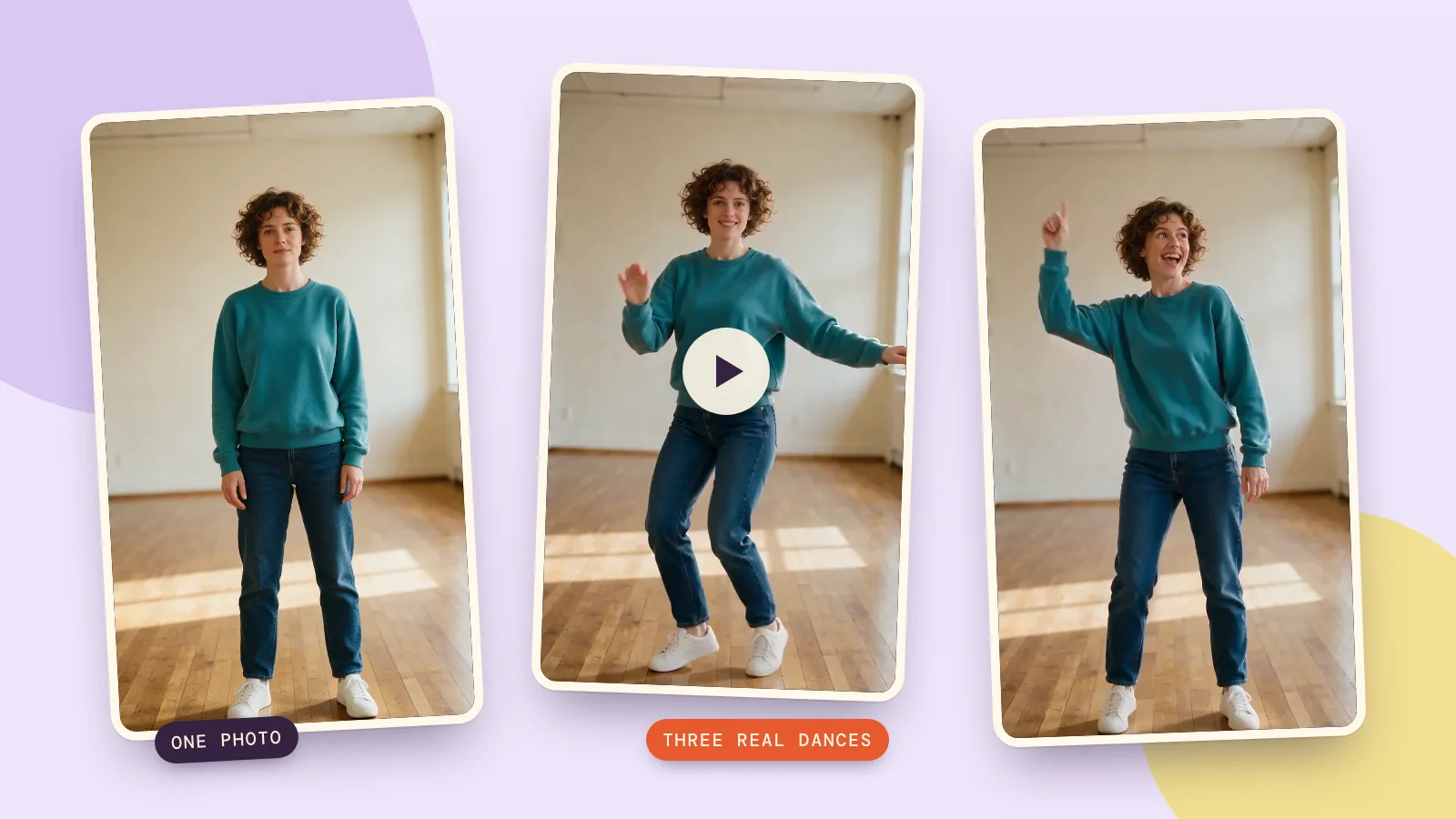
Use a sharp picture of one adult standing toward the camera, with both shoes visible, relaxed arms and space on either side. Our source has a plain studio wall and wooden floor, simple clothing and no props hiding the hands. Those choices give the model fewer missing details to invent.
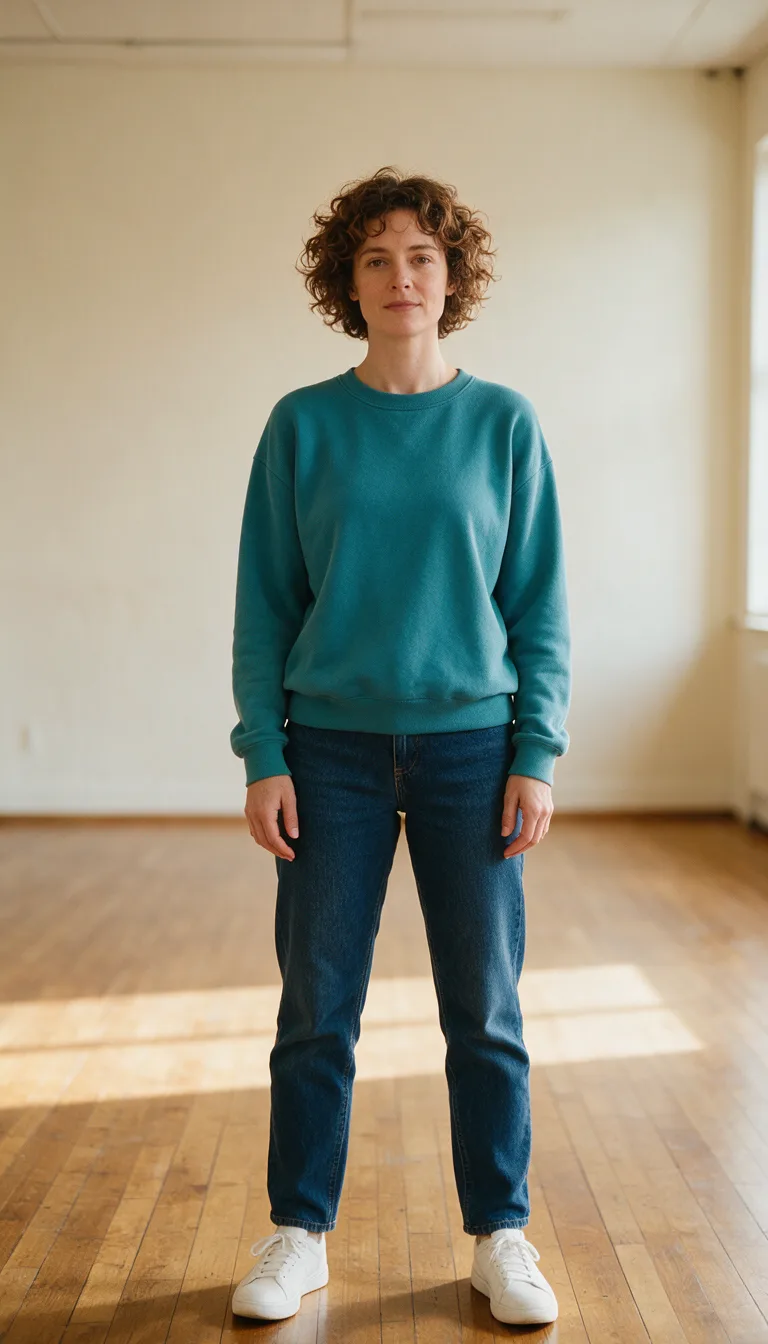
A close selfie gives plenty of face detail but no usable legs. A crowded room makes it harder to separate the dancer from the furniture. For a first attempt, avoid crossed arms, a large bag or a crop through the knees. Use a duet only when you have selected a duet preset and a suitable photo with two adults.
Full-length editorial photograph of one fictional adult woman aged 32 with short curly brown hair, wearing a plain teal sweatshirt, straight dark blue jeans and white sneakers, standing facing the camera in a bright empty cream-walled dance studio with a warm wooden floor. Arms relaxed at her sides, both hands visible and naturally formed, feet apart, entire head and shoes in frame with generous space around her. Soft daylight, realistic photography, static eye-level camera, no text, no logos, no other people.
What do three different dances look like from the same photo?
For each clip, we supplied the studio portrait and the corresponding full preset video to Seedance 2.0 Mini's reference-to-video mode. We used 720p, five seconds, 9:16 and audio generation off. This follows the page's reference-video workflow; it is not a text-only interpretation of the preset's name.
What happened with Charleston?
Charleston, in Retro & Latin, gives the dancer alternating footwork and swinging arms. In our result, the knees bend and the feet step across while the teal sweatshirt and studio remain recognizable. The movement reads as a short, softened version of the reference rather than a precise dance lesson.
What happened with Robot?
Robot, in Street, shifts the emphasis from crossing steps to bent elbows, raised hands and changes of pose. Her face, short curls, clothes and room stay recognizable. Inspect the hand positions during the pauses as well as the larger arm movement; a convincing silhouette alone is not enough to judge the result.
What happened with Disco point?
Disco point, in Party, produces a clear upward pointing gesture, alternating arm positions and small steps. It is the easiest of these three to recognize from a single frame. The source starts with a neutral expression; the video adds a smile, which shows that preserving a face does not mean freezing its expression.
The card below contains the exact shared instructions and generation settings for all three clips. To recreate a test, add the starting photo as the image reference and the selected dance clip as the video reference; the prompt alone does not contain the choreography. Choosing the preset on the Dance page supplies that reference for you.
The person in @Image1 performs exactly the same dance as the person in @Video1, matching every step and arm movement in time. Keep the face, outfit and setting from @Image1. Static camera, full body in frame.
How much should you budget for a dance video?
If you found this guide by searching for a free AI dance video generator, check the generation price before starting. PopNow's dance generation uses credits, including Quick try. A five-second Kling 3.0 Full dance at 720p is 504 credits. For the Seedance 2.0 Mini reference mode used here, a five-second output plus a five-second reference gives an estimate of 236 credits; the service also measures reference and output durations, so the exact quote and final charge can differ from that rounded example.
Choose one move and one photo first, inspect the preview, then decide whether to generate a full version. A different source photo can fix missing feet or an obscured face more directly than generating the same difficult picture repeatedly. Mixing music in the browser is free; making the underlying AI video is the paid step.
How do you choose between models or your own moves?
For a same prompt, different models comparison, keep the photo, reference clip and settings fixed and change only the model. Our three examples keep Seedance 2.0 Mini fixed, so they demonstrate different presets rather than prove a model ranking. The model comparison page helps you inspect supported features; a dance test needs reference-to-video or motion-control support, not just text-to-video.
You can also choose Upload a move and provide a video you filmed or have permission to use. The page accepts clips from 3 to 30 seconds, but Seedance's reference mode has a 15-second limit; choose a supported model or shorten the clip when needed. For movement described entirely in your own words rather than taken from a reference video, use image to video.
FAQ
Can I make an AI dancing video from a single photo?
Yes. One clear photo supplies the person, clothes and background, while a preset supplies the movement. A full-body photo with visible shoes is a better starting point for footwork than a close portrait.
Is Quick try a free preview?
Quick try uses credits to generate a four-second, 480p video with Seedance 2.0 Mini by default. Check the displayed price before pressing Try it. Adding music afterward is a separate browser operation and is free.
Will the face and clothing stay exactly the same?
The instructions ask the model to preserve them, and our examples keep the same recognizable person and outfit. Expression, fabric folds and small details can change. Watch the whole clip, especially turns and hand movements, before sharing it.
Does the dance video include music automatically?
The page offers an automatic track and can align it with the moves, but music is mixed in your browser after generation. Listen to it and use Download with music to export that version. The three videos in this guide are silent so the movement is easy to compare.
Can I upload my own dance clip?
Yes, if you filmed it or have the right to use it. Confirm the clip's usage rights, keep within the chosen model's duration limit and use a photo of an adult who agreed to be animated.