A faceless YouTube channel is one where you never appear on camera: the videos are built from voiceover, footage, pictures and on-screen text instead. To start one with AI, pick a narrow topic, use an AI video maker to turn each idea into a script, shots, a voiceover and captions, then edit in your own opinion before you publish. On PopNow one sentence like "Why do cats knead blankets?" becomes a finished 30-second vertical explainer, and the price shows on the button before anything runs.
The tools make the work fast. What makes a channel worth watching, and worth paying under YouTube's rules, is still you: the topic you pick, the facts you check and the angle no one else has. This guide covers both, with three real faceless videos we made on PopNow.
What a faceless video can be
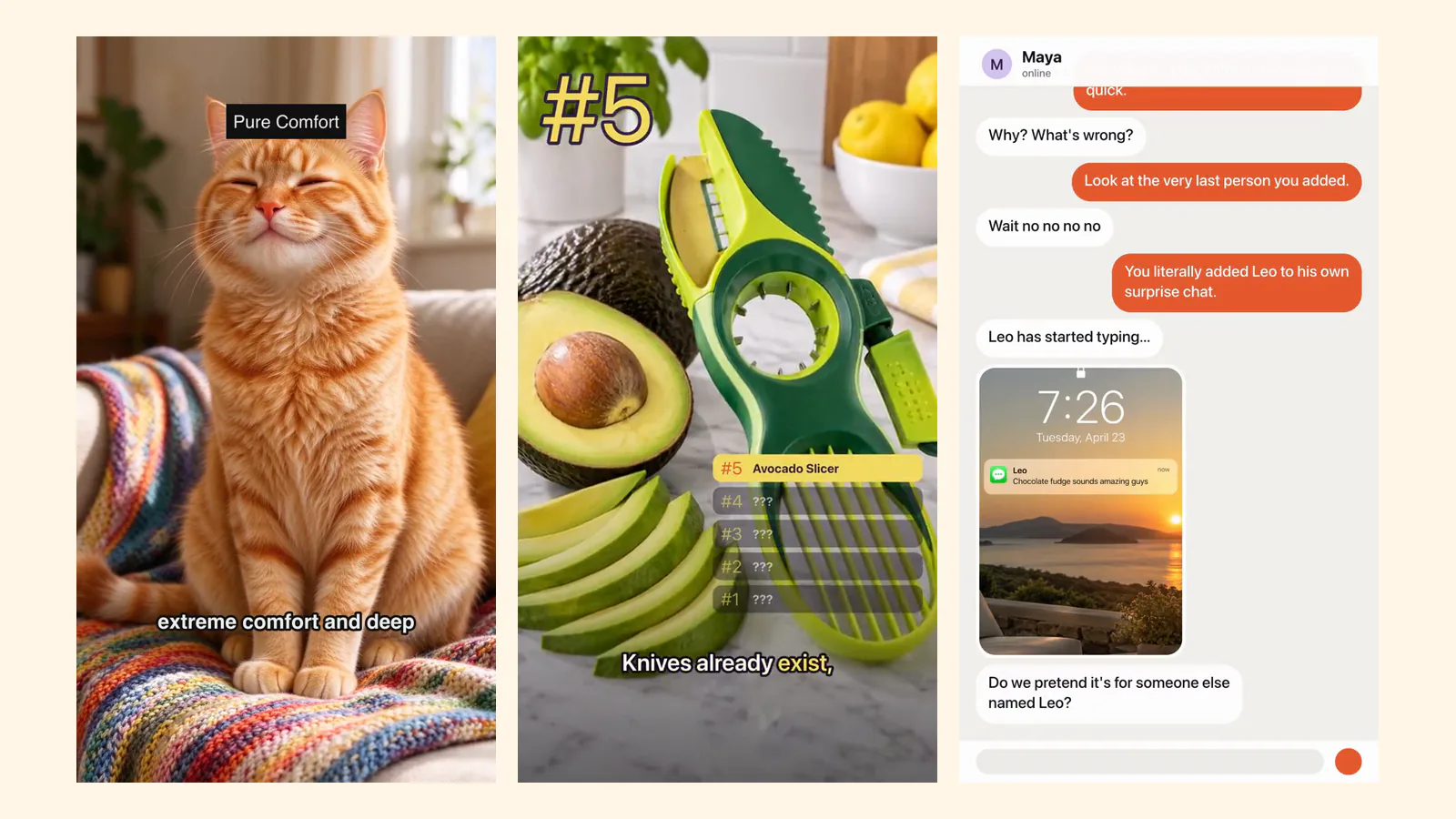
Faceless doesn't mean one style. These are the three shapes that work best with AI, each shown with a real clip.
1. A narrated explainer. One question, answered in five short beats with a voiceover, word-by-word captions and a title on each beat. This is the classic faceless Shorts format for facts, science, history and pets.
2. A countdown or list. Number five down to number one, a picture and one line each, then a reveal. Lists are easy to binge and easy to make in a series.
3. A story told on screen. A group chat, a receipt, a quiz. The whole video is graphics and text, so there is nothing to film at all.
How to start a faceless YouTube channel with AI
- Pick one narrow topic. "Pets" is too wide; "why cats do weird things" is a channel. A narrow topic tells YouTube who to show your videos to and gives you fifty ideas before you run out.
- Choose your format and keep it. An explainer, a countdown or an on-screen story. Viewers subscribe to a format they recognize, so use the same shape, voice and caption style in every video.
- Write ideas as questions. "Why do cats knead blankets?" works better than "cat kneading" because it is what people actually search and it gives the video a clear ending: the answer.
- Make the first video. Open the AI video maker, type the idea and pick the explainer format. It writes the script, plans the shots, picks a voice and music and adds captions. For lists and on-screen stories, open Encore and pick a format from the No face needed group.
- Check every fact and add your take. Read the script before you publish. Fix anything you can't confirm, and add one line only you would say: a story, a test you ran, a strong opinion.
- Finish in the editor. Trim, swap a clip or change a caption in the free video editor. It exports 9:16 for Shorts with no watermark.
- Upload on a schedule. Two or three shorts a week in the same format beats ten one week and none the next.
The tools you need
| Job | What to use | Notes |
|---|---|---|
| Script, shots, voice, music and captions in one go | AI video maker | One idea in, a finished vertical video out |
| Lists, quizzes, chat and receipt stories | Encore | 16 formats, several need no face at all |
| A voiceover for footage you already have | Text to speech | Many voices and languages |
| Single clips and pictures | AI video generator and image generator | Every run shows its price first |
| Trimming, captions, music | Video editor | Free, no watermark, runs in your browser |
There is no subscription. You buy a credit pack once and every run shows its exact price on the Generate button; if a run fails, its credits come back.
What YouTube's rules say about AI videos
Two YouTube policies matter for a faceless AI channel. Both are worth reading in full on YouTube Help.
- Monetization: avoid mass-produced videos. In July 2025 YouTube renamed its repetitious content policy to inauthentic content. It lists "AI-generated content made with generic or unoriginal templates" and "templated storylines" among the things that don't qualify for monetization. A channel of near-identical videos is exactly what this targets. Your own topic choice, checked facts and point of view are what keep each video original.
- Disclosure: only for realistic content. YouTube asks creators to disclose AI-generated or altered content that seems realistic, such as making a real person appear to say something they didn't. Using AI to help write a script or make captions is listed as a minor use, and clearly non-realistic content doesn't need the label. When a video could pass for real footage, turn the label on in YouTube Studio when you upload.
This is not legal advice, and platforms change their rules; check the current pages before you plan a channel around them.
Mistakes that sink faceless channels
- Copying a viral channel's exact format and topic. Use a format, but bring your own subject.
- Publishing the first draft. AI scripts can sound confident and still be wrong. One minute of fact-checking protects the whole channel.
- Changing the voice and style every video. Consistency is what makes a faceless channel recognizable.
- Using real people's faces or voices without permission. Stick to original characters, objects, animals and on-screen graphics.
FAQ
Can you make money with a faceless YouTube channel made with AI?
Faceless channels can join the YouTube Partner Program like any other channel, but AI videos made from generic templates, with no original value, don't qualify for monetization under YouTube's inauthentic content policy. Original topics, checked facts and your own commentary are what count. Nobody can promise a channel will earn money.
What is the best AI tool for faceless YouTube videos?
The one that covers the most steps without leaving the page. An AI video maker that writes the script, makes the visuals, adds a voiceover and captions saves the most time; you then only need an editor for small fixes.
Do I have to disclose that my videos use AI?
Only when the content looks realistic, according to YouTube's disclosure rules. Scripts, captions and clearly unrealistic visuals don't need the label. When in doubt, turn it on.
Can I use my own voice instead of an AI voice?
Yes. Record your voice, put it under the clips in the video editor, and keep the AI for the visuals and captions. Many faceless creators do exactly that.
How long should faceless Shorts be?
Most of the examples on this page run 15 to 30 seconds. Shorter is easier to watch to the end; make it as long as the answer needs and no longer.
Do I need a subscription?
No. On PopNow you buy a credit pack once and pay per video. The editor is free to use.