An animated video ad is a short clip, usually 10 to 20 seconds, that shows your product moving, being used or being talked about, with your headline, selling points and a button at the end. You don't need a shoot to make one. Upload one clear product photo, choose the kind of ad, add your product name and selling points, and an AI ad generator plans the shots, animates your product in fitting scenes and lays your text and logo over the top. On PopNow every ad comes in 9:16, 1:1, 4:5 and 16:9 at once.
Below are real ads made on PopNow from single product photos, what each type is good for, and how to keep the product and your brand exactly right.
Five kinds of animated product ads
Each type answers a different question a shopper has. Pick the one that matches where the ad will run.
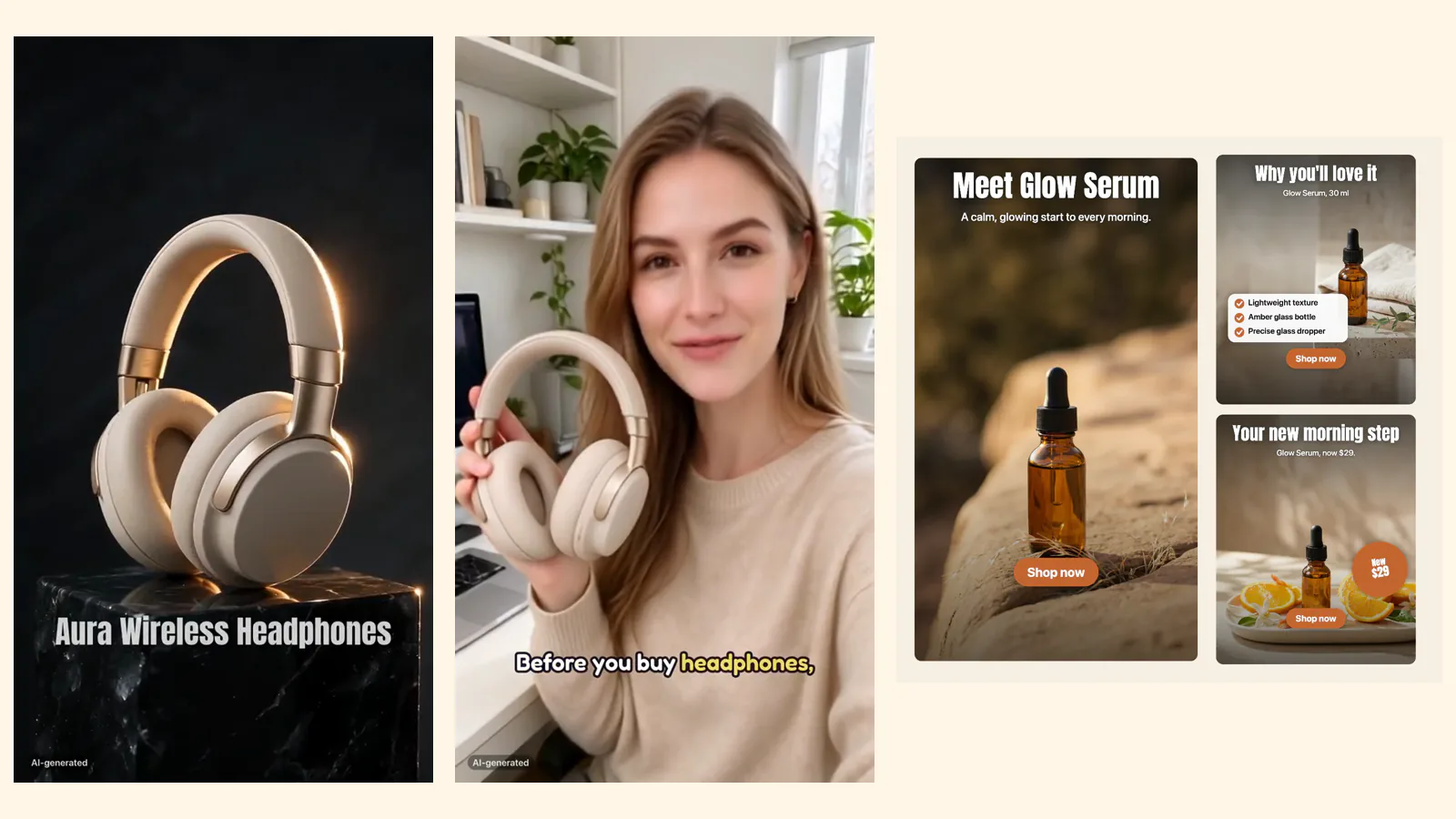
1. A movie-style reveal. Mood, light, the product on a pedestal, a close-up of the finish and an end card with your logo. Best for launches, premium products and the first second of a feed ad, where the job is to stop the scroll.
2. A creator talking about it. An AI presenter holds your product while a voiceover explains why it's worth it, with word-by-word captions, check-mark selling points and a price card. Best for social feeds where people expect a person talking to camera.
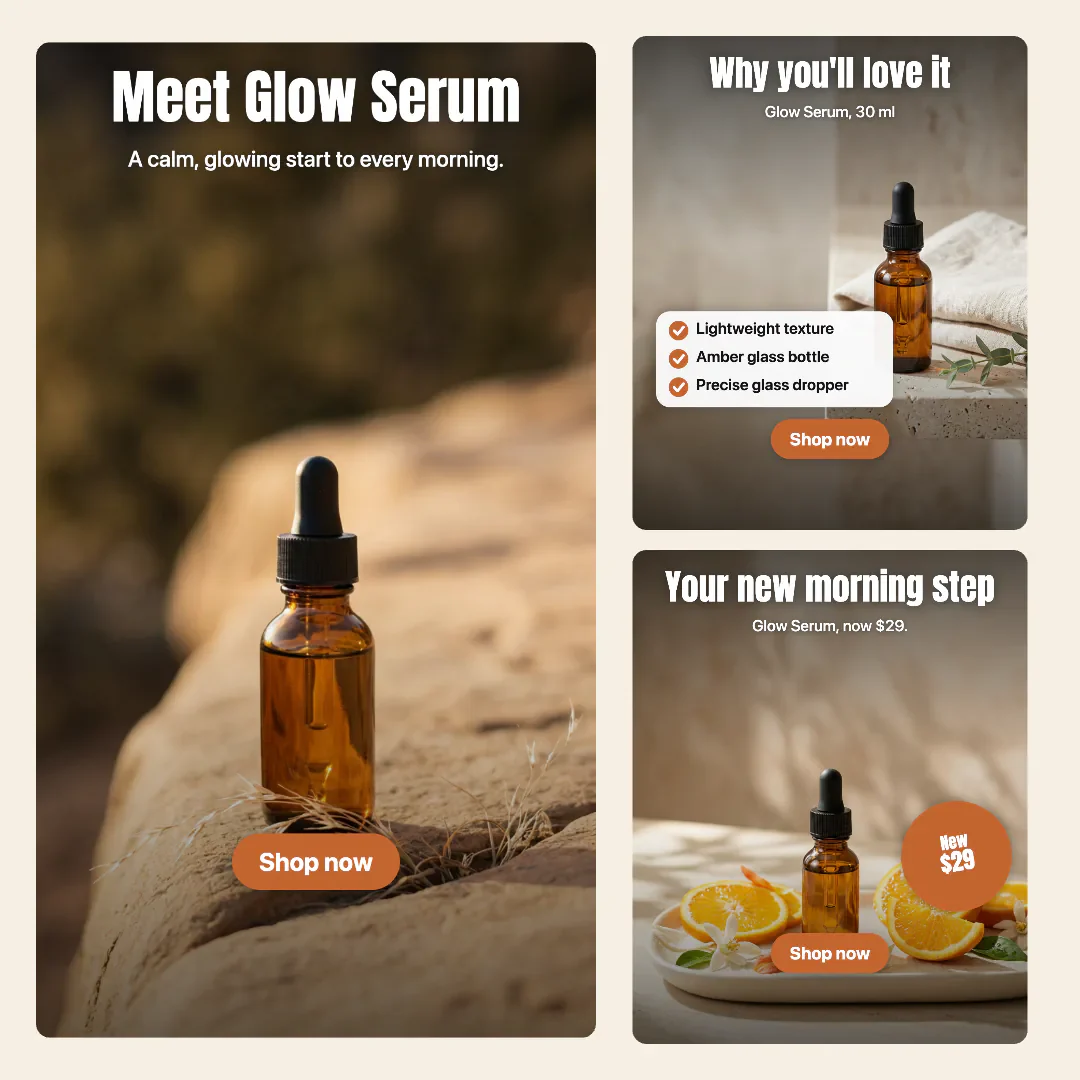
3. Photo ads. Three still ads (hero, benefits, promo) with your headline, selling points, price or offer badge and a button. They take about a minute and are an easy way to test headlines.
4. Unboxing. A plain box on a table, hands lift the lid and your product comes out. It shows size and finish in a way still photos can't. The box is always plain; the generator never invents packaging or extras.
5. Lifestyle. Two or three real moments of the product in use, with your selling points lighting up one by one. Best for everyday products where the moment sells more than the object.
How to make an animated video ad from a product photo
- Pick your best product photo. One sharp photo with the whole product visible and nothing covering the label. If you only have a phone snapshot, put it in a clean scene first with AI product photography. A plain background helps, but it isn't required. You can also paste your product page link and the photo and name are read from it.
- Open the ad generator and choose a type. Movie-style for launches, Creator for social feeds, Photo ads to test headlines.
- Tell it the facts. Product name, up to three selling points, price or offer and the button text. These are the only claims the ad uses. It writes the headline, script and scenes from them.
- Choose your sizes. 9:16 for Stories, Reels and TikTok, 1:1 and 4:5 for feeds, 16:9 for YouTube and your website. Extra sizes don't cost more: the same ad is rearranged for each size, not stretched.
- Check the price and press Make my ads. Each ad type shows its price before anything runs, and failed shots are refunded.
- Fix text for free, then download. Change any headline or line after the ad is made, then download everything or find it in your assets.
Keep the product and your brand exactly right
The fastest way to lose trust is an ad where the product looks slightly different from what arrives. Three things help:
- Your photo is the reference for every shot. The product keeps its shape, colors and label, and the end card always shows your original photo or cutout rather than a redraw.
- Brand rules. In the brand kit, list the words to always write exactly (brand name, product names, label text, approved claims) and the words you never say. A brand check after generation flags any variant or banned word, with a Fix button.
- Your colors and fonts. Save your logo, three brand colors and two fonts once, and every headline, button, badge and end card uses them.
Where to run them, and what to label
Most ad platforms ask advertisers to say when an ad contains realistic AI-generated people or scenes, and rules differ by platform and country. The videos can carry a small AI-generated label, as in the samples above, and the creator ads never claim personal results. For the fine print, read each ad platform's current policy, for example Meta's AI disclosures, and the FTC guidance on endorsements if you advertise in the US.
Test two or three types against each other before you scale one. If you sell online, the tools for ecommerce sellers page puts the product photo, listing set and ad tools side by side. A movie-style reveal and a creator ad often win with different audiences, and the photo ads tell you cheaply which headline works.
FAQ
What is an animated video ad?
A short video ad, usually 10 to 20 seconds, where the product moves, is used or is presented by someone, with text, selling points and a button. It can be made from a single product photo with an AI ad generator.
Can I make a video ad from just one photo?
Yes. One clear product photo is enough for every ad type. The photo is used as the reference for each shot, so the product keeps its shape, colors and label.
Which sizes should I export?
9:16 for Stories, Reels and TikTok, 1:1 or 4:5 for feed posts and 16:9 for YouTube and websites. On PopNow you get every size you pick at once, and extra sizes don't cost more.
Do the creator ads use real people?
No. The presenter is AI-generated and doesn't claim personal results. If you'd like, you can use your own photo as the presenter; it stays a still image.
Can I use the ads commercially?
Yes. To the extent the law allows, you own what you make with PopNow and can use it in personal and commercial projects. Only upload products, logos and photos you have the right to use.