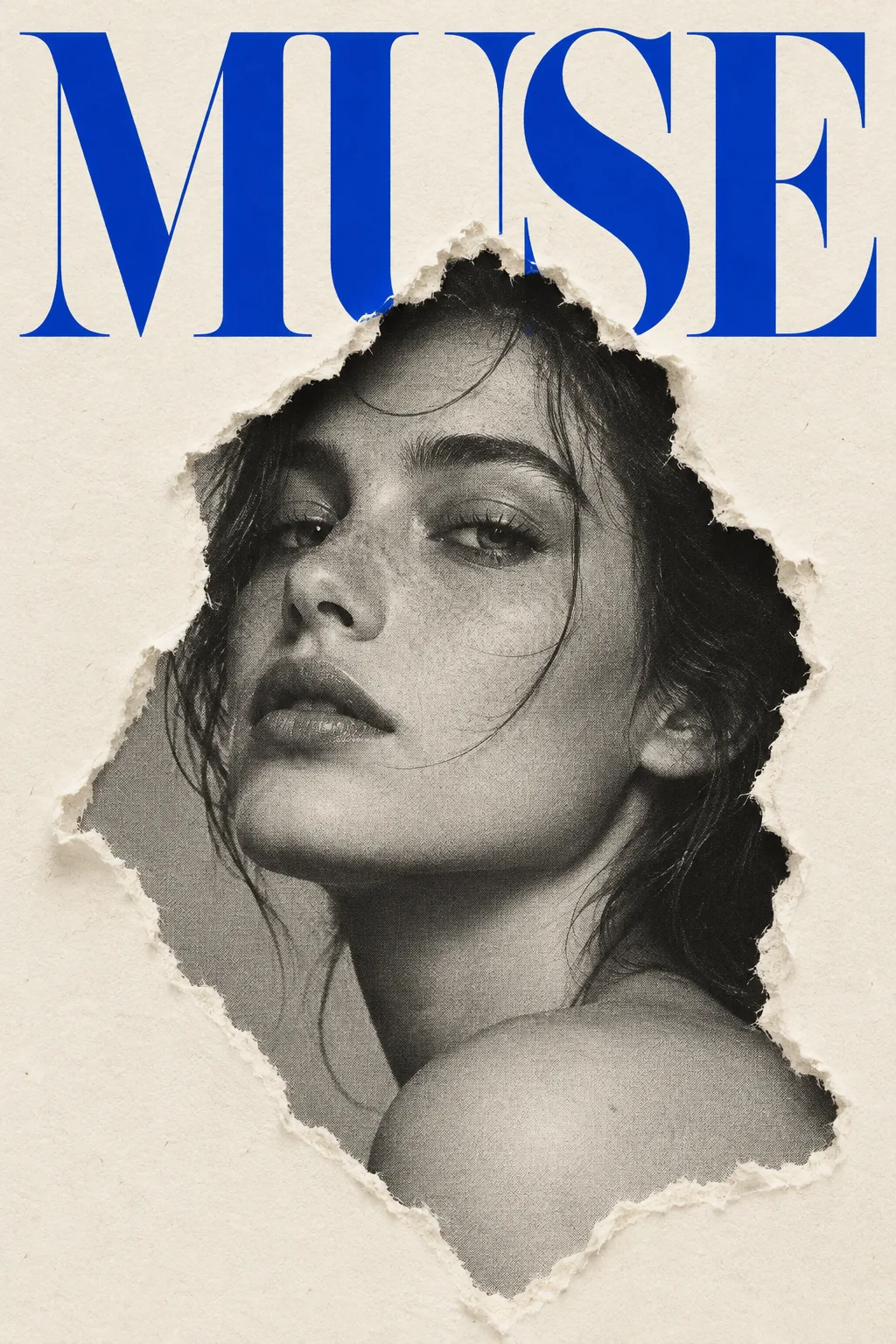
Torn Paper Portrait, made with GPT Image 2.5 Sunburst
Example made with GPT Image 2.5 Sunburst

Text to imageFashion

GPT Image 2.5 Sunburst poster design promptTorn Paper Portrait

The exact text-to-image prompt behind this picture, made with GPT Image 2.5 Sunburst.

Prompt

Vertical 2:3 poster frame. A sparse fashion poster on warm off-white paper, a black and white halftone portrait of a woman revealed through an irregular torn-paper hole in the center, monumental cobalt blue Didone serif letters across the top that read "MUSE", fine paper fibers at the torn edge, refined editorial design, no other text.

Prompts are kept in their original English to help reproduce the example. Copy one as it is, or adapt it for your project.

Opens GPT Image 2.5 Sunburst with this prompt and the settings below filled in.

135 tested GPT Image prompts →

Settings

Mode
Text to image
Aspect ratio
2:3
Quality
high
Price
From 2 credits

The exact price shows before you generate.

Make your own version

  1. The words in quotes, "MUSE", are printed in the picture. Keep them short and change them to your own.
  2. refined editorial design sets the whole feel of the shot. Swap it for another camera style to change the vibe.

Where this idea comes from

Inspired by an idea from @VigoCreativeAI, collected in VigoZhao/AI-Visual-Prompt-Cookbook under CC BY 4.0. PopNow wrote this prompt and made the example above.

Portrait prompt guide

Why this portrait prompt works

A monochrome fashion portrait peers through a ripped aperture in a minimalist editorial poster, contrasting tactile paper textures with crisp typography. GPT Image 2.5 Sunburst renders clean halftone shading on the subject's face while isolating the bold cobalt headline across the top. This compositional balance works because the physical tear cleanly separates the vintage photographic style from the modern paper surface.

  1. Base layout canvasVertical 2:3 poster frame. A sparse fashion poster on warm off-white paper,

    It establishes the clean background tone and vertical poster format. Removing it risks a cluttered background or pure digital white rather than physical cardstock.

  2. Core subject framinga black and white halftone portrait of a woman revealed through an irregular torn-paper hole in the center,

    This places the monochrome subject inside a physical cutout. Altering it to full color or removing halftone loses the distinct editorial collage effect.

  3. Typography and colormonumental cobalt blue Didone serif letters across the top that read "MUSE",

    This specifies the exact font style, contrast color, and uppercase text. Changing the font name or word shifts the poster toward generic display text.

  4. Texture and cleanupfine paper fibers at the torn edge, refined editorial design, no other text.

    It adds tactile physical micro-details around the rip and prevents unwanted AI filler text. Without this, paper edges look digitally sharp and flat.

Keeping the same face

To preserve a consistent model identity across a series of torn-paper editorial posters, describe distinct facial geometry and specific hair styling rather than generic terms.

Facial structure and age
Specify distinct jawlines, cheekbone depth, or age markers to stop the AI from generating generic, drifting faces across separate generations.
Halftone shading density
Keep the halftone dot pattern and contrast values constant so the subject's facial appearance does not shift from high-contrast film to soft digital portraiture.
Hairstyle and silhouette
Fix specific hair traits, like a sleek side-parted bob or textured crop, so the silhouette inside the torn window stays immediately recognizable.

Three ways to make it yours

Mature Male Noir Cover

Swaps the subject to a mature man with a beard and adjusts the headline color and text for a moodier fashion look.

Prompt

Vertical 2:3 poster frame. A sparse fashion poster on warm off-white paper, a black and white halftone portrait of a 40-year-old bearded man revealed through an irregular torn-paper hole in the center, monumental crimson red Didone serif letters across the top that read "NOIR", fine paper fibers at the torn edge, refined editorial design, no other text.

High-Fashion Avant-Garde

Uses an androgynous model with a close crop and emerald typography to create an edgy runway aesthetic.

Prompt

Vertical 2:3 poster frame. A sparse fashion poster on warm off-white paper, a black and white halftone portrait of an androgynous adult with a sleek buzzcut revealed through an irregular torn-paper hole in the center, monumental emerald green Didone serif letters across the top that read "ICON", fine paper fibers at the torn edge, refined editorial design, no other text.

Senior Minimalist Elegance

Highlights an older woman with silver hair paired with warm ochre lettering for a timeless luxury brand feel.

Prompt

Vertical 2:3 poster frame. A sparse fashion poster on warm off-white paper, a black and white halftone portrait of a 60-year-old woman with elegant silver hair revealed through an irregular torn-paper hole in the center, monumental deep ochre Didone serif letters across the top that read "AURA", fine paper fibers at the torn edge, refined editorial design, no other text.

Model and settings

Keep the 2:3 aspect ratio to maintain traditional vertical magazine and poster proportions, ensuring proper room for the top headline. Select high quality so GPT Image 2.5 Sunburst renders crisp letterforms and fine paper fiber edges without blur. Run in text-to-image mode for initial poster generation, or switch to image-to-image mode if you want to place a custom face photo into the torn center.

  • Nano Banana ProPick this model if you need complex layered graphics or dense secondary typography, as it plans layout grids prior to rendering.
  • FLUX.2 ProUse this when you want precise brand hex codes for the lettering and ultra-fine photographic halftone skin grain.

If the portrait comes out wrong

Extra gibberish text or subheaders appearing below the main title.
Keep the phrase "no other text" strictly at the end, and remove any vague adjectives like "detailed poster" that invite filler text.
The torn paper edge looks like a clean digital mask with smooth plastic edges.
Ensure "fine paper fibers at the torn edge" and "irregular torn-paper hole" remain in the prompt to force physical tearing artifacts.
The face inside the hole renders in full color instead of black and white.
Move "a black and white halftone portrait" directly before the subject description to strictly constrain the palette inside the tear.

Questions about this portrait prompt

Why did the AI spell the headline word incorrectly?

GPT Image 2.5 Sunburst handles short, quoted words best when capitalized and isolated. Ensure the word remains wrapped in quotation marks and keep it under six letters to minimize typographic distortion.

Can I change the paper background to a darker color?

Yes, replace "warm off-white paper" with another shade like "matte charcoal cardstock". Make sure to change the text color to a lighter tint, like cream or silver, to preserve readable contrast.

How do I make the halftone effect look rougher and more vintage?

Add terms like "coarse newsprint halftone grain" or "high-contrast screenprint dots" directly into the portrait description. This tells the generator to render visible printing dots rather than smooth gray gradients.