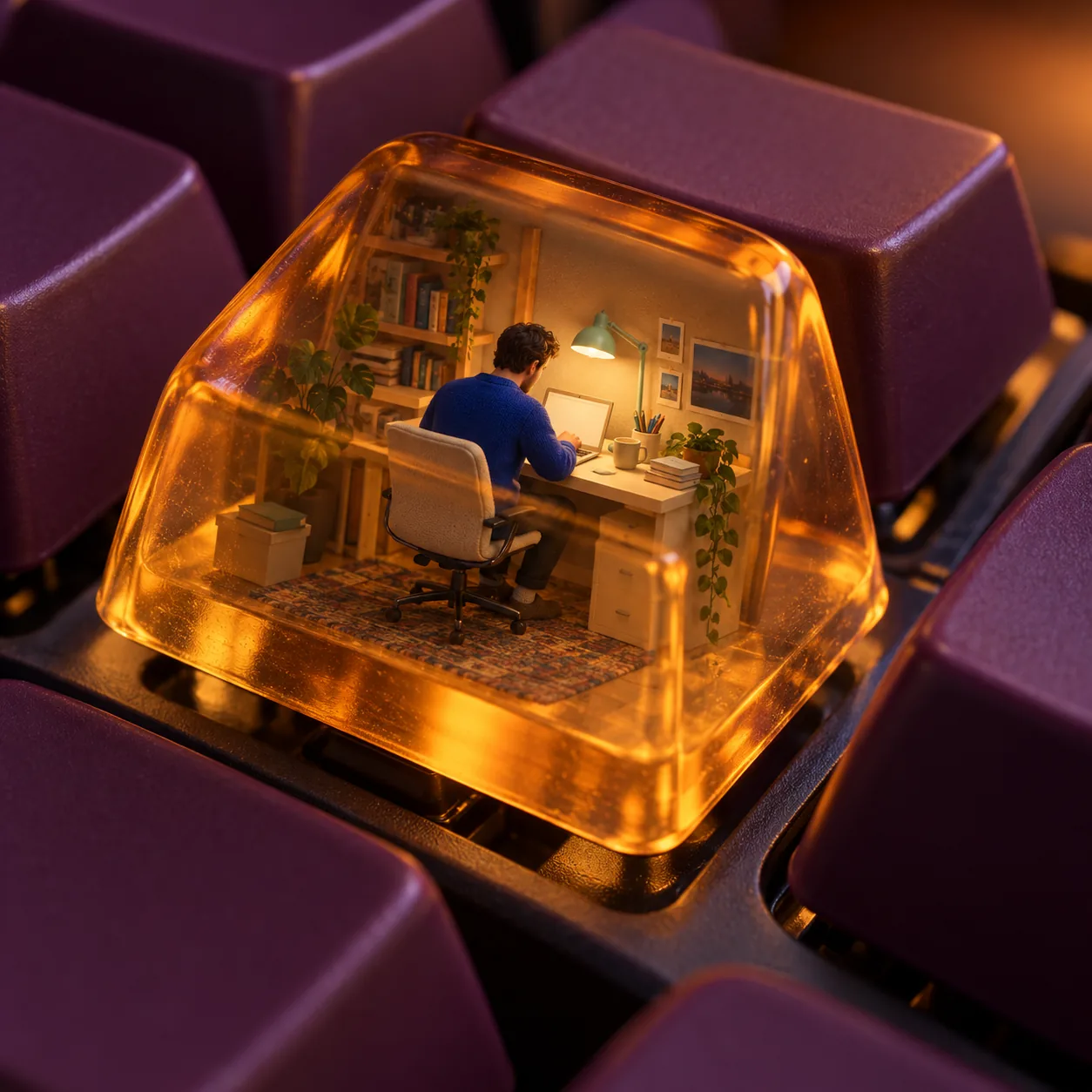
Keycap Evening Office, made with GPT Image 2.5 Sunburst
Example made with GPT Image 2.5 Sunburst

Text to image3D & miniatures

GPT Image 2.5 Sunburst miniature diorama promptKeycap Evening Office

The exact text-to-image prompt behind this picture, made with GPT Image 2.5 Sunburst.

Prompt

Square 1:1 frame. One oversized translucent amber keyboard keycap contains a complete miniature workspace, with an adult figure in a cobalt sweater seated at a cream desk beneath a tiny mint task light. Nearby blank plum keycaps establish the real keyboard scale. Evening studio illumination, macro 3D rendering with realistic resin refraction and soft plastic texture, intimate concentration inside an ordinary object, no logos, no text.

Prompts are kept in their original English to help reproduce the example. Copy one as it is, or adapt it for your project.

Opens GPT Image 2.5 Sunburst with this prompt and the settings below filled in.

135 tested GPT Image prompts →

Settings

Mode
Text to image
Aspect ratio
1:1
Quality
high
Price
From 2 credits

The exact price shows before you generate.

Make your own version

  1. The prompt ends with no text. Leave that in, or the model may add random lettering.

Where this idea comes from

Inspired by an idea from @egeberkina, collected in jamez-bondos/awesome-gpt4o-images under CC BY 4.0. PopNow wrote this prompt and made the example above.

Style prompt guide

Style traits to keep

A detailed miniature office diorama encapsulated within a single translucent resin keyboard keycap creates a playful, surreal macro scene. GPT Image 2.5 Sunburst renders clean material separation between the glowing amber resin housing and the tiny interior furniture. Placing adjacent standard keycaps provides immediate scale reference, turning an everyday mechanical keyboard into an imaginative micro world.

The miniature resin keycap aesthetic relies on specific physical simulation cues and deliberate scale contrasts to make the scene believable.

Texture
Smooth matte PBT plastic on the exterior keycaps contrasts with glossy, clear amber casting on the hero keycap to sell realistic physical materials.
Light
Warm evening studio lighting works alongside the tiny mint task light to generate localized interior glow and subtle optical caustic reflections.
Composition
The macro perspective frames adjacent standard keycaps close to the focal piece, immediately communicating scale and depth of field.
Palette
High-contrast complementary tones like cobalt blue, amber resin, plum purple, and mint green prevent the tiny interior details from blending together.

What defines this look

  1. Core concept setupSquare 1:1 frame. One oversized translucent amber keyboard keycap contains a complete miniature workspace,

    Establishes the primary focal point as a hollow, transparent resin keycap holding a micro interior. Removing this breaks the diorama structure and turns the keycap into a solid standard piece.

  2. Interior miniature detailswith an adult figure in a cobalt sweater seated at a cream desk beneath a tiny mint task light.

    Populates the inside of the keycap with distinct color-blocked elements that stay legible despite the small scale. Changing these colors disrupts the high-contrast readability through the amber resin.

  3. Contextual scale anchorNearby blank plum keycaps establish the real keyboard scale.

    Places surrounding keyboard elements to visually prove how small the inner scene is. Without nearby keys, the viewer loses the macro optical illusion and might see a regular full-sized room.

  4. Material and lighting styleEvening studio illumination, macro 3D rendering with realistic resin refraction and soft plastic texture,

    Instructs the 3D renderer to simulate optical physics like light bending through clear resin and smooth matte plastic finishes. Altering this can result in flat, unconvincing plastic surfaces.

  5. Mood and negative constraintsintimate concentration inside an ordinary object, no logos, no text.

    Sets the focused atmosphere while keeping keycap tops clean and free of distorted alphanumeric characters. Leaving out the negative constraint risks random pseudo-letters appearing across the key surfaces.

Same style, new subjects

Botanical Keycap Terrarium

Swaps the office worker for a sleeping pet inside a greenhouse terrarium while retaining the macro resin keycap style.

Prompt

Square 1:1 frame. One oversized translucent emerald keyboard keycap contains a complete miniature greenhouse, with a sleeping ginger cat curled beneath miniature brass shelving and tiny fiddle-leaf figs. Nearby blank slate-grey keycaps establish the real keyboard scale. Evening studio illumination, macro 3D rendering with realistic resin refraction and soft plastic texture, serene nature inside an ordinary object, no logos, no text.

Corner Cafe Keycap

Shifts the miniature subject to an urban coffee bar while preserving the macro keyboard perspective and translucent enclosure.

Prompt

Square 1:1 frame. One oversized translucent ruby keyboard keycap contains a complete miniature coffee shop counter, with an adult barista in an apron pouring coffee beside a tiny espresso machine. Nearby blank charcoal keycaps establish the real keyboard scale. Evening studio illumination, macro 3D rendering with realistic resin refraction and soft plastic texture, bustling street life inside an ordinary object, no logos, no text.

Miniature Observatory Keycap

Uses an architectural observatory still life as the interior subject inside a deep blue resin keycap.

Prompt

Square 1:1 frame. One oversized translucent sapphire keyboard keycap contains a complete miniature astronomical observatory, with a brass telescope aimed upward on a parquet floor beneath tiny star charts. Nearby blank cream keycaps establish the real keyboard scale. Evening studio illumination, macro 3D rendering with realistic resin refraction and soft plastic texture, quiet exploration inside an ordinary object, no logos, no text.

Model and settings

Keep the square 1:1 aspect ratio to ensure the keyboard rows and the central hero keycap remain tightly centered with balanced surrounding negative space. Set the quality to high so the tiny interior elements inside the resin shell remain sharply defined without blur. Because this is a standard text-to-image generation, no reference images or start frames are necessary.

  • FLUX.2 ProPick FLUX.2 Pro if you need precise hex color matching across custom keycap sets or require ultra-photorealistic material textures on surrounding keyboard switches.
  • Seedream 5.0 ProChoose Seedream 5.0 Pro when you want to feed reference photos of your actual mechanical keyboard setup to guide the miniature housing.

When the style drifts

The resin keycap looks completely solid and opaque, hiding the interior miniature office.
Increase transparency by replacing translucent amber with clear see-through tinted amber resin with visible interior volume.
Random distorted letters or fake mechanical legends appear on the keycap surfaces.
Reiterate blank unprinted keycaps and strengthen the negative phrase to no alphanumeric legends, no typography, clean smooth keycap tops.
The scene looks like a regular full-sized room rather than a macro keyboard miniature.
Emphasize surrounding mechanical keyboard details by adding mechanical keyboard switches, keycap stems, and visible adjacent rows around the base.

Questions about this style prompt

How do I make the tiny objects inside the keycap stand out clearly?

Use bold, contrasting colors for the inner elements against the keycap tint. For example, pairing a deep cobalt figure against a warm amber shell ensures the miniature silhouette remains crisp through the resin refraction.

Can I change the keycap color without making the inside invisible?

Yes, but keep the resin color modifier translucent, tinted, or clear rather than deep or dark. Light tints like ice blue, pale rose, or smoked glass let interior illumination shine through cleanly.

Why are the nearby keyboard keycaps looking blurry or warped?

Macro rendering naturally applies a shallow depth of field. To make the surrounding keys clearer, specify deep focus macro rendering or crisp edge-to-edge keyboard layout in the prompt text.