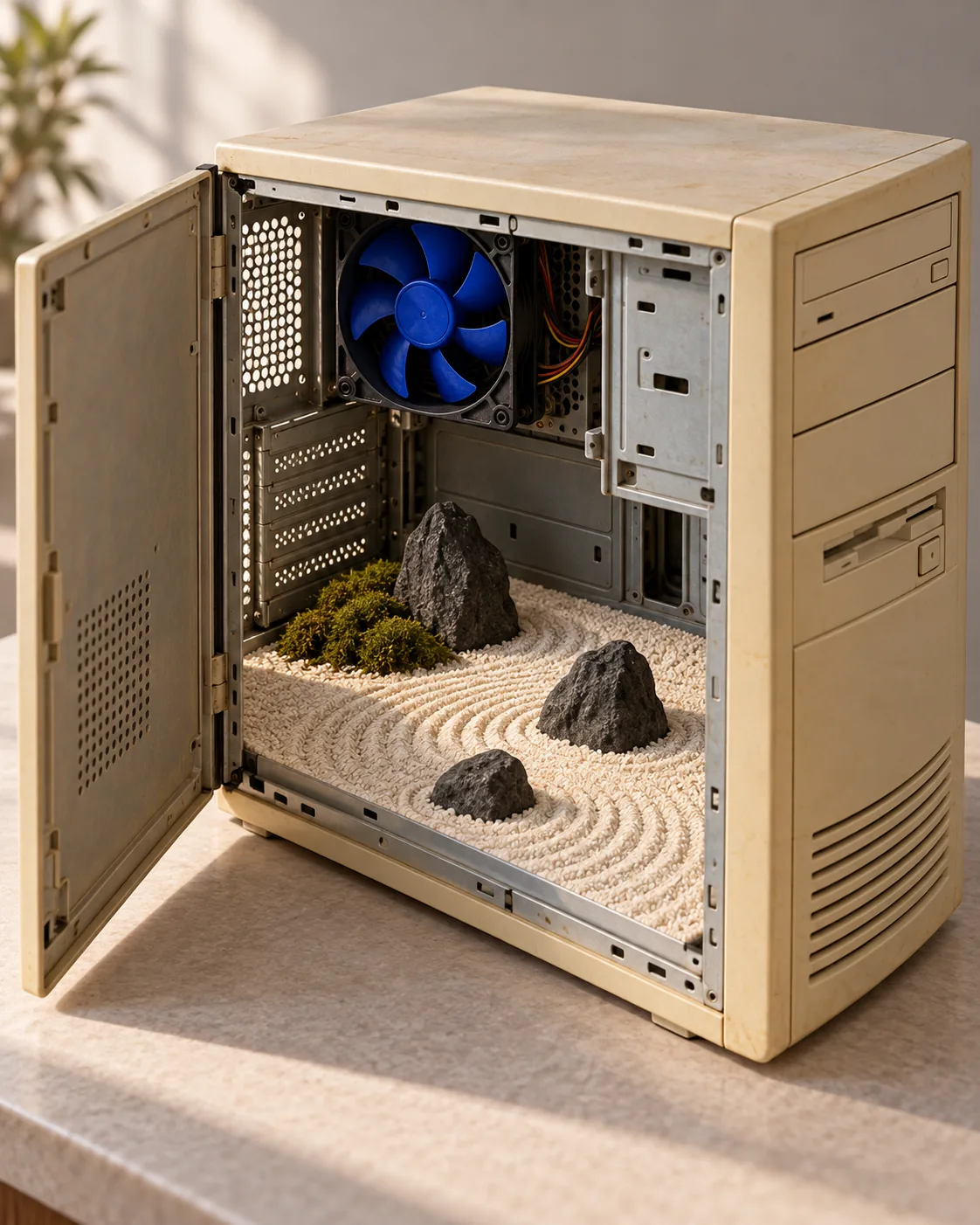
Computer Stone Garden, made with GPT Image 2.5 Sunburst
Example made with GPT Image 2.5 Sunburst

Text to image3D & miniatures

GPT Image 2.5 Sunburst isometric miniature promptComputer Stone Garden

The exact text-to-image prompt behind this picture, made with GPT Image 2.5 Sunburst.

Prompt

Vertical 4:5 portrait frame. An old beige desktop computer case opens to reveal a miniature dry landscape garden, with carefully raked cream gravel, three dark stones and one small moss patch where the circuit boards would be. A cobalt cooling fan remains visible above the scene. Isometric physical model aesthetic, soft studio daylight, warm plastic patina and precise sand texture, contemplative reuse of familiar technology, no logos, no text.

Prompts are kept in their original English to help reproduce the example. Copy one as it is, or adapt it for your project.

Opens GPT Image 2.5 Sunburst with this prompt and the settings below filled in.

135 tested GPT Image prompts →

Settings

Mode
Text to image
Aspect ratio
4:5
Quality
high
Price
From 2 credits

The exact price shows before you generate.

Make your own version

  1. The prompt ends with no text. Leave that in, or the model may add random lettering.

Where this idea comes from

Inspired by an idea from 藏师傅, collected in ImgEdify/Awesome-GPT4o-Image-Prompts under MIT. PopNow wrote this prompt and made the example above.

Style prompt guide

Style traits to keep

A weathered vintage computer chassis transformed into a Japanese zen rock garden blends retro computing nostalgia with tranquil miniature sculpture. GPT Image 2.5 Sunburst renders the contrast between yellowed plastic casing and delicately raked sand with tactile depth. The prompt balances technological hardware with organic serenity by framing the interior as a crafted physical diorama.

The physical diorama style blends tactile retro materials with clean miniature model craft to turn mundane objects into serene sculptures.

Texture
Contrasting surfaces, such as micro-grooved raked sand alongside aged plastic patina, give the miniature scene a convincing tactile weight.
Palette
Warm 1990s beige and cream tones balance against deep dark stone and a single cobalt accent, preventing visual clutter.
Light
Soft studio daylight creates gentle, realistic miniature shadows without harsh glare or heavy ambient occlusion.
Composition
An isometric physical model perspective frames the subject from an elevated angle, emphasizing both internal depth and exterior housing structure.

What defines this look

  1. composition and subject setupVertical 4:5 portrait frame. An old beige desktop computer case opens to reveal a miniature dry landscape garden,

    This defines the vertical orientation and establishes the hollowed vintage chassis as the outer shell. Removing it turns the composition into a generic garden rather than an enclosed technological diorama.

  2. zen garden interior elementswith carefully raked cream gravel, three dark stones and one small moss patch where the circuit boards would be.

    This dictates the minimalist rock arrangement replacing internal motherboard components. Without these specific organic details, the model tends to render leftover wires, chips, or messy debris.

  3. hardware contrast accentA cobalt cooling fan remains visible above the scene.

    This anchors the scene back to desktop hardware and introduces a crisp blue focal point. Omitting it leaves the interior looking detached from its computing origins.

  4. style and material texturesIsometric physical model aesthetic, soft studio daylight, warm plastic patina and precise sand texture,

    This instructs the model to build a clean tabletop diorama with tactile surfaces and even lighting. Changing this phrase risks flattening the render into a digital illustration or hyper-contrasted CGI.

  5. mood and negative constraintscontemplative reuse of familiar technology, no logos, no text.

    This sets a peaceful tone while stripping out fake brand badges and messy lettering on the casing. Altering this can result in garbled text decals across the computer bezel.

Same style, new subjects

Vintage Radio Greenhouse

Applies the miniature repurposed diorama aesthetic to vintage audio equipment housing botanical greenery.

Prompt

Vertical 4:5 portrait frame. An old wooden transistor radio case opens to reveal a miniature greenhouse, with tiny terracotta pots, lush green fern sprouts and glass pane shelves where the vacuum tubes would be. A brass tuning dial remains visible on the front. Isometric physical model aesthetic, soft studio daylight, warm polished wood patina and precise leaf texture, contemplative reuse of familiar technology, no logos, no text.

Retro Television Street Scene

Shifts the interior miniature from a natural garden to a tiny urban streetscape inside a hollowed CRT monitor.

Prompt

Vertical 4:5 portrait frame. A chunky vintage CRT television casing opens to reveal a miniature rainy city street, with wet asphalt crosswalks, three tiny streetlamps and glowing storefront awnings where the picture tube would be. A pair of chrome channel dials remains visible beside the scene. Isometric physical model aesthetic, soft studio daylight, warm matte plastic patina and precise wet pavement texture, contemplative reuse of familiar technology, no logos, no text.

Rotary Telephone Bird Sanctuary

Transforms vintage telecommunication hardware into a detailed miniature wildlife haven.

Prompt

Vertical 4:5 portrait frame. An antique rotary telephone base opens to reveal a miniature woodland bird sanctuary, with finely detailed twig nests, three resting songbirds and tiny blooming wildflowers where the internal bell mechanism would be. A coiled handset cord remains visible beside the base. Isometric physical model aesthetic, soft studio daylight, warm bakelite patina and precise feather texture, contemplative reuse of familiar technology, no logos, no text.

Model and settings

Keep the 4:5 aspect ratio setting because it provides the vertical clearance needed to capture both the upper computer fan and the lower garden bed in balance. Maintain high quality mode so GPT Image 2.5 Sunburst renders individual gravel ridges and subtle plastic yellowing without compression blur. If you switch to landscape scenes, shift the aspect ratio to 16:9 while leaving quality set to high.

  • FLUX.2 ProPick FLUX.2 Pro when you need exacting photorealism and precise hex color matching for specific hardware plastics and sand shades.
  • Nano Banana ProChoose Nano Banana Pro if you want strict architectural planning of the isometric layout and crisp physical model boundary cuts.

When the style drifts

The computer case looks like a flat 2D graphic or digital render instead of a tangible crafted model.
Add tactile physical keywords like macro photograph of a handcrafted physical diorama and emphasize soft studio daylight while removing abstract terms.
Circuit boards, cables, and electronic clutter overpower the tranquil zen garden inside.
Strengthen the negative guidance by adding empty chassis, stripped interior and ensure where the circuit boards would be is clearly stated.
The gravel and stone textures become muddy and blend together into flat beige sludge.
Specify sharp high-contrast gravel grooves and distinct matte dark river stones to force separate material definition.
Random brand badges and garbled text print across the beige plastic casing.
Keep no logos, no text at the end of the prompt and explicitly add blank unbranded bezel.

Questions about this style prompt

How do I make the sand raking patterns look sharper?

Use descriptive tactile phrases such as fine concentric raked ridges or crisp comb marks in cream sand. Keeping quality set to high in GPT Image 2.5 Sunburst ensures these micro-textures do not smudge.

Can I change the computer era to a modern metal chassis?

Yes, replace old beige desktop computer case with brushed aluminum tower chassis or matte black server rack. Adjust the patina wording to match anodized metal or modern industrial finishes instead of yellowed plastic.

Why does the image keep adding computer cables across the sand?

Generators often connect computers with wiring automatically. To prevent this, add fully emptied hollow chassis and explicitly state completely stripped cables inside the prompt.