



Japanese Woodblock Print AI Generator: Woodblock Print
Carved keylines, flat ink and stylized waves.
- Works on your own photo
- Best shape: 2:3 · 3:4
Works on
- Seedream 5.0 Pro
- Qwen Image 3.0
- Nano Banana 2.1
- Seedream 5.0 Flash
About Woodblock Print
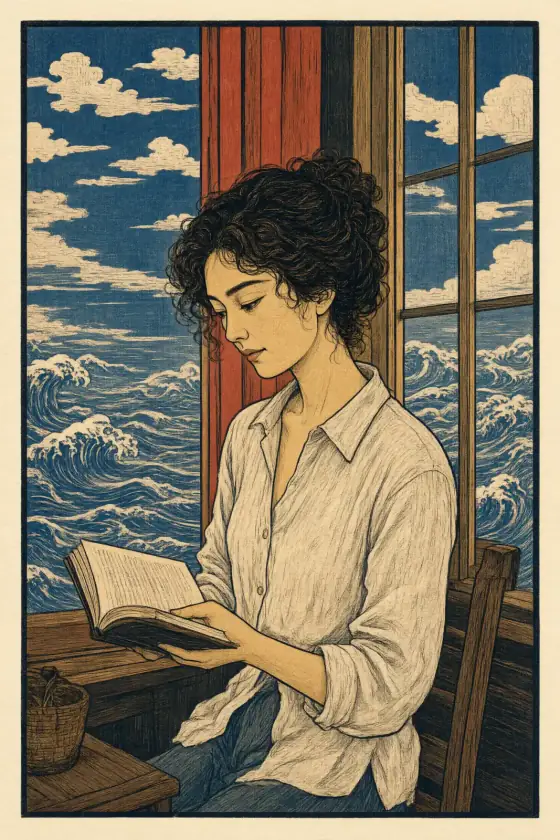
Woodblock Print prints your subject as a traditional Japanese woodblock print. Colors sit in flat areas — deep indigo, vermilion and soft ochre — bounded by bold carved keylines, and you can see the grain of the wood pressed into the ink. Skies fill with stylized clouds, water curls into patterned waves, and the whole image rests on textured handmade paper, as if it came off a printing block rather than a screen.
You write the subject; the style carves it. It turns everyday scenes into prints: someone reading by a window with waves rolling beyond it, a man in a long coat on a street under patterned clouds, a cat asleep on a sill, a lighthouse on a rocky point in a curling sea. Weather is its favorite element — rain, snow and wind all become graphic rhythm.
Use it for posters, book covers, wall prints, tattoo flash references, restaurant and tea branding, and seasonal cards. For soft black ink and empty space, use Ink Wash; for neon-lit 1980s city illustration, City Pop; for quiet, earthy photography, Quiet Clay.
Subjects to paste as they are: “a fishing boat riding a large wave at dawn”, “a woman with an umbrella crossing a wooden bridge in the rain”, “a mountain village under falling snow”. Water, weather and one strong shape make the most striking prints.
Finishes that work on top: Film grain for an aged, well-handled print. Golden hour warms the palette for sunset scenes.
Tips
- Add weather: rain, snow, wind, waves. The style turns each of them into a bold pattern.
- Keep one strong shape at the center — a boat, a bridge, a figure, a mountain. Flat color needs a clear silhouette.
- Want another season? Add “under cherry blossoms” or “among red maple leaves”; the palette adapts.
- The print has no text. If you want a seal or a title panel, add it afterwards in an editor.
What the style adds
Your words go where it says “your subject”. Everything else is added for you.
your subject, traditional woodblock print, flat areas of indigo, vermilion and soft ochre, bold carved keylines, visible wood grain in the ink, stylized waves and clouds, textured handmade paper
Models and price
- Seedream 5.0 Pro36 credits
- Qwen Image 3.030 credits
- Nano Banana 2.148 credits
- Seedream 5.0 Flash29 credits
One 1K image from a description. The button always shows the exact price before you spend anything.
How to use Woodblock Print
- Describe itWrite who or what should be in the picture. A small action and a clear place work best. Or switch to “My photo” and drop in a picture you have the right to use.
- Pick a shapeKeep the suggested ratio and model, or change them in the bar at the bottom.
- Paint itPress “Paint it”. The price is on the button before you spend anything.
Questions about Woodblock Print
Can I use Woodblock Print on my own photo?
Yes. Switch to “My photo” at the bottom, drop in a picture you have the right to use, and the style redraws it while keeping the composition and pose.
How much does one Woodblock Print image cost?
29 credits for one 1K image on Seedream 5.0 Flash. 2K costs more, and the button shows the exact price before you run it.
Is it a copy of a famous print?
No. The template describes the technique — flat color, carved keylines, wood grain, stylized waves and clouds — and names no artist and no work. Every image is new.
How is it different from Ink Wash?
Ink Wash is brush and black ink with lots of empty paper. Woodblock Print is carved and printed: flat colors, bold outlines and patterned water and clouds.
Similar styles
 Paper collage
 Wild Color
 Fresco
 Pop Art
Bring it to life
Effects that turn a still in this look into a short video.
 Rain Falls
 Snowfall