



Risograph Print AI Generator: Risograph
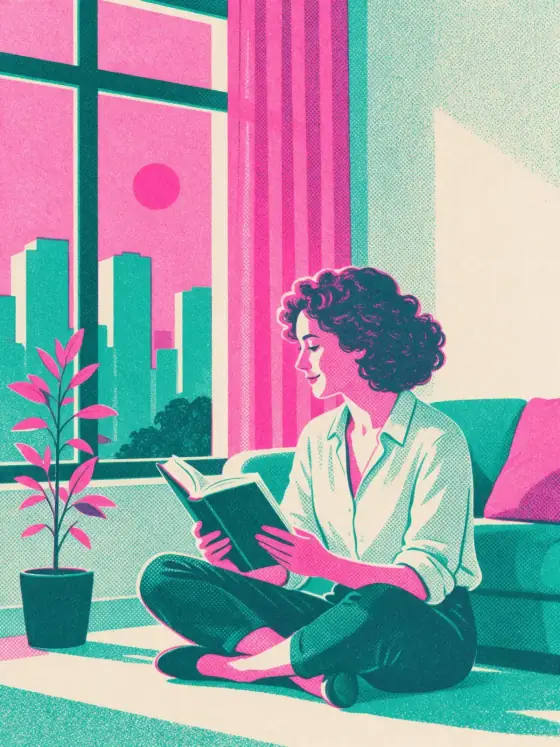
Fluorescent pink and teal two-color print.
- Works on your own photo
- Best shape: 3:4 · 2:3
Works on
- Seedream 5.0 Pro
- Qwen Image 3.0
- Nano Banana 2.1
- Seedream 5.0 Flash
About Risograph
Risograph prints your subject the way small presses and zine makers do: two inks only, fluorescent pink and teal, laid down as grainy halftone dots on off-white paper. The layers never line up perfectly — a thin sliver of pink peeks out beside the teal — and that slight misregistration is exactly what makes it feel printed by hand rather than made on a screen. Shapes are flat and graphic, and where the two colors overlap they mix into a deep, inky violet.
You write the subject; the style supplies the press. It flatters bold, simple compositions: a woman reading by a window, a man in a long coat on a city street, a cat curled up in the sun, a lighthouse on a pink rock above teal water. Plants, bicycles, coffee cups and city skylines all look great in two colors.
Use it for gig posters, zines, book and podcast covers, merch prints, tote bags, event flyers and bold social graphics. For 1970s space-age painting, use Retro Future; for neon-pastel 1980s illustration, City Pop; for gold-and-navy poster glamour, Art Deco.
Subjects to paste as they are: “a woman riding a bicycle past a row of palm trees”, “a stack of books and a coffee cup on a windowsill”, “a man reading a newspaper on a park bench”. Two or three clear shapes are enough; the inks do the rest.
Finishes that work on top: Film grain for an even rougher print. Black & white is switched off here, because the look is defined by its two colors.
Tips
- Keep the composition simple and bold. Two inks reward big shapes and clear silhouettes.
- Want other inks? Add “in orange and blue ink” or “in red and black ink” to your subject; the print texture stays the same.
- Name everyday objects — bicycles, plants, cups, skylines. They make great risograph motifs.
- Leave room for type: add “with empty space at the top” and set your text afterwards; generated lettering rarely prints cleanly.
What the style adds
Your words go where it says “your subject”. Everything else is added for you.
your subject, risograph print illustration, two-color fluorescent pink and teal duotone, grainy halftone texture, slight misregistration between layers, flat graphic shapes, off-white paper
Models and price
- Seedream 5.0 Pro36 credits
- Qwen Image 3.030 credits
- Nano Banana 2.148 credits
- Seedream 5.0 Flash29 credits
One 1K image from a description. The button always shows the exact price before you spend anything.
How to use Risograph
- Describe itWrite who or what should be in the picture. A small action and a clear place work best. Or switch to “My photo” and drop in a picture you have the right to use.
- Pick a shapeKeep the suggested ratio and model, or change them in the bar at the bottom.
- Paint itPress “Paint it”. The price is on the button before you spend anything.
Questions about Risograph
Can I use Risograph on my own photo?
Yes. Switch to “My photo” at the bottom, drop in a picture you have the right to use, and the style redraws it while keeping the composition and pose.
How much does one Risograph image cost?
29 credits for one 1K image on Seedream 5.0 Flash. 2K costs more, and the button shows the exact price before you run it.
Why don’t the colors line up perfectly?
That is misregistration, the small offset between ink layers on a real risograph. It is part of the charm. For a tighter print, add “precise registration” to your subject.
How is it different from Retro Future?
Retro Future is a painted illustration with airbrushed gradients and a space-age mood. Risograph is a print: two flat inks, halftone grain and paper texture.
Similar styles
 Watercolor
 Paper collage
 City Pop
 Colored Pencil
Bring it to life
Effects that turn a still in this look into a short video.
 Slow Push-In