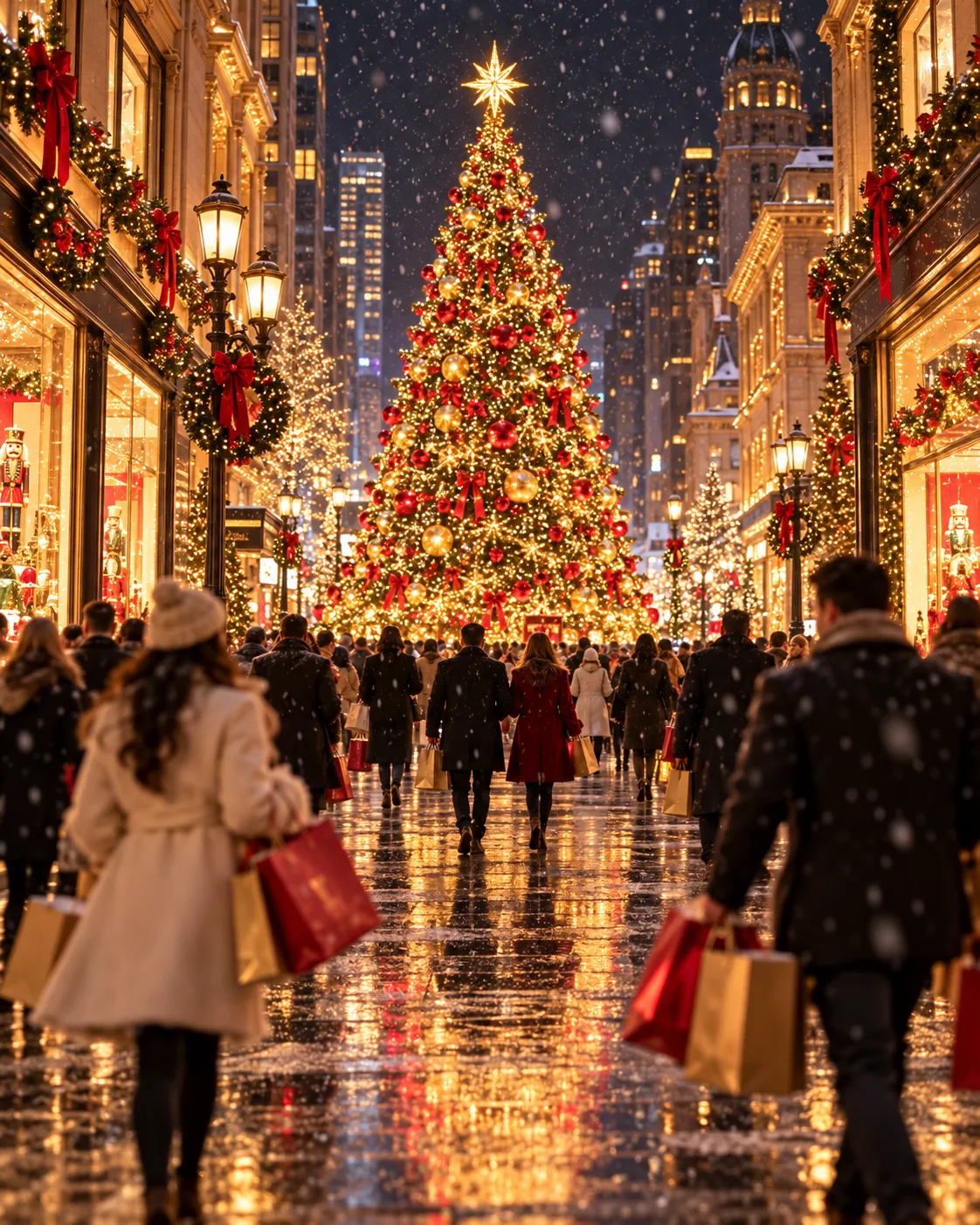
Snowy Avenue, made with GPT Image 2.5 Sunburst
Example made with GPT Image 2.5 Sunburst

Text to imagePlaces & nature

GPT Image 2.5 Sunburst cinematic still promptSnowy Avenue

The exact text-to-image prompt behind this picture, made with GPT Image 2.5 Sunburst.

Prompt

Vertical 4:5 portrait frame. Winter night on a grand shopping avenue, a towering decorated tree glowing gold and red in the center, light snow falling, warm window displays on both sides, shoppers with bags softly blurred in motion, cinematic holiday photography with a rich warm palette, no readable text.

Prompts are kept in their original English to help reproduce the example. Copy one as it is, or adapt it for your project.

Opens GPT Image 2.5 Sunburst with this prompt and the settings below filled in.

135 tested GPT Image prompts →

Settings

Mode
Text to image
Aspect ratio
4:5
Quality
high
Price
From 2 credits

The exact price shows before you generate.

Make your own version

  1. For a different mood, rewrite only the light: light snow falling.
  2. cinematic holiday photography with a rich warm palette sets the whole feel of the shot. Swap it for another camera style to change the vibe.
  3. The prompt ends with no readable text. Leave that in, or the model may add random lettering.

Where this idea comes from

Inspired by an idea from Leah, collected in YouMind-OpenLab/awesome-seedream-4.5 under CC BY 4.0. PopNow wrote this prompt and made the example above.

Scene prompt guide

How the scene is composed

A grand holiday shopping avenue comes alive at night under falling snow, anchored by a massive glowing Christmas tree and bustling with blurred pedestrian traffic. GPT Image 2.5 Sunburst balances multiple competing warm light sources against the cool night air to build deep contrast. Specifying motion blur and soft window glow ensures the composition feels active and cinematic without becoming cluttered.

  1. framing and scene settingVertical 4:5 portrait frame. Winter night on a grand shopping avenue,

    Sets the tall vertical composition and establishes the nighttime urban environment. Removing this phrase can cause the generator to default to daytime lighting or a horizontal street view that cuts off the tree height.

  2. central focal anchora towering decorated tree glowing gold and red in the center,

    Positions the primary visual anchor in the middle of the frame and defines its warm illumination colors. Changing this shifts the entire focal point away from a traditional holiday centerpiece.

  3. atmosphere and framing architecturelight snow falling, warm window displays on both sides,

    Introduces weather texture and flanking architecture that lines the boulevard. Without this phrase, the street edges look dark and empty, robbing the scene of depth and ambient illumination.

  4. street level human movementshoppers with bags softly blurred in motion,

    Adds realistic street life without pulling focus toward individual faces through motion blur. Omitting this either creates an abandoned ghost-town feeling or freezes pedestrians into stiff, distracting poses.

  5. style and text suppressioncinematic holiday photography with a rich warm palette, no readable text.

    Guides color rendering toward cozy amber tones while explicitly telling the model to avoid generating chaotic, fake storefront typography along the buildings.

Camera and light

The lighting and perspective rely on contrasting street-level illumination against falling atmospheric snow to create photographic depth.

Camera
Eye-level street perspective placed dead center on the avenue, aimed slightly upward to capture the full vertical scale of the tree and upper building facades.
Light
Dual lighting dynamic combining warm golden and red holiday glows with soft shop windows against a cool, dark nighttime ambiance.
Scale
The massive central tree spans multiple stories, creating a clear proportional hierarchy between ground pedestrians, shop awnings, and the sky.
Mood
Cozy, cinematic holiday atmosphere reinforced by wet pavement reflections and soft motion blur from moving pedestrians.

Variations on the scene

Autumn sunset avenue

Shifts the season to autumn twilight and replaces the holiday tree with an illuminated modern public sculpture.

Prompt

Vertical 4:5 portrait frame. Autumn sunset on a grand shopping avenue, a towering modern art sculpture reflecting amber and bronze in the center, golden leaves falling, warm boutique displays on both sides, shoppers with bags softly blurred in motion, cinematic city photography with a rich warm palette, no readable text.

Elevated balcony view

Raises the camera to an upper-floor balcony to emphasize the street geometry and roofline lights.

Prompt

Vertical 4:5 portrait frame. High-angle balcony view overlooking a winter night on a grand shopping avenue, a towering decorated tree glowing gold and red in the center, light snow falling, illuminated shop awnings on both sides, pedestrians softly blurred in motion below, cinematic holiday photography with rich warm tones, no readable text.

Central ice rink

Replaces the Christmas tree with an active ice skating rink as the central avenue subject.

Prompt

Vertical 4:5 portrait frame. Winter night on a grand shopping avenue, a crowded circular ice skating rink illuminated in cyan and gold in the center, light snow falling, warm cafe facades on both sides, skaters softly blurred in motion, cinematic holiday photography with a rich warm palette, no readable text.

Model and settings

Keep the aspect ratio set to 4:5 because vertical framing emphasizes the height of the decorated tree and tall street architecture. Select high quality so the model renders individual falling snowflakes and fine string lights cleanly without blur artifacts. If you need a wide desktop background or banner instead, switch the aspect ratio to 16:9, but make sure to widen your scene description so the tree does not get cropped at the top.

  • FLUX.2 ProChoose FLUX.2 Pro when you want strict control over specific light color codes or if you decide to include legible, photorealistic storefront branding instead of suppressing text.

When the scene falls apart

Storefront signs fill with distracting, garbled pseudo-lettering.
Keep 'no readable text' at the end of the prompt, or add 'unbranded boutique windows with decorative holiday garlands' to give the model decorative details instead of signage.
Pedestrians look stiff, distorted, or overly dominant in the foreground.
Ensure you include 'shoppers with bags softly blurred in motion' or change it to 'distant crowd blurred with slow shutter speed' to keep human figures secondary.
The street lighting looks flat, washed out, or too much like daytime.
Add 'deep shadows and high contrast night illumination' to prevent the model from overexposing the ambient sky.
The central tree looks miniature or pasted into the scene unnaturally.
Replace 'a towering decorated tree' with 'a massive multi-story holiday tree anchoring the avenue perspective' to enforce correct proportion against the flanking buildings.

Questions about this scene prompt

Why are the shoppers blurred instead of sharply focused?

Blurring moving pedestrians mimics a slow photographic shutter speed and adds kinetic energy. It also keeps the AI from generating awkward facial artifacts on distant background figures, ensuring visual focus remains on the glowing tree and architecture.

How can I prevent gibberish neon signs from appearing on the shops?

Keeping the instruction 'no readable text' at the end directs GPT Image 2.5 Sunburst to suppress lettering. You can also specify 'softly lit curtained window displays' to provide visual content without text prompts.

How do I turn this into an icy blue cool-toned scene?

Replace 'glowing gold and red' and 'rich warm palette' with 'glowing silver and icy blue lights' and 'cool winter twilight palette with blue reflections'. The model will shift the window lights, tree bulbs, and pavement reflections to cool tones.