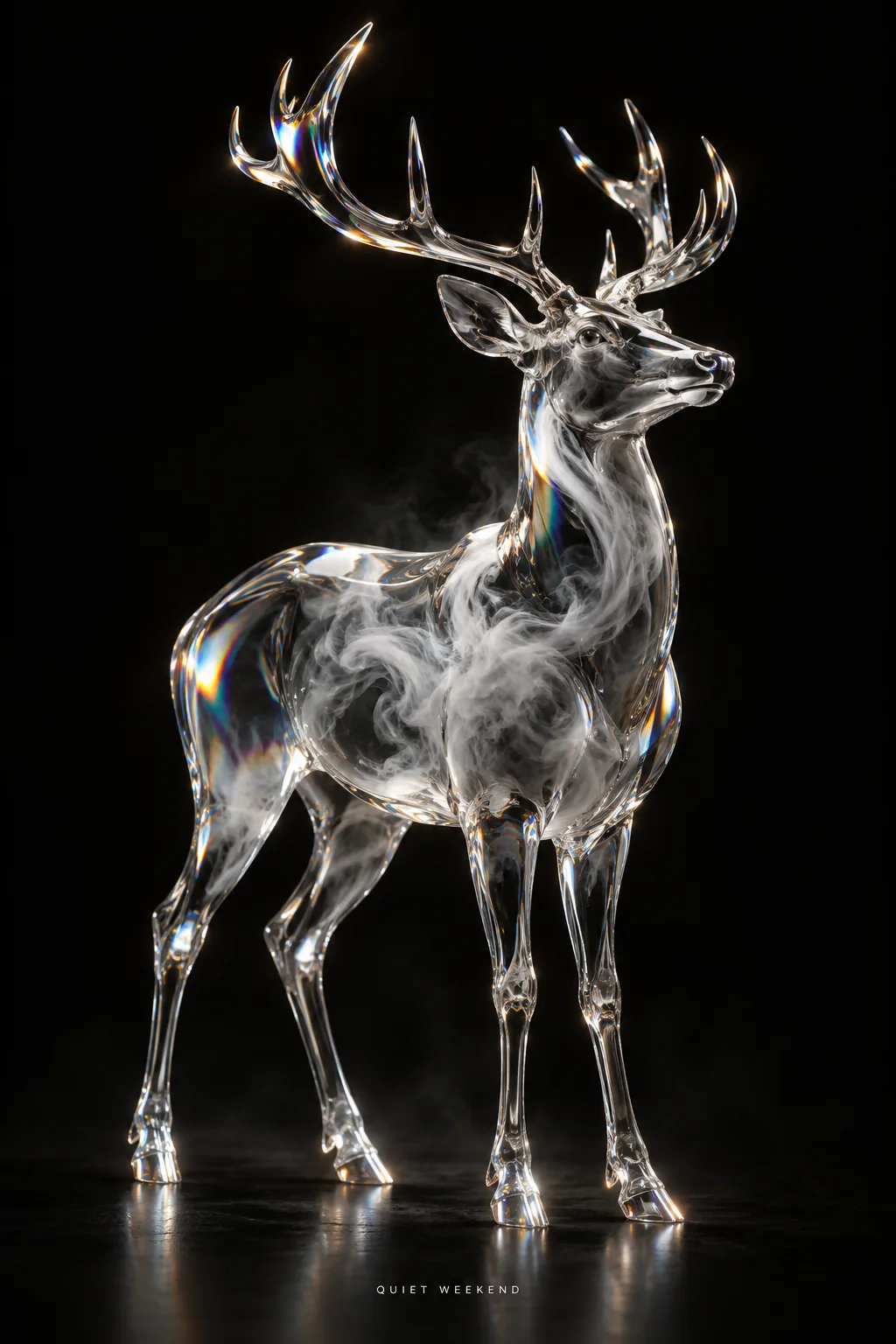
Glass Deer, made with GPT Image 2.5 Sunburst
Example made with GPT Image 2.5 Sunburst

Text to imageAnimals

GPT Image 2.5 Sunburst poster design promptGlass Deer

The exact text-to-image prompt behind this picture, made with GPT Image 2.5 Sunburst.

Prompt

Vertical 2:3 poster frame. A sparse black poster with one oversized translucent glass deer standing in the center, soft smoke swirling inside its body, liquid chrome edges and small rainbow refractions, dramatic studio light, tiny white sans serif text at the bottom that reads "QUIET WEEKEND", no other text.

Prompts are kept in their original English to help reproduce the example. Copy one as it is, or adapt it for your project.

Opens GPT Image 2.5 Sunburst with this prompt and the settings below filled in.

135 tested GPT Image prompts →

Settings

Mode
Text to image
Aspect ratio
2:3
Quality
high
Price
From 2 credits

The exact price shows before you generate.

Make your own version

  1. The words in quotes, "QUIET WEEKEND", are printed in the picture. Keep them short and change them to your own.
  2. For a different mood, rewrite only the light: dramatic studio light.
  3. Vertical 2:3 poster frame sets the whole feel of the shot. Swap it for another camera style to change the vibe.

Where this idea comes from

Inspired by an idea from @VigoCreativeAI, collected in VigoZhao/AI-Visual-Prompt-Cookbook under CC BY 4.0. PopNow wrote this prompt and made the example above.

Scene prompt guide

How the scene is composed

An oversized translucent glass deer glows against a pitch-black background with internal smoke and metallic highlights. This prompt works effectively because GPT Image 2.5 Sunburst renders ray-traced glass physics and precise specular refractions while isolating the subject against negative space. The exact typography instruction locks the layout into a polished graphic design poster.

  1. Layout and backgroundVertical 2:3 poster frame. A sparse black poster

    This sets the composition to an empty dark canvas and prevents background clutter. Without it, the model might place the deer in a forest or add unwanted textured backdrops.

  2. Primary subject definitionwith one oversized translucent glass deer standing in the center,

    It defines the subject, its scale, and its clear glass transparency. Changing translucent glass to solid crystal or frosted plastic shifts how light passes through the figure.

  3. Internal texture and shaderssoft smoke swirling inside its body, liquid chrome edges and small rainbow refractions,

    This injects dynamic volumetric detail and prism color shifts into the transparent volume. Removing this phrase leaves the deer looking like a plain empty glass bottle.

  4. Studio lighting and typographydramatic studio light, tiny white sans serif text at the bottom that reads "QUIET WEEKEND", no other text.

    It creates crisp edge highlights on the chrome borders and places exact typography at the base. The negative instruction keeps random extra lettering from appearing.

Camera and light

Studio lighting and centered framing give this poster its clean gallery aesthetic.

Light
Directional spotlights carve out the silhouette of the glass and ignite prism refractions. If the light is too diffused, the glass loses its glossy highlights and appears flat.
Camera
A straight-on eye-level view centers the deer symmetrically in the poster frame. Shifting to a low angle exaggerates the deer scale and creates a more imposing presence.
Scale
The oversized subject dominates the canvas while leaving plenty of dark negative space around the antlers. Crowding the edges ruins the minimalist poster design.
Atmosphere
Trapped smoke inside the glass adds depth and an ethereal contrast against the stark black void. Adjusting smoke density alters the mood from subtle mist to thick vapor.

Variations on the scene

Glass Wolf Poster

Replaces the deer with a prowling wolf for a moodier, more aggressive wildlife poster.

Prompt

Vertical 2:3 poster frame. A sparse black poster with one oversized translucent glass wolf standing in the center, soft smoke swirling inside its body, liquid chrome edges and small rainbow refractions, dramatic studio light, tiny white sans serif text at the bottom that reads "MIDNIGHT HOWL", no other text.

Macro Profile View

Switches to an intimate profile angle focusing on intricate glass antlers and internal smoke swirls.

Prompt

Vertical 2:3 poster frame. A sparse black poster with a side profile close-up of a translucent glass deer head in the center, soft smoke swirling inside its antlers, liquid chrome edges and small rainbow refractions, dramatic studio light, tiny white sans serif text at the bottom that reads "DEEP FOCUS", no other text.

Warm Amber Refraction

Shifts the cold chrome and smoke palette toward warm copper and glowing dawn embers.

Prompt

Vertical 2:3 poster frame. A sparse deep navy poster with one oversized translucent glass deer standing in the center, golden dawn embers glowing inside its body, polished copper edges and amber prism refractions, dramatic studio light, tiny white sans serif text at the bottom that reads "FIRST LIGHT", no other text.

Model and settings

Keep the 2:3 aspect ratio to maintain standard vertical poster proportions and preserve balanced negative space above the deer. Select high quality so the model renders fine smoke wisps and sharp glass caustic refractions without compression artifacts. If you switch to horizontal ratios for widescreen displays, adjust the composition description so the subject remains centered without stretching.

  • FLUX.2 ProPick FLUX.2 Pro when you want exacting hex color control over the chromatic edge reflections and sharp typography layout.
  • Nano Banana ProSwitch to Nano Banana Pro if you plan to add denser graphic layouts, subtitles, or multi-line poster credits with strict positioning.

When the scene falls apart

The deer looks like a flat sticker pasted onto a solid black background.
Ensure translucent glass and dramatic studio light are kept together, or add subtle rim lighting on contours to anchor reflections against the dark backdrop.
Stray gibberish text or watermarks appear in the black space.
Keep no other text at the end of the prompt and ensure the requested phrase is wrapped in double quotes.
The glass body looks foggy and loses its crystal-clear transparency.
Change soft smoke swirling inside to wisps of fine white smoke so the volumetric smoke does not fully occlude the clear glass refraction.

Questions about this scene prompt

How do I change the color of the glass refractions?

Replace small rainbow refractions with specific tones like emerald green caustic refractions or violet refractions. GPT Image 2.5 Sunburst will tint the internal light bounces while keeping the outer glass clear.

Can I replace the deer with a different animal or object?

Yes, swap translucent glass deer with another subject such as translucent glass falcon or translucent glass chess piece. Keep the structural modifiers like chrome edges and internal smoke to maintain the poster aesthetic.

Why is the text at the bottom rendering with typos?

Always enclose the exact words in double quotation marks and explicitly define the typeface style. Specifying tiny white sans serif text helps GPT Image 2.5 Sunburst cleanly separate the font from the animal sculpture.