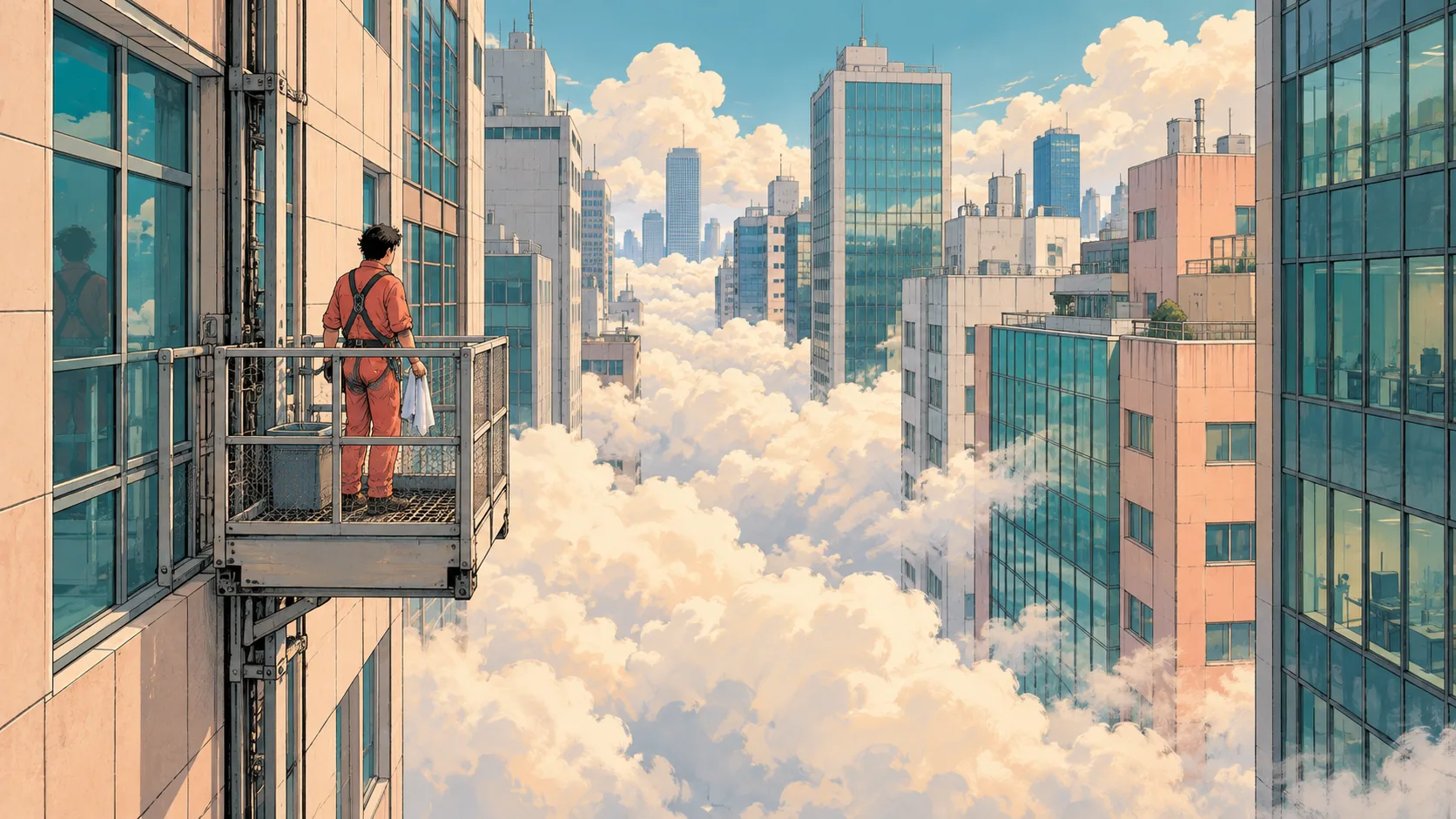
Clouds Between Buildings, made with GPT Image 2.5 Sunburst
Example made with GPT Image 2.5 Sunburst

Text to imageAnime

GPT Image 2.5 Sunburst anime promptClouds Between Buildings

The exact text-to-image prompt behind this picture, made with GPT Image 2.5 Sunburst.

Prompt

Wide 16:9 landscape frame. Dense cream clouds drift at street level between slender office buildings, while an adult window cleaner in coral coveralls pauses safely on an enclosed maintenance balcony above them. Precise manga penwork describes railings and tiled facades against loose gouache cloud shapes. Teal windows, peach concrete and soft midday light create a quiet, slightly impossible urban afternoon, no logos, no readable signs.

Prompts are kept in their original English to help reproduce the example. Copy one as it is, or adapt it for your project.

Opens GPT Image 2.5 Sunburst with this prompt and the settings below filled in.

135 tested GPT Image prompts →

Settings

Mode
Text to image
Aspect ratio
16:9
Quality
high
Price
From 2 credits

The exact price shows before you generate.

Make your own version

  1. For a different mood, rewrite only the light: peach concrete and soft midday light create a quiet.

Where this idea comes from

Inspired by an idea from @VigoCreativeAI, collected in VigoZhao/AI-Visual-Prompt-Cookbook under CC BY 4.0. PopNow wrote this prompt and made the example above.

Style prompt guide

Style traits to keep

A window cleaner in coral coveralls stands on an enclosed balcony above a city where thick cream clouds fill the streets between slim office towers. GPT Image 2.5 Sunburst handles it well because the prompt pairs two clear techniques, crisp manga ink lines and soft gouache clouds, with a tight three-color palette.

This look depends on a clear split between sharp ink and soft paint, held together by a small, warm-and-cool color scheme.

Line
Fine manga penwork outlines railings, window grids and tile joints. It gives the towers a precise, drafted feel and keeps the scene readable even with clouds filling the frame.
Texture
Gouache clouds look matte, slightly streaky and opaque, like brushed paint. They contrast with the thin ink lines and give the image its handmade, illustrated quality.
Palette
Teal glass, peach concrete, cream cloud and one coral figure. Cool and warm tones are balanced, so the worker stands out without needing a heavy outline or a bright background.
Light
Soft midday light means even brightness and gentle shadows. It keeps the cream clouds luminous instead of gray, and it supports the quiet, still mood of the afternoon.

What defines this look

  1. Surreal settingDense cream clouds drift at street level between slender office buildings

    This sets the impossible idea: clouds at ground level, not in the sky. Without 'street level' the model tends to draw a normal skyline with clouds behind it, and the dreamlike effect is lost.

  2. Human focal pointan adult window cleaner in coral coveralls pauses safely on an enclosed maintenance balcony above them

    The coral figure is the one warm accent in a cool scene. 'Enclosed' and 'safely' keep the pose calm and free of danger. Remove them and the image may show a risky ledge.

  3. Line stylePrecise manga penwork describes railings and tiled facades

    This tells the model to use clean, controlled ink lines on the hard, geometric parts of the scene. Drop 'precise' and the lines get looser, so the buildings lose their sharp architectural detail.

  4. Contrasting textureagainst loose gouache cloud shapes

    Soft, chalky, opaque paint for the clouds is the key contrast with the sharp line work. If you remove it, the clouds become smooth anime gradients and the mixed-media look disappears.

  5. Palette and moodTeal windows, peach concrete and soft midday light create a quiet, slightly impossible urban afternoon, no logos, no readable signs.

    Three named colors keep the palette controlled, and 'soft midday light' avoids harsh shadows. The 'no logos, no readable signs' ending stops stray lettering from appearing on the buildings.

Same style, new subjects

Baker in the fog

Swaps the worker for a baker in a street doorway, keeping the same ink-and-gouache style and palette.

Prompt

Wide 16:9 landscape frame. Dense cream clouds drift along a narrow old street between slim townhouses, while an adult baker in a coral apron pauses in a shop doorway holding a tray of bread. Precise manga penwork describes shutters and brick edges against loose gouache cloud shapes. Teal doors, peach plaster and soft midday light create a quiet, slightly impossible afternoon, no logos, no readable signs.

Cat on the rooftop

Uses a pet as the focal point to show the style works with an animal subject.

Prompt

Wide 16:9 landscape frame. Dense cream clouds drift between tall apartment blocks, while a ginger cat sits calmly on a rooftop water tank above them. Precise manga penwork describes pipes, ladders and tiled walls against loose gouache cloud shapes. Teal shutters, peach concrete and soft midday light create a quiet, slightly impossible urban afternoon, no logos, no readable signs.

Still life at the window

Turns the scene into an indoor still life, useful when you want a calmer, close-up version.

Prompt

Wide 16:9 landscape frame. Dense cream clouds press against a high apartment window, where a coral teapot, two cups and a potted plant sit on the sill. Precise manga penwork describes the window frame and tiled sill against loose gouache cloud shapes. Teal glass, peach walls and soft midday light create a quiet, slightly impossible afternoon, no logos, no readable signs.

Model and settings

Keep the 16:9 ratio, since the wide frame lets the towers, clouds and balcony all fit with room to spare. Keep quality on high so the thin ink lines stay crisp and the facade tiles don't blur. For a phone wallpaper or poster, switch to a tall ratio and move the worker higher in the frame. Lower quality is fine for rough drafts, but fine line detail suffers.

  • Seedream 5.0 ProChoose it when you want richer detail in the facades and tiles, or when you have reference pictures to match a specific manga linework style.
  • Nano Banana 2.1A good pick if you want sharp, high-resolution output and plan to add clean text later, such as a title on a poster version.

When the style drifts

The style washes out into generic anime with smooth gradient clouds.
Repeat the contrast in stronger words: 'visible gouache brush texture on the clouds, matte and chalky, with thin black ink outlines on the buildings only'.
The clouds sit in the sky instead of at street level.
Make the position explicit: 'clouds filling the street below, the ground hidden by cloud, towers rising out of it'.
Colors turn muddy or gray instead of teal, peach and cream.
Keep the three named colors and add 'bright, clean, low-contrast pastel palette, no gray shadows'. Avoid adding extra colors.
Signs or lettering appear on the buildings.
Keep 'no logos, no readable signs' at the end and add 'blank plain facades, no text anywhere'.

Questions about this style prompt

Why does this prompt name both manga penwork and gouache?

They are two different textures. Penwork gives sharp, precise edges to the buildings, while gouache gives soft, opaque paint to the clouds. Naming both makes the model combine them instead of choosing one overall anime look.

How do I change the worker without losing the style?

Replace only the subject phrase, such as the window cleaner and balcony, and keep the penwork, gouache, palette and light wording unchanged. Keeping one coral element helps the figure stand out against the teal and cream.

Why does the prompt say the balcony is enclosed and the worker safe?

It keeps the mood calm and avoids a dangerous-looking pose high above the ground. Without those words, GPT Image 2.5 Sunburst may show the person on an open ledge, which changes the quiet tone.