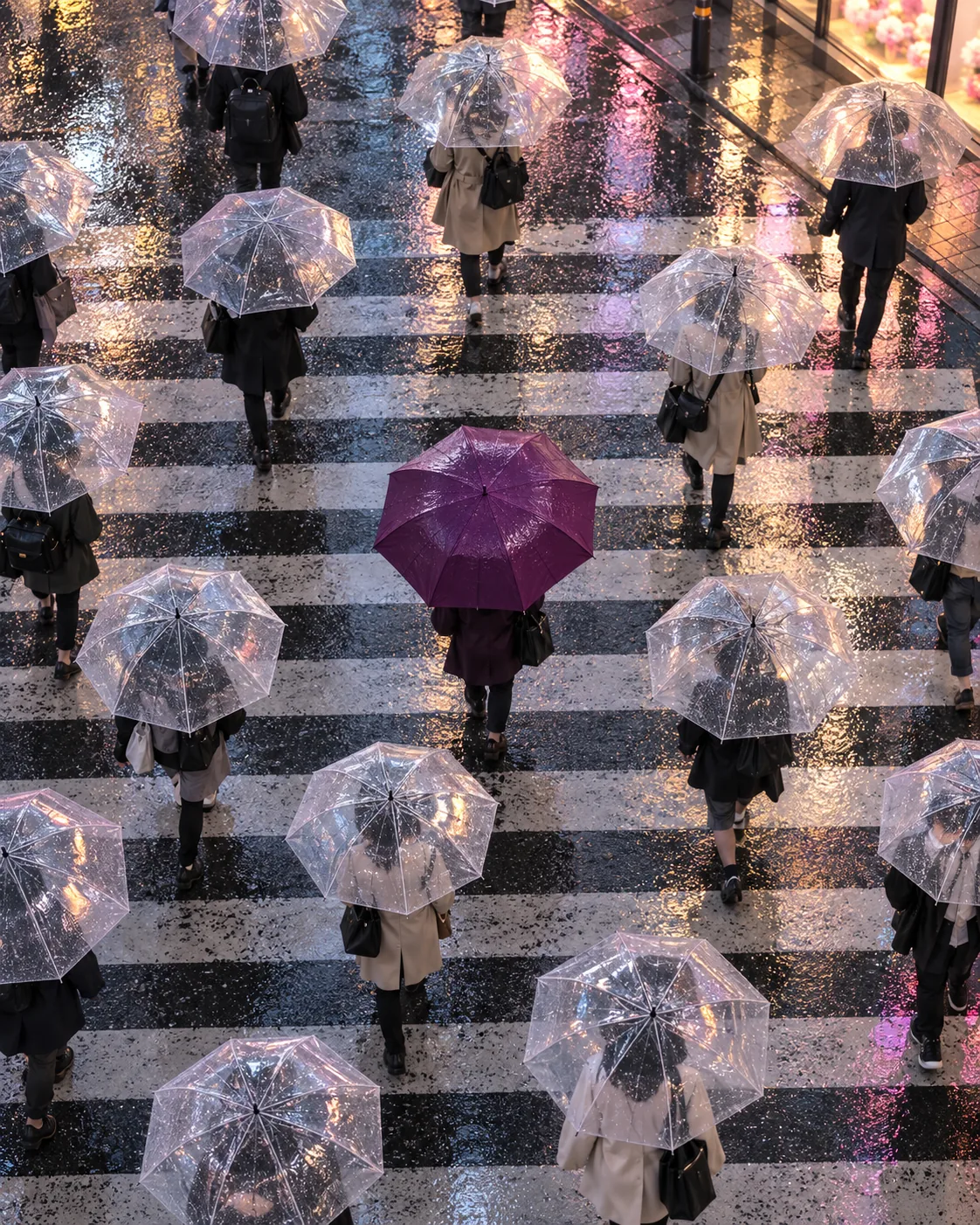
Bubble Umbrella Crosswalk, made with GPT Image 2.5 Sunburst
Example made with GPT Image 2.5 Sunburst

Text to imageCinematic

GPT Image 2.5 Sunburst cinematic still promptBubble Umbrella Crosswalk

The exact text-to-image prompt behind this picture, made with GPT Image 2.5 Sunburst.

Prompt

Vertical 4:5 portrait frame. Overhead view of a rainy city crosswalk where every pedestrian carries a transparent umbrella, except one person under a glossy plum-purple umbrella in the center, wet asphalt reflecting soft pastel shop lights, gentle drizzle, cinematic street photography with a calm muted palette and one bold color accent, no readable text.

Prompts are kept in their original English to help reproduce the example. Copy one as it is, or adapt it for your project.

Opens GPT Image 2.5 Sunburst with this prompt and the settings below filled in.

135 tested GPT Image prompts →

Settings

Mode
Text to image
Aspect ratio
4:5
Quality
high
Price
From 2 credits

The exact price shows before you generate.

Make your own version

  1. The prompt ends with no readable text. Leave that in, or the model may add random lettering.

Scene prompt guide

How the scene is composed

An overhead rainy crosswalk filled with clear umbrellas creates a hypnotic urban pattern interrupted by one striking plum-purple canopy. GPT Image 2.5 Sunburst renders translucent rain-slick surfaces cleanly, balancing glossy street reflections against muted pedestrians. The compositional contrast between uniform clear domes and a single saturated focal point gives the shot immediate editorial polish.

  1. framing and camera angleVertical 4:5 portrait frame. Overhead view of a rainy city crosswalk

    Establishes a bird's-eye vantage that turns painted crosswalk lines and pedestrians into a flat graphic layout. Removing the overhead view pushes the camera to street level, where background clutter obscures the umbrella pattern.

  2. focal subject contrastwhere every pedestrian carries a transparent umbrella, except one person under a glossy plum-purple umbrella in the center,

    Creates the primary visual conflict by establishing a strict rule and a single exception. Changing this phrasing often causes the model to scatter several colored umbrellas throughout the crowd instead of maintaining one focal point.

  3. environmental lighting texturewet asphalt reflecting soft pastel shop lights, gentle drizzle,

    Adds texture and environmental illumination across the lower half of the composition. Omitting the reflections leaves the road surface looking like dry, flat grey paint rather than slick city asphalt.

  4. color and text constraintcinematic street photography with a calm muted palette and one bold color accent, no readable text.

    Constrains the color grading so only the plum umbrella commands visual attention. Without the calm muted palette instruction, nearby storefronts and clothing will introduce competing primary colors that ruin the minimalist contrast.

Camera and light

The visual strength of this scene relies on aerial perspective and controlled light bounce across wet surfaces. Modifying the camera height or street illumination changes the mood from quiet cinematic observation to chaotic rush-hour traffic.

Camera
A high overhead bird's-eye angle flattens depth and treats umbrellas like geometric circles on asphalt. Tilting down slightly introduces pedestrian silhouettes and building facades into the frame.
Light
Soft ambient overcast daylight keeps shadows diffuse while wet ground serves as a secondary light source. Boosting sunlight dries the scene visually and cancels the reflective gloss.
Scale
Human figures remain uniform in scale to let the central purple dome anchor the composition. Moving the subject off-center shifts the narrative from symmetrical balance to accidental street photography.
Mood
Muted pastels and gentle drizzle deliver a calm, melancholic atmosphere. Adding heavy downpours or dark storm clouds turns the contemplative quiet into high-contrast urban drama.

Variations on the scene

Winter twilight overhead

Swaps rainy drizzle for winter slush and shifts the focal color to warm amber for a cold-weather mood.

Prompt

Vertical 4:5 portrait frame. Overhead view of a slushy winter crosswalk at twilight where pedestrians carry matte black umbrellas through falling snow flurries, except one person under an illuminated amber-gold umbrella in the center, damp pavement catching soft golden streetlamp reflections, cinematic urban photography with muted cool tones, no readable text.

Eye-level street perspective

Brings the camera down to pedestrian eye level to emphasize movement and street-level depth.

Prompt

Vertical 4:5 portrait frame. Eye-level perspective through a rain-streaked lens facing a crowded city crosswalk where commuters hold clear bubble umbrellas, except one person holding a glossy crimson-red umbrella directly mid-stride, wet asphalt reflecting neon storefront glow, gentle rain drizzle, cinematic street photography with a calm muted palette and one bold color accent, no readable text.

Commuter with bicycle

Replaces the single pedestrian with a cyclist under a marigold umbrella to create a distinct central narrative.

Prompt

Vertical 4:5 portrait frame. Overhead view of a rainy city crosswalk where adult pedestrians carry dark navy umbrellas, except one lone commuter pushing a vintage bicycle under a vivid marigold-yellow umbrella in the center, wet crosswalk stripes reflecting soft pastel shop signage, gentle rain drizzle, cinematic street photography with muted tones and one bold accent, no readable text.

Model and settings

Keep the aspect ratio set to 4:5 portrait because vertical framing tightly encloses the zebra crossing and prevents empty street margins. Use high quality mode to ensure GPT Image 2.5 Sunburst renders transparent plastic ribs, individual rain droplets, and asphalt sheen crisply. If you switch this prompt to landscape 16:9 for screen displays, make sure to specify a wider pedestrian crossing to avoid empty roadway corners.

  • FLUX.2 ProPick FLUX.2 Pro when you need precise hex color matching on the plum umbrella or want maximum photorealism across the wet asphalt textures.

When the scene falls apart

Multiple people carry colored umbrellas, ruining the single-accent contrast.
Reinforce the negative constraint by adding 'strictly one solitary colored umbrella, all other umbrellas are completely clear' to the prompt.
Asphalt looks like dry matte pavement without believable reflections.
Replace 'wet asphalt' with 'mirror-like puddles and glossy soaked tarmac with vivid specular reflections'.
Gibberish shop logos and pedestrian signage generate across the scene.
Add 'featureless storefronts and blank architectural facades' to reinforce the prompt's 'no readable text' instruction.
The plum-purple umbrella looks unnaturally bright and pasted on top of the crowd.
Change 'glossy plum-purple umbrella' to 'natural deep plum umbrella catching ambient rain sheen' so the lighting blends with the scene.

Questions about this scene prompt

Why does the model keep adding colors to the other umbrellas?

AI models love spreading color across matching objects. Specifying that every other umbrella must be completely transparent helps, but if leaks persist, explicitly describe the surrounding crowd as wearing monochrome dark raincoats and carrying colorless plastic canopies.

How can I ensure the camera stays directly overhead instead of at an angle?

Replace 'Overhead view' with 'Top-down bird's-eye view looking straight down at the ground'. Adding 'flat lay urban composition' also forces the generator to maintain a true ninety-degree perpendicular camera angle without showing street horizons.

Can I swap the plum color for a different accent shade?

Yes, you can swap plum-purple for any single vivid color like cobalt blue, saffron yellow, or scarlet red. Keep the surrounding palette muted and specify transparent umbrellas for the remainder of the crowd so the new color maintains equal visual pop.