


by Sand.aiVideo
daVinci-MagiHuman
Put a line in quotes and the person on screen says it
- Up to 1080p
- 5–10s clips
From 120 credits for a 5-second clip≈ $0.12· Create Video
What is daVinci-MagiHuman?
daVinci-MagiHuman is an open 15-billion-parameter video model from Sand.ai and SII-GAIR. It generates the picture and the soundtrack together, so a line written in quotation marks is spoken by the person on screen. On PopNow it runs in text-to-video and image-to-video, returning a 5 to 10 second clip at 256p, 720p or 1080p, in 16:9 or 9:16.
Best on PopNow for: Talking-head clips where one short line carries the message: a presenter introducing something, a character reacting with a single sentence, or a brief dialogue beat for an explainer or an ad.
Good for
- A presenter delivering one line to camera
- Short dialogue moments for explainers and ads
- Animating a portrait photo that speaks a line you write
What daVinci-MagiHuman does well
The voice comes with the picture
There is no separate speech step. Place the line in quotation marks inside the prompt, describe how it is delivered, and the finished clip carries the words in its soundtrack. In our test runs the spoken line matched the quoted text word for word.
Starts from a face you already have
Image mode uses your photo as the first frame, so the person keeps the look you chose. The prompt then describes what happens next, for example turning away from the sea, tucking hair behind an ear, and then the line.
Two shapes, three sizes
Choose 16:9 for landscape or 9:16 for vertical, and 256p, 720p or 1080p. The model renders small and upscales in its own stage, so the file comes back close to nominal size, such as about 1904 by 1088 at 1080p.
Real results from daVinci-MagiHuman
Every image and clip here was generated with daVinci-MagiHuman. Hit Recreate to open it in the studio with the same prompt and settings.
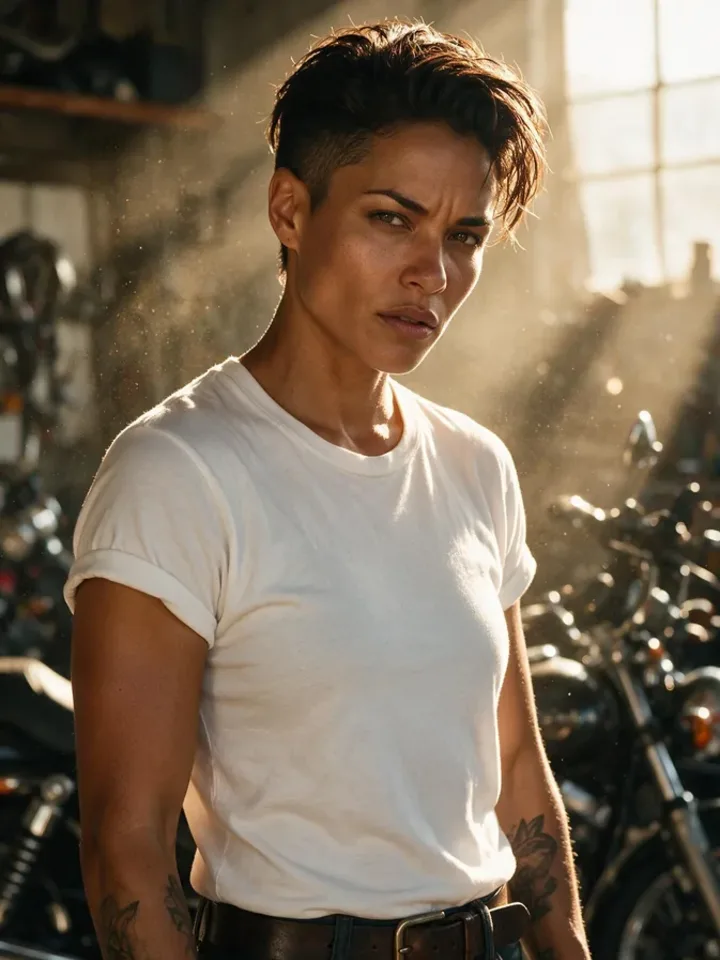 Input
InputBring your own image
Prompts that worked on daVinci-MagiHuman
Real outputs with the exact prompt we used, and why it worked. Hit Recreate to try the same settings.
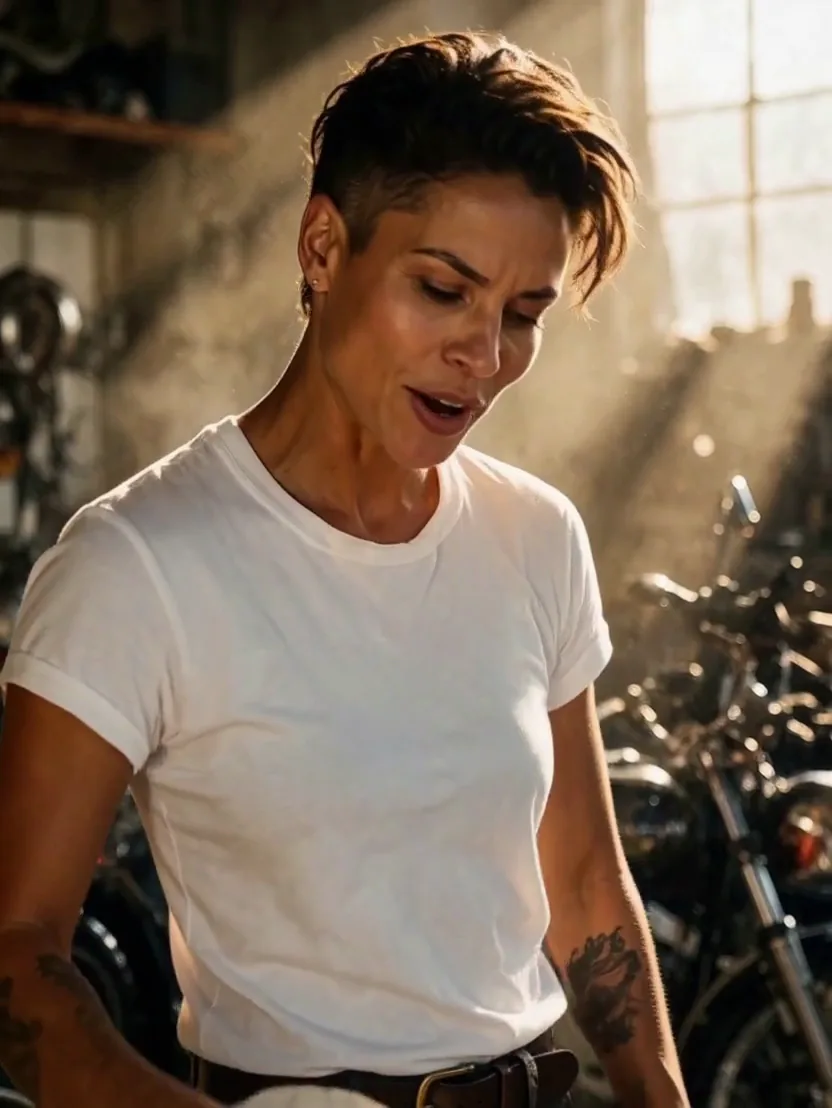
She looks up from the motorbikes, wipes her hands on a rag, smiles at the camera and says: "Give me ten minutes and she will run like new." Warm workshop light, dust in the sunbeams.
The photo fixes who the person is, and the prompt covers the action in order: looks up, wipes her hands, smiles at the lens. The quoted line is about ten words, which is about what fits in five seconds, and the light gets one concrete phrase. Short actions and a single line leave room for the speech to land inside the clip.
Recreate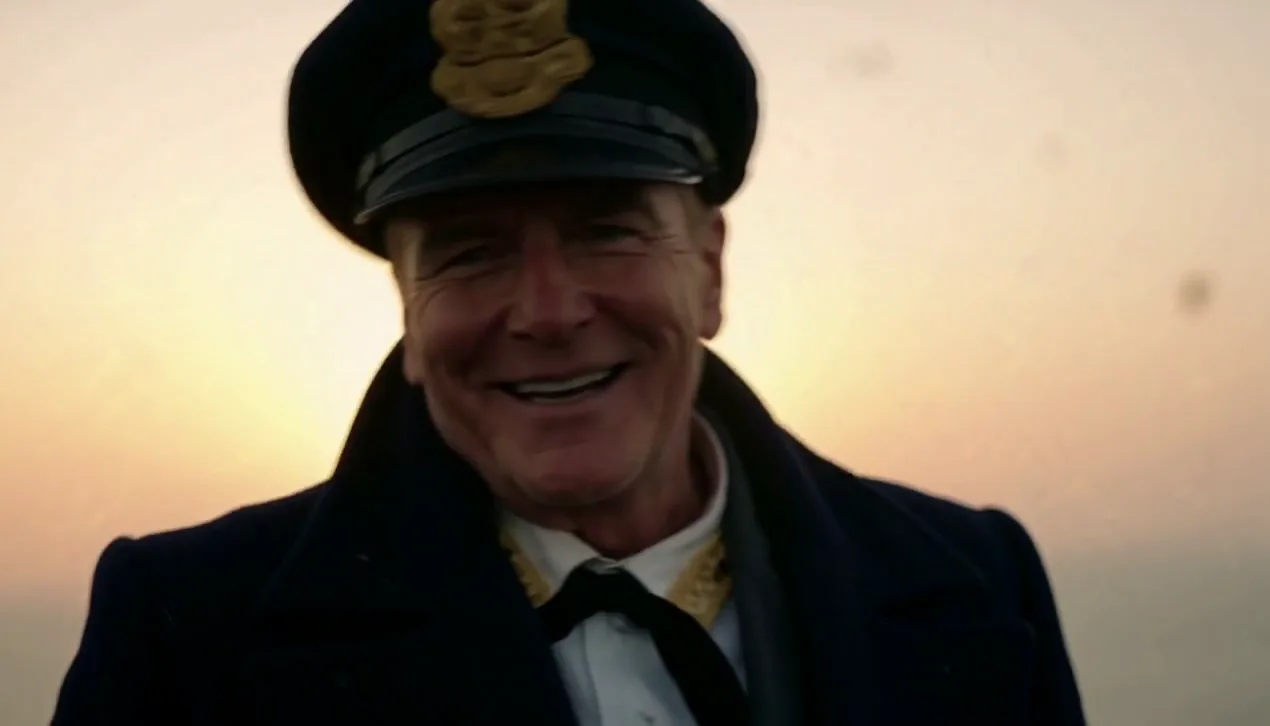
Close-up of a weathered ship captain in a navy coat and cap on a misty deck at dawn, facing the camera, who smiles and says: "Hold steady, everyone. We reach the harbor by sunrise." Soft golden backlight, gentle sea breeze, cinematic.
This is text mode, so the prompt has to describe the person as well as the setting: a weathered captain in a navy coat and cap, facing the camera. The spoken sentence is a full, short thought, and the light is named as a condition, a soft golden backlight, rather than left to chance.
RecreateWhat daVinci-MagiHuman can do
Each mode opens in the studio with daVinci-MagiHuman already picked. The price shows before you generate.


Best ways to use daVinci-MagiHuman on PopNow
Where this model already does the work for you, from one-tap apps to the full studio.
A recurring host for a channel
Upload one stable portrait and reuse it for each episode, with a fresh line every time. The host looks the same across the series because the same photo starts every clip.
OpenDialogue beats for short drama
Build a serialised episode scene by scene. Each shot can carry one spoken beat, which suits vertical drama and cliffhanger endings.
OpenSingle-line clips in the studio
Open the video studio, pick daVinci-MagiHuman and use text mode for a one-off line, or image mode when the face must match a photo.
OpenHow to prompt daVinci-MagiHuman
- Keep the quoted line short enough to say comfortably in the clip length you pick.
- Start from a photo when the face has to stay the same; text alone invents a new person each time.
- Draft at 256p to check the timing, then render at 720p or 1080p.
Settings worth knowing
Everything else has a sensible default, so you can type a prompt and go.
resolution256p · 720p · 1080p- Output size. Bigger sizes look sharper and cost more.
aspect_ratio16:9 · 9:16- The shape of the frame: wide, square or tall.
duration_seconds5–10s- How long the clip runs. You pay per second.
image_url- The picture to start from.
seed0–2147483647- Reuse the same number to get a repeatable result.
How it compares
Same kind of job, different strengths and prices.
MiniMax H3 is the all-round video model with sound and longer clips. Pick daVinci-MagiHuman when the scene is mostly a person speaking.


Where daVinci-MagiHuman falls short
- Clips run 5 to 10 seconds, so a line has to fit inside that span. Split a longer speech into several shots.
- Only 16:9 and 9:16 are offered. Square frames and other shapes are not part of this model.
- A 1080p clip took close to four minutes in our runs, against about a minute at 720p. Check the take at 720p before you render the final size.
- Asking for a selfie can put a phone into the frame. Describe the person looking straight into the camera instead.
How to use daVinci-MagiHuman in three steps
- Open the video studio, choose daVinci-MagiHuman and pick text or image mode.
- Write the shot and the line in quotation marks. In image mode, upload the starting photo first.
- Choose 16:9 or 9:16 and 720p for the first take, check the credit total, then generate.
Questions about daVinci-MagiHuman
How much does daVinci-MagiHuman cost?
On PopNow, the cheapest run of daVinci-MagiHuman costs 120 credits ($0.12) for a 5-second clip. Larger sizes cost more: 256p 120 · 720p 240 · 1080p 360. You pay with credits (1 credit = $0.001), the exact cost shows on the Generate button before you start, and failed generations are refunded automatically.
How long and how sharp are daVinci-MagiHuman videos?
Clips run 5–10s at up to 1080p.
How do I make the person say something?
Put the words in quotation marks inside the prompt. The model speaks the quoted line itself, so you do not pick a voice or run a second audio step.
Does every clip have sound?
Yes. Each clip comes back with its soundtrack, and the price depends on the resolution only, so the sound does not add a separate charge.
How long can a clip be?
Between 5 and 10 seconds in whole seconds. The default is 5, and you are billed for each second of the length you request.
How many credits does a clip cost?
24 credits per second at 256p, 48 at 720p and 72 at 1080p. A five-second 720p clip is 240 credits, and the button shows the exact figure before you generate.
Why does a phone appear in my shot?
Requests for a selfie make the model draw a phone. Write that the person looks straight into the camera, and the phone usually disappears.
daVinci-MagiHuman or MiniMax H3?
MiniMax H3 is the all-round video model with sound and longer clips. Pick daVinci-MagiHuman when the scene is mostly a person speaking.
Make something with daVinci-MagiHuman
Keep the line short, pick a clear portrait, and render at 720p until the words and the framing both land.