



AI video effect · Liquid Chrome Skin
Liquid Chrome Skin: Become a mirror-metal bust
A wave of liquid metal turns you into a mirror-polished bust that still blinks.
1Add a photo
- One clear subject, waist-up or full body, with some space around them
- Leave room in the frame: wings, fire, portals and clones need space to appear
- Sharp, well-lit photos keep the face and fur the same through the effect
More optionsMiniMax H3 Max
More options6s
about 1 min
More to try
All effects Costume Walk RevealSlow steps toward the camera, then one beat later a full vampire costume reveal.Try itRecreate
 Pumpkin Head DanceHold up a glowing jack-o'-lantern and dance like the pumpkin is your head.Try itRecreate
 Y2K Vampire PartyAn early-2000s flash camera catches you as a vampire at a Halloween house party.Try itRecreate
 Full Moon HowlPull on a fluffy wolf hood and howl at a huge full moon over a misty forest.Try itRecreate
 Petal BladeA storm of crimson petals forms a blade in your hand, then bursts toward the lens.Try itNewRecreate
 Portal DoorA ring of golden light tears open beside you onto a glowing other world.Try itNewRecreate
 Shadow CloneCopies of you peel off in a smoky trail, then all strike the same pose.Try itNewRecreate
 Werewolf TurnThe full moon rises, fur and fangs creep in, and you turn into a movie-grade werewolf.Try itRecreate


What the Liquid Chrome Skin effect does
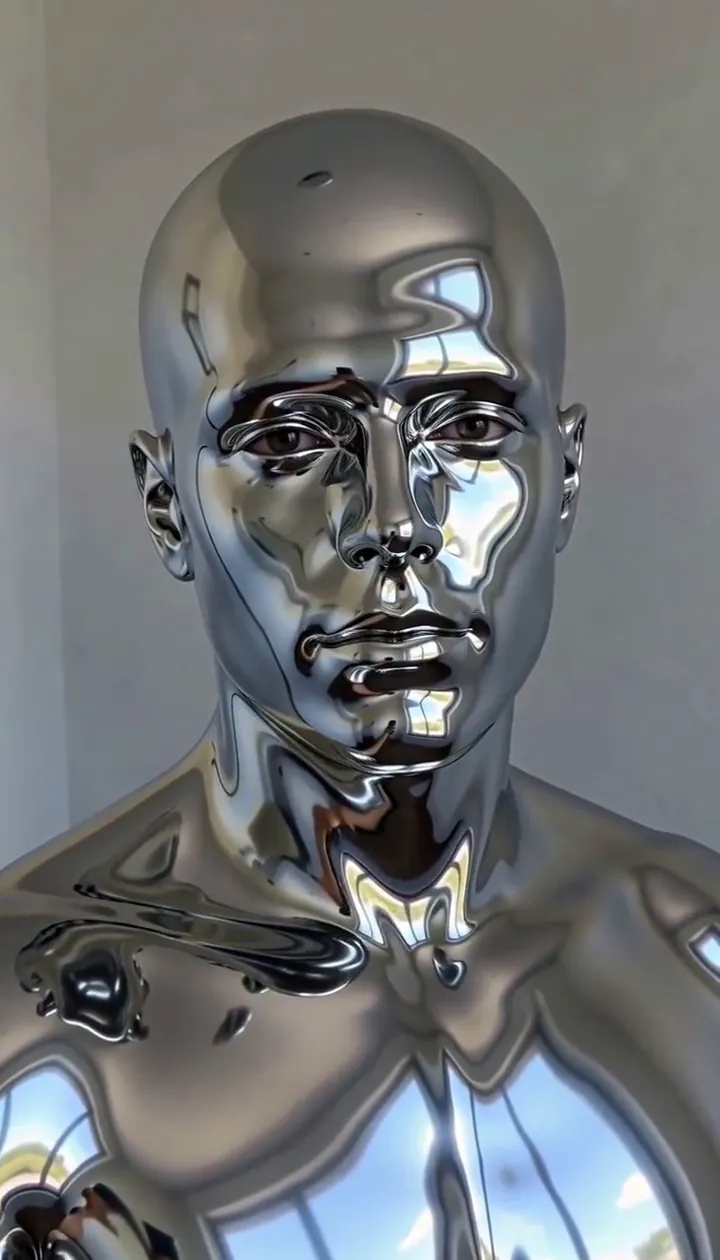
Liquid Chrome Skin replaces the visible surface of a portrait with flowing reflective metal. The change starts at the neck and travels across skin, hair and clothing, leaving a polished bust that can still blink and turn. Ripples and reflections provide motion even after the material has covered the face.
Use a chest-up reference with even light and a simple wall. The transformation emphasizes the shape of the face and hair rather than natural skin texture, so decide whether a sculpted metal interpretation suits the portrait you want. This is the cinematic edition of Liquid Chrome, with a six-second H3 Max render emphasizing a flowing neck-to-hair coating and a reflective bust finish.
How to use Liquid Chrome Skin
- Frame a bust Choose an evenly lit upper-body picture with visible neck and hair.
- Apply the metal wave Keep MiniMax H3 Max for the sample version of the reflective surface change.
- Inspect the curls and blink Compare the original silhouette with the metal finish and watch the small movements that remain.
Which photos work best for Liquid Chrome Skin
Works well
- Chest-up portrait with even lighting
- Hair clearly outlined against a plain wall
Avoid
- Strong shadow hiding half the face
- A crop that removes the neck entirely
Liquid Chrome Skin examples

What we saw when we tested Liquid Chrome Skin
In our test runs, a man in his early 30s in a black t-shirt against a pale wall; the chrome spreads up from the neck and the hair turns to metal too. A chest-up, evenly lit portrait works best.
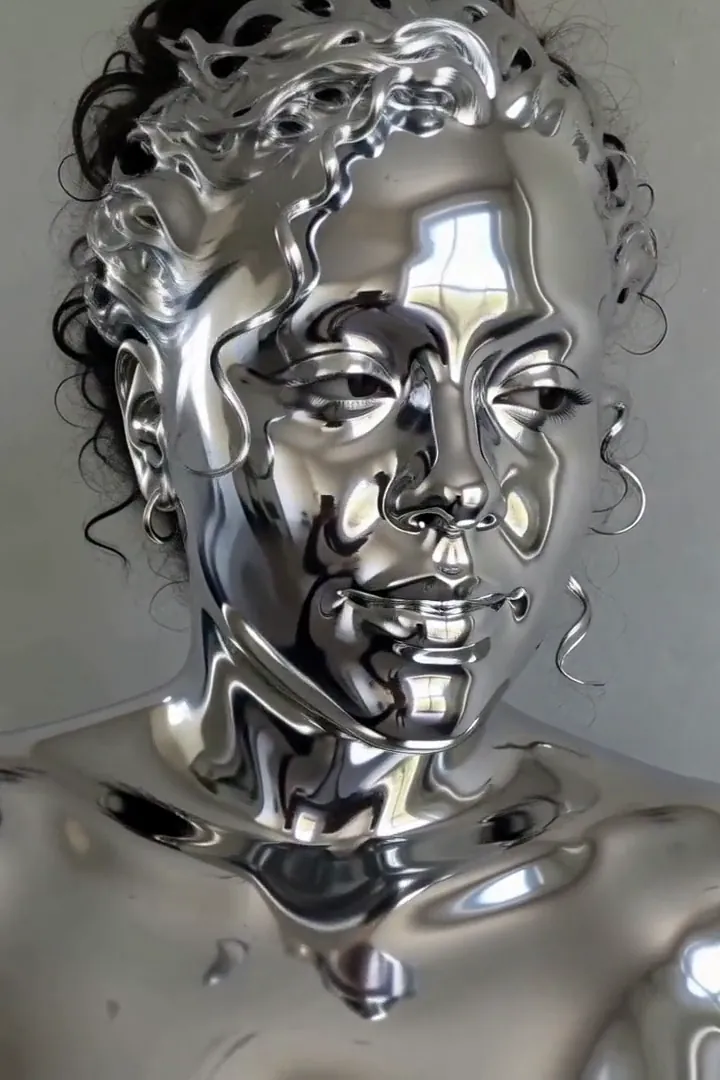
The other supplied run uses a woman in her early 30s with curly hair pulled back against a light grey wall. Liquid metal rises from her neck over her face and curls until she is a mirror-polished bust. The hair becomes sculpted metal, so the end result is a statue-like bust.
How Liquid Chrome Skin does on each model
- MiniMax H3 Max (480 credits · about 30 s) Default; MiniMax H3 Max made the samples. 480 credits and a typical render time of 31 seconds. The Liquid Chrome Skin render includes generated sound; its page samples play muted.
- MiniMax H3 (185 credits · about 55 s) Cheaper at 185 credits, but MiniMax H3 is untested with this prompt; compare its result without assuming the same finish.
- Seedance 2.0 Mini · 480p (124 credits · about 2 min)
The prompt behind Liquid Chrome Skin
A wave of liquid chrome spreads up from the person's neck across their skin, hair and clothes, turning them into mirror-polished flowing metal that reflects the surroundings; ripples travel across the chrome surface as they slowly turn their head and blink. Camera slowly pushes in. Same face shape and pose, realistic reflections, cinematic VFX. One continuous shot, no cuts, no scene change. No text, no logos.Tips for a better Liquid Chrome Skin result
- Include the base of the neck to show where the coating starts rather than beginning with an already metallic face.
- Avoid shiny accessories close to the cheek if they make the original face outline harder to separate.
Liquid Chrome Skin: questions and answers
Will curls remain ordinary hair after the chrome wave?
The recorded curly-haired subject finished with metal covering the curls, giving the result the appearance of a sculpted bust.
Where does the reflective coating begin?
The liquid-metal wave rises from the neck before covering the face, hair and visible clothing.
Is the chrome result supposed to stand completely motionless?
The preset asks for surface ripples, a slow head turn and blinking, preserving small movements within the statue-like appearance.
Why use even portrait lighting for mirrored skin?
Even light keeps the original facial shape readable before changing reflections become the main surface detail.
Does the transformation stop at a natural complexion?
The intended final material is mirror-polished metal, so retaining ordinary skin texture would miss this effect’s central change.
Related effects and tools
- Liquid Chrome · A mirror-bright wave turns you into polished metal.
- Molten Gold · Liquid gold pours over you and sets into a gleaming statue.
- Marble Statue · Marble creeps up until you’re a gallery masterpiece.
- Edit the Liquid Chrome Skin clip