


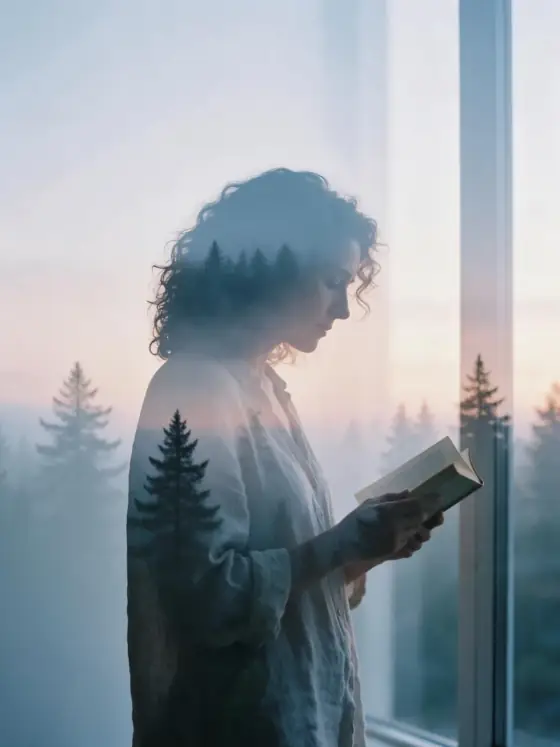

Double Exposure AI Photo Generator: Double Exposure
Your subject blended with a misty pine forest.
- From a description only
- Best shape: 3:4 · 4:5
Works on
- Seedream 5.0 Pro
- Qwen Image 3.0
- Nano Banana 2.1
- Seedream 5.0 Flash
About Double Exposure
Double Exposure layers two pictures into one. The outline of your subject becomes a window, and through it you see a misty pine forest at dusk; where the two images overlap, they blend into soft, see-through tones of cool blue and peach. Around the silhouette the frame stays pale and open, so the shape reads clearly from across a room.
Use it for book covers, album art, event posters, memorial and tribute pieces, and any image about memory, travel or belonging. It is less suited to busy group scenes, where the silhouettes merge into one another.
Subjects to paste as they are: “a woman in profile reading a book”, “a man standing still with his collar turned up”, “a cat sitting upright on a windowsill”. Simple, upright shapes give the forest the clearest window.
Finishes that work on top: Film grain for an analog print, Soft glow for an even hazier dusk.
Tips
- Profiles and upright figures work best. The clearer the outline, the cleaner the blend.
- Keep the background plain in your subject. The style supplies the second image; a busy room competes with it.
- One subject at a time. Two overlapping figures turn into a single confusing shape.
What the style adds
Your words go where it says “your subject”. Everything else is added for you.
your subject, double exposure photograph blending the silhouette with a misty pine forest at dusk, soft overlapping transparency, cool blue and peach palette, clean pale negative space, quiet dreamlike mood
Models and price
- Seedream 5.0 Pro36 credits
- Qwen Image 3.030 credits
- Nano Banana 2.148 credits
- Seedream 5.0 Flash29 credits
One 1K image from a description. The button always shows the exact price before you spend anything.
How to use Double Exposure
- Describe itWrite who or what should be in the picture. A small action and a clear place work best.
- Pick a shapeKeep the suggested ratio and model, or change them in the bar at the bottom.
- Paint itPress “Paint it”. The price is on the button before you spend anything.
Questions about Double Exposure
Can I use Double Exposure on my own photo?
Not yet. This style works from a description: write what you want to see and the style adds the look.
How much does one Double Exposure image cost?
29 credits for one 1K image on Seedream 5.0 Flash. 2K costs more, and the button shows the exact price before you run it.
Will this style change how the person looks?
No. The template only describes the second exposure, the colors and the space around the subject. Whoever you write keeps the same features inside the blend.
Why is the background so pale?
Clean negative space is what makes a double exposure readable. If you want a darker version, add “against a dark night sky” to your subject.
Similar styles
 Airy Film
 90s TV Drama
 Cyanotype
 Romance Glow
Bring it to life
Effects that turn a still in this look into a short video.
 Slow Push-In
 Petal Storm