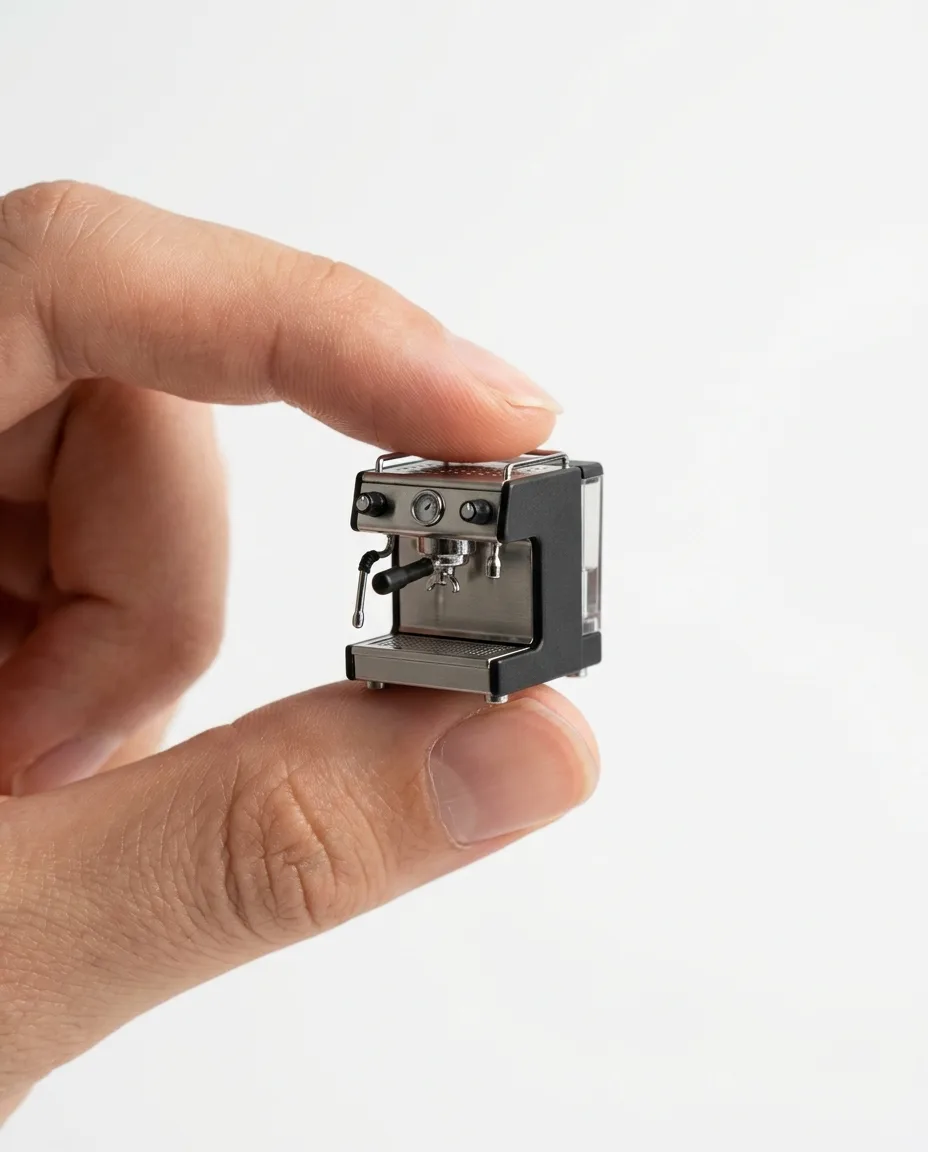
Tiny Product Between Fingertips, made with Nano Banana 2.1
Example made with Nano Banana 2.1

Text to imageProducts & food

Nano Banana 2.1 product photo promptTiny Product Between Fingertips

The exact text-to-image prompt behind this picture, made with Nano Banana 2.1.

Fill in the blanks

Change any box and the prompt below updates. Copy it, or make one with your version.

Prompt

A high-resolution ad photo of a realistic miniature espresso machine held delicately between a person's thumb and index finger. The product is tiny but hyper-detailed, centred, with a shallow depth of field. Clean white background, studio light, soft shadows, a well-groomed hand with natural skin tone, minimalist luxury product style, no logos.

Prompts stay in English, the language these models follow best. Copy it as it is, or change a few words.

Opens Nano Banana 2.1 with this prompt and the settings below filled in.

91 tested Nano Banana prompts →

Settings

Mode
Text to image
Aspect ratio
4:5
Resolution
1k
Price
From 48 credits

The exact price shows before you generate.

Make your own version

  1. The surprise is the size: a realistic miniature espresso machine held delicately between a person's thumb and index finger. Try another everyday thing at an impossible size.
  2. This is a fill-in template: swap the parts in braces, like {product}, in the boxes above and keep the rest word for word.
  3. minimalist luxury product style sets the whole feel of the shot. Swap it for another camera style to change the vibe.

Where this template comes from

Adapted from a prompt by @azed_ai, collected in PicoTrex/Awesome-Nano-Banana-images under CC BY 4.0. PopNow rewrote it as a fill-in template and made the example above.

Product prompt guide

How this product shot is built

A miniature espresso machine, held between a person's thumb and index finger on a clean white background, is what Nano Banana 2.1 makes from this prompt. The tiny scale is the point: the hand gives the viewer a size reference, while the shallow depth of field and studio light focus attention on the machine. That combination reads as a minimalist luxury ad photo.

  1. Format and subjectA high-resolution ad photo of a realistic miniature espresso machine

    This sets the format and the subject in one line: an ad photo of a realistic miniature espresso machine. Remove 'realistic' and the model may draw a toy or cartoon look, so keep it.

  2. Scale cueheld delicately between a person's thumb and index finger

    The hand is the scale reference, so the object reads as tiny. Without it, the model may draw a normal-sized espresso machine, so change this phrase only if you want a different grip.

  3. Scale and focusThe product is tiny but hyper-detailed, centred, with a shallow depth of field

    This sets the focus and the detail level. A shallow depth of field blurs the background so the machine stands out, and 'hyper-detailed' sharpens small parts such as the portafilter. Remove 'hyper-detailed' and those parts get vague.

  4. Backdrop and lightingClean white background, studio light, soft shadows

    The clean white background removes distractions, and the studio light with soft shadows gives a polished catalogue look. Change the background and the product sits in a different scene. Harder light would make the metal parts glare.

  5. Hand and style controla well-groomed hand with natural skin tone, minimalist luxury product style, no logos

    This sets the hand and the overall look. A well-groomed hand with natural skin tone keeps the image believable, and 'no logos' blocks stray branding. Drop the style phrase and the scene looks busier.

What to change for your own product

This prompt is built around one tiny object held in a hand, so the product is the main swap. Keep the hand, backdrop and light wording, and change the object, its material and its finish.

Product
The prompt uses a realistic miniature espresso machine. For your own product, name its exact type and one visible feature, such as a miniature glass dropper bottle, and leave out brand names.
Material
The prompt sets no material, so the model picks one. For your product, add its real finish, such as matte black metal or frosted glass, so the render matches the item you sell.
Backdrop
The clean white background is a plain stage that keeps the focus on the product. For your product, keep white for a catalogue look, or describe a soft colour that suits your packaging.
Light
Studio light with soft shadows keeps the product even and polished. For a reflective item, keep the soft light, and for a matte item, you can ask for a firmer light instead.

Ready-made variations

Skincare dropper bottle

It swaps the espresso machine for a skincare dropper bottle in a beauty look, and the plain unlabelled glass avoids garbled label text in a skincare product shot.

Prompt

A high-resolution ad photo of a realistic miniature glass skincare dropper bottle held delicately between a person's thumb and index finger. The product is tiny but hyper-detailed, centred, with a shallow depth of field. Clean white background, soft studio light, gentle shadows, a well-groomed hand with natural skin tone, minimalist luxury beauty style, plain unlabelled amber glass, no logos.

Running sneaker

It changes the object to a sneaker on a light grey backdrop with firmer light, for a footwear launch or a bold social post.

Prompt

A high-resolution ad photo of a realistic miniature white running sneaker held delicately between a person's thumb and index finger. The product is tiny but hyper-detailed, centred, with a shallow depth of field. Clean light grey background, hard studio light, crisp shadows, a well-groomed hand with natural skin tone, bold modern sports style, plain unbranded sole, no logos.

Gadget in a lifestyle campaign

It keeps the same set-up but uses a pastel backdrop and warm window light, for a playful lifestyle campaign for a small gadget.

Prompt

A high-resolution ad photo of a realistic miniature wireless earbud case held delicately between a person's thumb and index finger. The product is tiny but hyper-detailed, centred, with a shallow depth of field. Soft pastel pink background, warm window light, gentle shadows, a well-groomed hand with natural skin tone, playful lifestyle product style, no logos.

Model and settings

Keep the 4:5 ratio, since the tall frame leaves room for the centred product and the hand. Keep the 1k resolution for quick drafts, and raise it only for a print or large-banner version. This is a text-to-image job, so no input picture is needed. For a square or wider feed post, change the ratio and keep the prompt wording.

  • Seedream 5.0 ProPick this when you have photos of your real product and want the miniature to match its exact shape, since it can use up to ten reference pictures for high-detail results. It suits a tiny object where every curve of the machine must look right.
  • FLUX.2 ProChoose this if you need readable text on the product, such as a printed name on a bottle label, because its tagline promises readable text and hex colour control. This prompt asks for no logos, so it is only worth switching if you add a label.

When the product shot goes wrong

The miniature looks too small to read as a product, so the hand dominates the frame.
Add 'the product fills most of the centre of the frame' to the prompt, and keep the hand as a supporting detail at the edge.
A label or badge on the miniature turns into garbled text.
Add 'unlabelled, no text on the product' to the end of the prompt, because 'no logos' does not stop the model from drawing text.
The espresso machine's shape warps, with a bent handle or a melted portafilter.
Replace 'hyper-detailed' with 'simple, clean shape' so the model draws fewer small parts that can distort.
Harsh reflections or a waxy-looking hand make the image look fake.
Keep 'soft shadows' and add 'soft diffused light' to the lighting phrase, so highlights stay gentle on the metal and skin.

Questions about this product prompt

How do I make a tiny product look realistic in an AI image?

Keep the hand in the frame, because it gives viewers a size cue, and keep the phrase 'held delicately between a person's thumb and index finger'. This set-up suits Nano Banana 2.1 at the 4:5 ratio used here. If the scale still feels off, check that the product is the only thing the fingers touch.

Can I put my own brand name on the product in this prompt?

Not by typing it, because the prompt asks for no logos and the model may invent marks that look like a real brand. Use the image-to-image mode with a photo of your real product as the input picture, then describe only the change you want. This keeps the shape and finish of your own item.

Will the tiny espresso machine stay sharp when the image is shown small?

The shallow depth of field keeps the machine in focus while the background softens, which helps it read clearly on a phone. Fine parts such as the handle need the sharpest focus, so zoom in on the edges at full size before you publish.