Product Listing Infographic, made with GPT Image 2.5 Sunburst
Example made with GPT Image 2.5 Sunburst

Text to imageProducts & food

GPT Image 2.5 Sunburst infographic promptProduct Listing Infographic

The exact text-to-image prompt behind this picture, made with GPT Image 2.5 Sunburst.

Fill in the blanks

Change any box and the prompt below updates. Copy it, or make one with your version.

Prompt

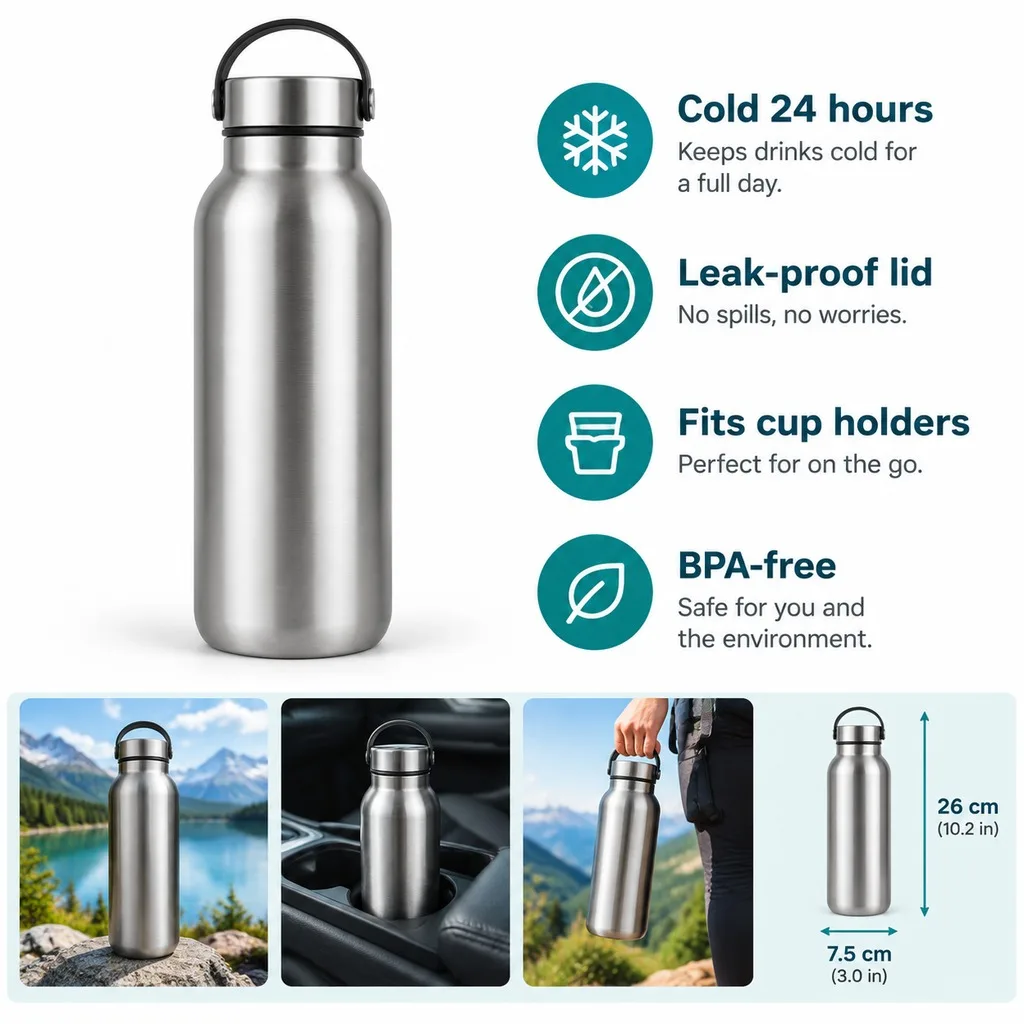
An online-store listing infographic for a stainless steel insulated water bottle, square format. Left: the product large on white with a soft shadow. Right: four feature callouts with simple line icons and short bold headlines: "Cold 24 hours", "Leak-proof lid", "Fits cup holders", "BPA-free". Bottom strip: three small lifestyle photos of the product in use and a dimension drawing with arrows. No brand names, clean sans-serif type, teal accent colour, crisp readable text.

Prompts stay in English, the language these models follow best. Copy it as it is, or change a few words.

Opens GPT Image 2.5 Sunburst with this prompt and the settings below filled in.

67 tested GPT Image prompts →

Settings

Mode
Text to image
Aspect ratio
1:1
Resolution
1k
Quality
high
Price
From 2 credits

The exact price shows before you generate.

Make your own version

  1. The layout is spelled out piece by piece: four feature callouts with simple line icons and short bold headlines. Keep that structure and change only the content, or the model loses track of the page.
  2. This is a fill-in template: swap the parts in braces, like {features}, in the boxes above and keep the rest word for word.
  3. The words in quotes, "Cold 24 hours", are printed in the picture. Keep them short and change them to your own.

Where this template comes from

Adapted from a prompt by @xin_pai88825, collected in freestylefly/awesome-gpt-image-2 under MIT. PopNow rewrote it as a fill-in template and made the example above.

Product prompt guide

How this product shot is built

A commercial e-commerce infographic displays a stainless steel water bottle alongside organized feature callouts, dimensions, and lifestyle insets on a crisp white background. GPT Image 2.5 Sunburst excels at rendering readable text, clean sans-serif typography, and structured graphic design layouts in a single pass.

  1. subject and format definitionAn online-store listing infographic for a stainless steel insulated water bottle, square format.

    Defines the commercial layout style, the main subject, and the overall composition. Altering this changes the base asset type from an e-commerce graphic into a plain studio photo.

  2. primary product placementLeft: the product large on white with a soft shadow.

    Positions the hero bottle on the left side of the frame with realistic studio grounding. Removing this causes the product to drift into the center and overlap the text callouts.

  3. feature typography and iconographyRight: four feature callouts with simple line icons and short bold headlines: "Cold 24 hours", "Leak-proof lid", "Fits cup holders", "BPA-free".

    Specifies the exact text strings and visual icon style for the right-hand panel. Changing the quoted phrases updates the marketing claims to match your exact product specifications.

  4. secondary detail panelBottom strip: three small lifestyle photos of the product in use and a dimension drawing with arrows.

    Adds secondary proof elements including lifestyle context and technical sizing graphics. Removing this simplifies the layout into a standard two-column feature poster.

  5. styling and typography constraintsNo brand names, clean sans-serif type, teal accent colour, crisp readable text.

    Sets the brand color accent, ensures font legibility, and prevents the model from generating messy fictional logos. Changing teal accent colour shifts the palette to match your own branding.

What to change for your own product

Swap out the core bottle elements to generate an identical e-commerce infographic layout for any catalog item.

Product
Currently a stainless steel insulated water bottle. Replace with your item, such as a matte ceramic coffee mug, wireless over-ear headphones, or organic facial serum.
Feature Callouts
Currently lists bottle metrics like Cold 24 hours and BPA-free. Replace with 3 to 4 specific selling points relevant to your product inside double quotation marks.
Accent Colour
Currently uses teal accent colour. Swap with your specific brand shade, such as navy blue accent colour, forest green accent colour, or warm coral accent colour.
Bottom Elements
Currently features lifestyle insets and a dimension drawing. Swap with cert seals, battery life charts, or ingredient macro shots depending on the product category.

Ready-made variations

Skincare Serum Infographic

Swaps the drinkware subject for beauty packaging and updates the headline callouts to cosmetic benefits.

Prompt

An online-store listing infographic for an anti-aging facial serum glass dropper bottle, square format. Left: the amber bottle large on white with a soft shadow. Right: four feature callouts with simple line icons and short bold headlines: "Hyaluronic Acid", "24H Hydration", "Fragrance Free", "Dermatologist Tested". Bottom strip: three small skin texture photos and a dimension drawing with arrows. No brand names, clean sans-serif type, rose gold accent colour, crisp readable text.

Wireless Headphones Infographic

Applies the structured graphic format to consumer electronics with tech-specific icons and marketing points.

Prompt

An online-store listing infographic for matte black wireless over-ear headphones, square format. Left: the headphones large on white with a soft shadow. Right: four feature callouts with simple line icons and short bold headlines: "40H Battery Life", "Active Noise Cancelling", "Memory Foam Cups", "Bluetooth 5.3". Bottom strip: three small lifestyle photos of commuters and a dimension drawing with arrows. No brand names, clean sans-serif type, electric blue accent colour, crisp readable text.

Running Sneaker Infographic

Uses an athletic footwear theme with an exploded diagram in place of simple measurements.

Prompt

An online-store listing infographic for lightweight running sneakers, square format. Left: the sneaker floating on white with a soft shadow. Right: four feature callouts with simple line icons and short bold headlines: "Breathable Mesh", "Cushioned Sole", "Ultra Lightweight", "High Traction Grip". Bottom strip: three small outdoor running photos and an exploded sole diagram with arrows. No brand names, clean sans-serif type, neon lime accent colour, crisp readable text.

Model and settings

Keep the aspect ratio at 1:1 square for standard e-commerce gallery listings and social shop cards. Maintain resolution at 1k or upscale to higher fidelity for clear small text and line icons. Ensure quality is set to high so fine vector graphics, arrows, and quote-wrapped text render without blurriness. If creating vertical social banners or mobile-first carousels, switch the aspect ratio to 4:5 or 9:16.

  • Nano Banana ProSelect Nano Banana Pro when you need exceptionally rigid diagram structures, dense technical spec tables, and ultra-precise typography alignment.
  • FLUX.2 ProChoose FLUX.2 Pro when photorealism on the product finish is your top priority and you want strict hex color accuracy for brand matching.

When the product shot goes wrong

Garbled label text or spelling errors in the feature callouts
Keep each headline under three words, enclose every phrase in strict double quotation marks, and add the phrase minimal text, ultra-sharp lettering.
Bottom lifestyle photos overlap the dimension drawing or main bottle
Clarify layout boundaries by adding separated by clean divider lines between bottom strip and upper section.
Warped bottle geometry or distorted lid lines
Add symmetrical studio product render, perfectly straight lines, commercial packshot quality to the prompt.

Questions about this product prompt

How do I ensure the callout text renders without spelling mistakes?

Keep your phrases short, memorable, and wrapped in double quotation marks like "Leak-proof lid". GPT Image 2.5 Sunburst handles short, common headline words much better than long explanatory sentences.

Can I change the background from white to another color?

Yes. Replace on white with a soft shadow with on light gray backdrop or on pastel mint studio surface. Ensure the background remains neutral so your text stays readable.

Why are the bottom strip photos blending into each other?

If the model merges small insets, add three distinct segmented photo boxes with white borders in the bottom section. This tells the generator to separate each secondary picture cleanly.