


by PopNowVideo
Video Face Enhancer
Steady face restoration across every frame of a clip
From 12 credits per second of video≈ $0.012
What is Video Face Enhancer?
Video Face Enhancer is a PopNow video tool that restores faces across a whole clip. It finds up to three faces per frame, largest first, and keeps the result steady from one frame to the next. Motion, framing, length, the original audio and the resolution all carry over unchanged, and there is no prompt to write.
Best on PopNow for: Cleaning up faces in a generated or low-light clip before you publish it, or polishing a short interview or family video that was heavily compressed.
Good for
- Fixing smeared faces in a generated video
- Cleaning up faces in a low-light phone clip
- A final polish before you upscale or share
What Video Face Enhancer does well
Steady from frame to frame
The restoration runs on the whole clip rather than on single stills. In our test, eyes, teeth and hairlines stayed sharp across the frames and did not flicker, which is the detail viewers notice first.
Length and audio untouched
A five-second clip comes back five seconds long with its audio intact. Nothing is trimmed, retimed or re-scored, so the restored file can replace the original in your timeline without changes.
Priced by the input length
The charge follows the length of the clip you send, rounded up to whole seconds with a three-second minimum. A long clip is one job, not a separate charge for every frame.
Real results from Video Face Enhancer
Every image and clip here was generated with Video Face Enhancer. Hit Recreate to open it in the studio with the same prompt and settings.
No prompt, just the settings
Bring your own clip
Prompts that worked on Video Face Enhancer
Real outputs with the exact prompt we used, and why it worked. Hit Recreate to try the same settings.
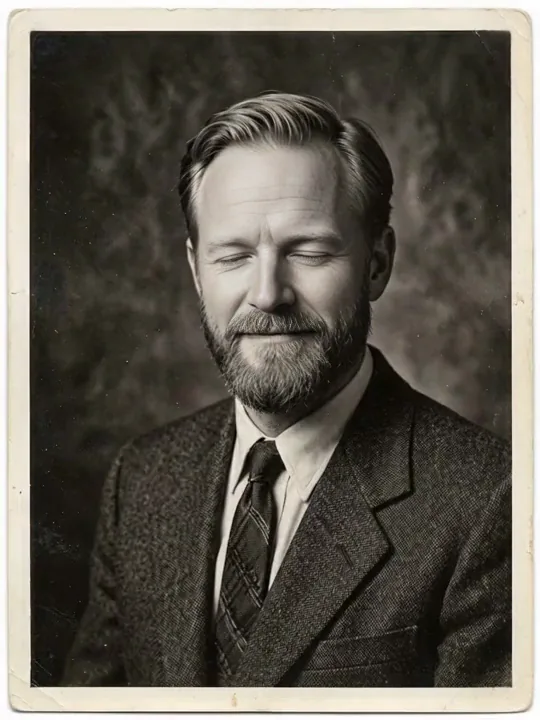
There is no prompt, so the example is a choice of footage rather than of wording: a short portrait clip with sound off, shot from a steady angle, where the faces are large enough to restore. Choose clips in which a face is clearly visible and the framing holds still.
RecreateWhat Video Face Enhancer can do
Each mode opens in the studio with Video Face Enhancer already picked. The price shows before you generate.

Best ways to use Video Face Enhancer on PopNow
Where this model already does the work for you, from one-tap apps to the full studio.
Repair an old video interview
Upload the MP4 of a past interview or a family recording. The faces get cleaned up while the audio stays exactly as it was recorded.
OpenFinal polish for a generated clip
Run a finished generation through the enhancer before you publish it, so faces hold up on a large screen.
OpenRestore a short film scene
Clean up the faces in a finished scene, then export the scene so it drops into your cut.
OpenHow to prompt Video Face Enhancer
- Billing follows the length of your clip, rounded up to whole seconds with a 3-second minimum, so trim it first.
- Faces that fill a good part of the frame benefit most.
- To raise the resolution as well, run Video Upscaler afterwards.
Settings worth knowing
Everything else has a sensible default, so you can type a prompt and go.
video_url- The clip to work on.
How it compares
Same kind of job, different strengths and prices.
Video Upscaler sharpens the whole clip and raises its resolution; Video Face Enhancer fixes faces at the same size.
Where Video Face Enhancer falls short
- Clips must be MP4 files between 3 seconds and 5 minutes long. Shorter or longer clips are refused before any charge.
- Faces must be real, reasonably large and clearly visible. Tiny faces, or faces turned well away from the lens, gain the least.
- Resolution does not change. For more pixels, run the restored clip through the video upscaler as a separate step.
How to use Video Face Enhancer in three steps
- Open the video studio and select Video Face Enhancer.
- Upload an MP4 clip between 3 seconds and 5 minutes long.
- Check the price, 12 credits per second with a 3-second minimum, then generate.
Questions about Video Face Enhancer
How much does Video Face Enhancer cost?
On PopNow, the cheapest run of Video Face Enhancer costs 12 credits ($0.012) per second of video. You pay with credits (1 credit = $0.001), the exact cost shows on the Generate button before you start, and failed generations are refunded automatically.
How long can the clip be?
From 3 seconds to 5 minutes. A clip outside that range is refused before anything is charged.
What does it cost?
12 credits per second of input, rounded up to the next whole second, with a 3-second minimum of 36 credits. A full five-minute clip is 3,600 credits.
Does the output keep the audio?
Yes. The original audio track is returned as recorded, because only the picture is processed.
Will the faces flicker between frames?
The result is built to stay steady across frames. In our test a five-second clip showed sharper eyes and hairlines in every frame without flicker.
Does it change the resolution or the frame rate?
No. The clip returns at the resolution, frame rate and length you sent. For a larger picture, run the upscaler separately.
Can I restore a long film?
Each clip can be up to five minutes. For longer material, split the film into scenes, enhance each one and join them in your editor.
Video Face Enhancer or Video Upscaler?
Video Upscaler sharpens the whole clip and raises its resolution; Video Face Enhancer fixes faces at the same size.
Make something with Video Face Enhancer
Choose footage with clear faces and steady framing, enhance it once, then check the cut at full size before you publish.