Pop-Out Travel Ticket, made with Nano Banana 2.1
Example made with Nano Banana 2.1

Text to imageArt & posters

Nano Banana 2.1 poster design promptPop-Out Travel Ticket

The exact text-to-image prompt behind this picture, made with Nano Banana 2.1.

Fill in the blanks

Change any box and the prompt below updates. Copy it, or make one with your version.

Prompt

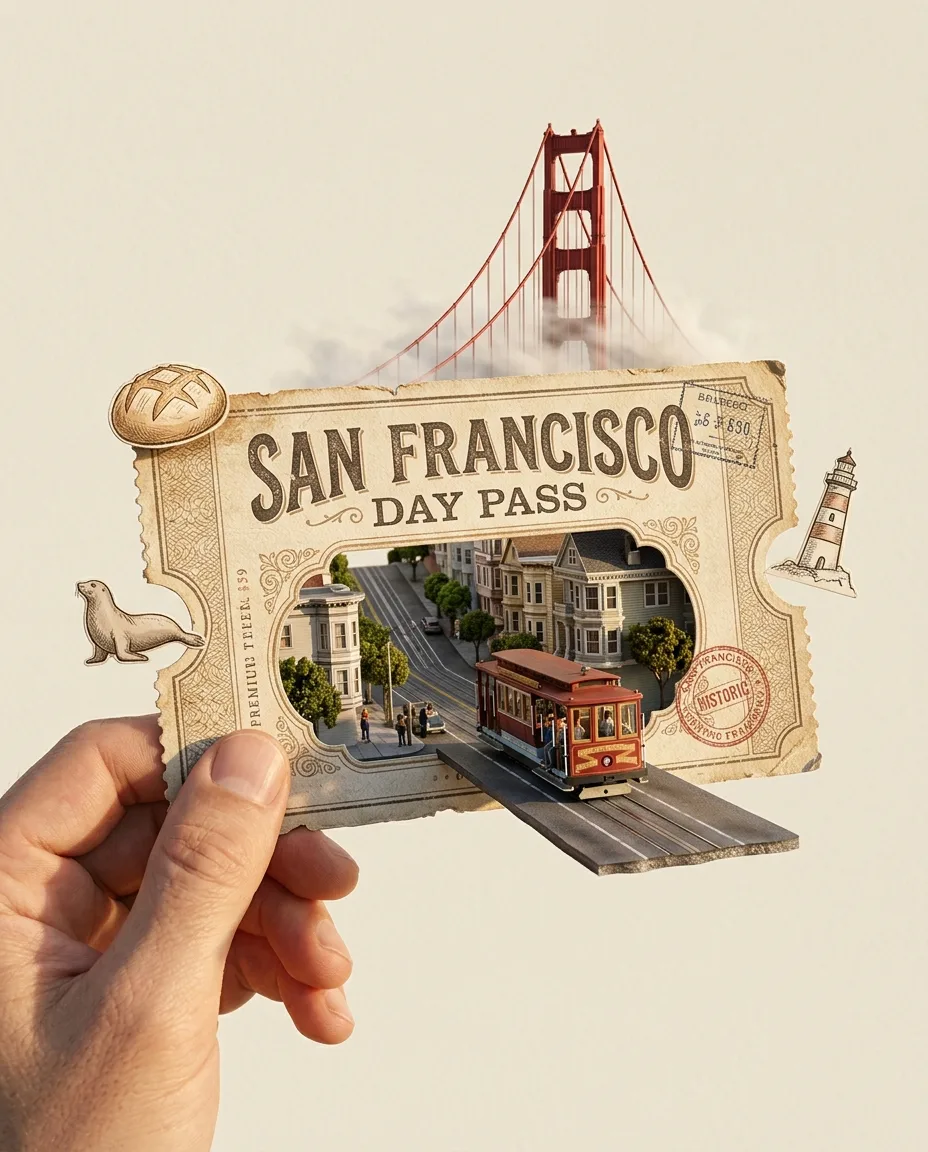
A photoreal 3D travel ticket concept: a hand holds a large vintage ticket that reads "SAN FRANCISCO DAY PASS" in front of a clean cream background. The ticket's cut-out window shows a miniature street scene of San Francisco with steep hills, and a red cable car drives out of the ticket in 3D onto a small floating road. A red suspension bridge rises behind the ticket, and hand-drawn sketches of a sourdough loaf, a sea lion and a lighthouse float around it. Premium paper texture, warm golden-hour light, ultra-detailed miniature.

Prompts stay in English, the language these models follow best. Copy it as it is, or change a few words.

Opens Nano Banana 2.1 with this prompt and the settings below filled in.

91 tested Nano Banana prompts →

Settings

Mode
Text to image
Aspect ratio
4:5
Resolution
1k
Price
From 48 credits

The exact price shows before you generate.

Make your own version

  1. The one odd detail, drives out of the ticket in 3D onto a small floating road, is what makes people stop scrolling. Swap it for your own.
  2. The words in quotes, "SAN FRANCISCO DAY PASS", are printed in the picture. Keep them short and change them to your own.
  3. This is a fill-in template: swap the parts in braces, like {popout}, in the boxes above and keep the rest word for word.

Where this template comes from

Adapted from a prompt by @AIwithkhan, collected in EvoLinkAI/awesome-gpt-image-2-API-and-Prompts under CC0 1.0. PopNow rewrote it as a fill-in template and made the example above.

Style prompt guide

Style traits to keep

A photoreal 3D image of a hand holding a large vintage San Francisco day pass, with a miniature cable car rolling out of its cut-out window onto a floating road, is what Nano Banana 2.1 makes. The prompt works because it names each object and where it sits, so the model can place the title, the bridge and three sketches without guessing. The clean cream background keeps the eye on the ticket.

The look comes from a photoreal 3D finish on textured card, set on a clean cream field and lit warmly. These four traits are what make it read as a pop-out travel ticket rather than a flat illustration.

Medium
The words photoreal 3D make the ticket, cable car and bridge read as rendered objects with depth, so the car seems to leave the card. Without them the scene tends to look like a flat drawing.
Palette
The clean cream background keeps the palette calm, so the red cable car and bridge are the only strong colour. Without it the scene can drift into a busy mix of colours.
Texture
Premium paper texture adds a faint grain to the card, which makes the ticket feel like real stock rather than plastic. It is the main cue for the surface of the ticket.
Light
Warm golden-hour light gives the hills and card an amber glow with soft shadows, which makes the scene feel like a late afternoon photo. Removing it leaves neutral, flatter lighting.

What defines this look

  1. Sets medium and subjectA photoreal 3D travel ticket concept: a hand holds a large vintage ticket that reads "SAN FRANCISCO DAY PASS" in front of a clean cream background

    This opening tells the model to render a 3D object rather than a flat drawing, and it fixes the ticket as the hero. Without "photoreal 3D" the result is more likely to look like a flat poster illustration with no depth for the car to leave.

  2. Builds the miniature sceneThe ticket's cut-out window shows a miniature street scene of San Francisco with steep hills

    This sets up the window as the source of the pop-out, with the steep hills marking the city. Removing the hills leaves a generic street, so the scene loses its San Francisco identity.

  3. Adds the pop-out actiona red cable car drives out of the ticket in 3D onto a small floating road

    This is the key movement: the car leaves the paper and sits on a floating road. Changing "in 3D" or "floating" often flattens the car back onto the card, which removes the effect the title promises.

  4. Adds landmarks and sketchesA red suspension bridge rises behind the ticket, and hand-drawn sketches of a sourdough loaf, a sea lion and a lighthouse float around it

    The bridge gives a second landmark, and the three sketches add a hand-made layer around the 3D ticket. Cutting the sketches makes the layout simpler, but the scene then reads as one object rather than a collection of travel memories.

  5. Sets finish and lightPremium paper texture, warm golden-hour light, ultra-detailed miniature

    These closing terms control the surface, the light and the level of detail in one short run. Changing "golden-hour" to a cooler light shifts the mood, while dropping "ultra-detailed" makes the miniature softer and less crisp.

Same style, new subjects

Pet Passport

Swaps the travel theme for a pet passport with a dog in the window, which suits a keepsake card for pet owners.

Prompt

A photoreal 3D pet passport concept: a hand holds a large vintage passport that reads "BELLA'S HOME PASS" in front of a clean cream background. The cut-out window shows a miniature garden with a wooden fence, and a golden retriever trots out of the passport onto a small floating path. Hand-drawn sketches of a bone, a tennis ball and a leaf float around it. Premium paper texture, warm golden-hour light, ultra-detailed miniature.

Gardener's Card

Changes the subject to an adult gardener in the window, which suits a portrait-style gift card with the same cream and paper look.

Prompt

A photoreal 3D portrait concept: a hand holds a large vintage card that reads "A DAY IN THE GARDEN" in front of a clean cream background. The cut-out window shows a miniature gardener kneeling beside a rose bush, and a red watering can rolls out of the card onto a small floating path. Hand-drawn sketches of a rose, a trowel and a bee float around it. Premium paper texture, warm golden-hour light, ultra-detailed miniature.

Tea Set Menu

Replaces the landmarks with a still life of a tea set, which suits a calm cafe or kitchen menu that keeps the cream and gold look.

Prompt

A photoreal 3D still life concept: a hand holds a large vintage menu card that reads "MORNING TEA SET" in front of a clean cream background. The cut-out window shows a miniature teapot, two cups and a sliced lemon on a small floating tray. Hand-drawn sketches of a teaspoon, a teapot lid and a sprig of mint float around it. Premium paper texture, warm golden-hour light, ultra-detailed miniature.

Model and settings

Keep the 4:5 ratio and 1k resolution from the example, since the upright shape suits one hand holding a ticket. Stay in text-to-image mode, because this prompt has no input picture to edit and no start frame to animate. For a wide banner, switch to a landscape ratio and keep the wording, so the ticket and sketches still fit. For a larger print, raise the resolution one step and check the title stays sharp.

  • FLUX.2 ProChoose FLUX.2 Pro when the photoreal finish and an exact cream shade matter most, since it is built for photoreal images with readable text and hex colour control. It suits this prompt because the ticket and background are the main colour checks.
  • GPT Image 2.5 SunburstChoose GPT Image 2.5 Sunburst when clean lettering on the ticket is the priority, since OpenAI describes it as quality-first with clean text. That suits a title this visible in the middle of the frame.

When the style drifts

The ticket title comes out misspelled or blurred.
Keep the quoted title in capitals and add "printed in sharp, evenly spaced letters" after it. If it still fails, try FLUX.2 Pro, which is built for readable text.
The style washes out into a plain 3D render with no paper feel.
Keep "Premium paper texture" and "photoreal 3D" near the start, and add "visible fibres on the card" if the surface looks smooth.
The bridge and car crowd the cream background, so the ticket gets lost.
Remove "A red suspension bridge rises behind the ticket," so the cream stays the main field around the card.
The warm light turns the cream background muddy yellow-brown.
Change "warm golden-hour light" to "soft warm light" or add "pale cream background" so the backdrop stays clean.

Questions about this style prompt

Can Nano Banana 2.1 write the title on the ticket correctly?

Nano Banana 2.1 is built for sharp text, so the quoted title is a good test of it. Keep the title in capitals and inside double quotes, exactly as written in the prompt. If a letter comes out wrong, run the same wording again before you change the model.

Can I reuse this prompt for a ticket from another city?

Yes, but swap the title, the street scene and the landmarks together, since the cable car and the red suspension bridge only fit San Francisco. Keep the cream background and the paper texture wording so the style stays the same.

Why does the cable car look like it is driving out of the ticket?

The prompt says the car drives out of the cut-out window in 3D onto a small floating road, which tells the model to treat the miniature as a separate object. Removing "in 3D" can flatten the car back onto the paper, so keep that phrase when you want the pop-out effect.