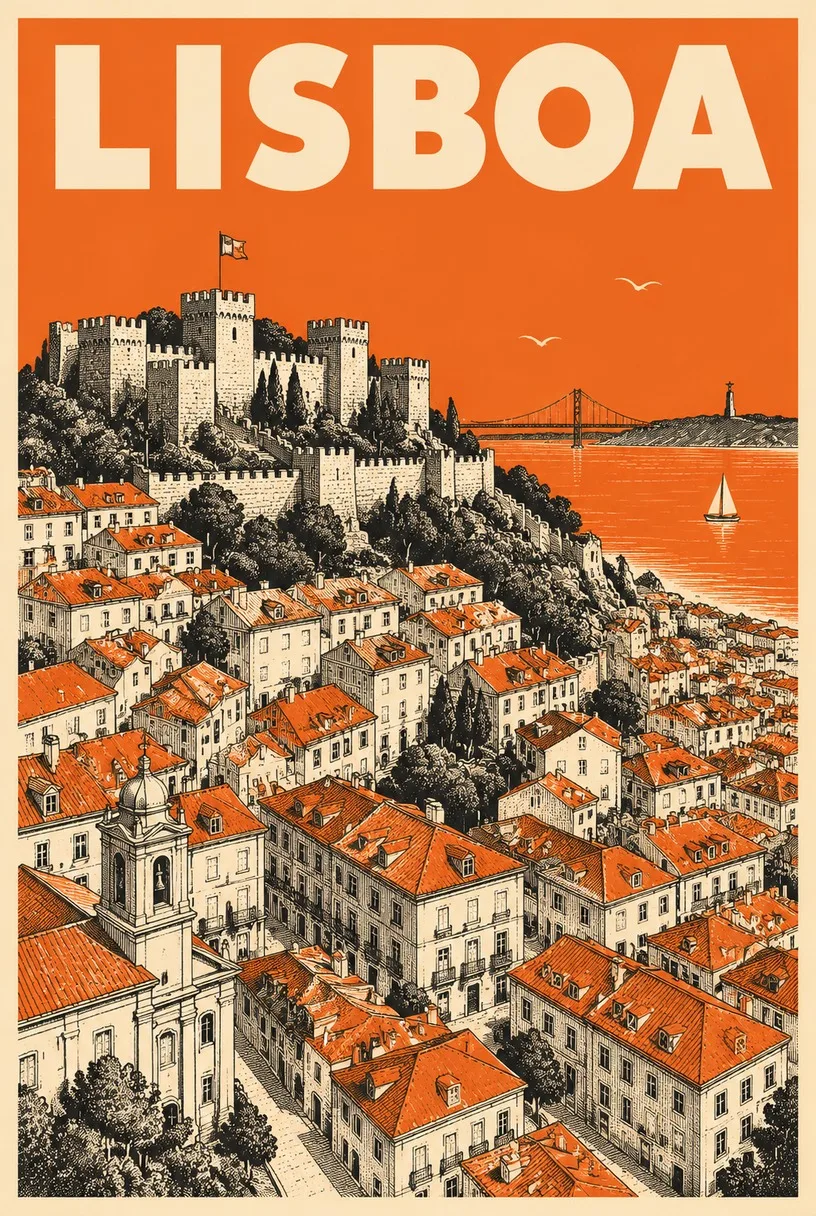
Mid-Century Travel Poster, made with GPT Image 2.5 Sunburst
Example made with GPT Image 2.5 Sunburst

Text to imageArt & posters

GPT Image 2.5 Sunburst poster design promptMid-Century Travel Poster

The exact text-to-image prompt behind this picture, made with GPT Image 2.5 Sunburst.

Fill in the blanks

Change any box and the prompt below updates. Copy it, or make one with your version.

Prompt

A vertical mid-century travel poster for Lisbon featuring the hilltop castle above terracotta rooftops. A strict three-colour palette: cream paper, black technical linework and tangerine. Minimal isometric bird's-eye view with ultra-fine hatching and a screen-print texture; solid flat tangerine for the whole sky and small accents on roofs. No gradients. Bold sans-serif "LISBOA" at the top in cream.

Prompts stay in English, the language these models follow best. Copy it as it is, or change a few words.

Opens GPT Image 2.5 Sunburst with this prompt and the settings below filled in.

67 tested GPT Image prompts →

Settings

Mode
Text to image
Aspect ratio
2:3
Resolution
1k
Quality
high
Price
From 2 credits

The exact price shows before you generate.

Make your own version

  1. Change the color palette, A strict three-colour palette: cream paper, black technical linework and tangerine, to shift the mood of the whole scene.
  2. This is a fill-in template: swap the parts in braces, like {color}, in the boxes above and keep the rest word for word.
  3. The prompt ends with No gradients. Leave that in, or the model may add random lettering.

Where this template comes from

Adapted from a prompt by @Goodmanprotocol, collected in freestylefly/awesome-gpt-image-2 under MIT. PopNow rewrote it as a fill-in template and made the example above.

Style prompt guide

Style traits to keep

A Lisbon travel poster with a hilltop castle rising above terracotta rooftops, built from just three flat colours: cream, black line and tangerine. GPT Image 2.5 Sunburst handles this well because the prompt sets a strict palette, a bird's-eye isometric view and a clear cream title, so the model has fixed rules to follow instead of guessing a style. The result reads like a mid-century print with clean hatched linework and a sky of solid tangerine.

Mid-century travel posters depend on a few flat colours and drafted linework, and these four traits from the prompt create that look.

Palette
Only cream, black and tangerine appear, so the poster reads as a limited-ink print. Cream paper gives it a warm base, and tangerine is the single bright note.
Line
Black technical linework with ultra-fine hatching gives the drawing a precise, drafted quality. The shading comes from line density rather than soft tones.
Texture
The screen-print texture adds a slight grain to the flat fills, which is what makes the result look printed rather than digital.
Composition
The minimal isometric bird's-eye view turns the hilltop and rooftops into a map-like pattern, with the castle as the clear focal point.

What defines this look

  1. Format and subjectA vertical mid-century travel poster for Lisbon featuring the hilltop castle above terracotta rooftops.

    Sets the format and the subject in one line. The vertical frame suits a travel poster, and naming the hilltop castle above rooftops fixes the composition; if you cut it, the model invents a generic Lisbon scene.

  2. Strict colour ruleA strict three-colour palette: cream paper, black technical linework and tangerine.

    Locks the colour to three inks, which is what makes the result look like a vintage print. Cream paper, black linework and tangerine are the only colours allowed; without this line the model tends to add greens, blues and shading that break the era.

  3. Drawing and textureMinimal isometric bird's-eye view with ultra-fine hatching and a screen-print texture

    Sets the drawing method: a high isometric view with fine hatching and print grain. Remove the hatching words and the castle turns into a smooth illustration; remove the screen-print texture and it looks like flat vector art.

  4. Flat sky and accentssolid flat tangerine for the whole sky and small accents on roofs. No gradients.

    Fills the sky with one solid tangerine block and adds small accents on the roofs. The phrase 'No gradients.' stops the model from fading the sky, and removing it usually gives a soft sunset glow that breaks the flat print look.

  5. Title placementBold sans-serif "LISBOA" at the top in cream.

    Places the title at the top in cream, so it reads clearly against the tangerine sky. Keep it to one short bold word; a longer title would crowd the castle, and a serif face would drift from the mid-century style.

Same style, new subjects

Fisherman on the quay

Replaces the castle with a working person, so you can test whether the palette and hatching still hold when the subject is human.

Prompt

A vertical mid-century travel poster for an older fisherman mending a net on a stone quay. A strict three-colour palette: cream paper, black technical linework and tangerine. Minimal isometric bird's-eye view with ultra-fine hatching and a screen-print texture; solid flat tangerine for the whole sky and small accents on boats and roofs. No gradients. Bold sans-serif "PESCADOR" at the top in cream.

Cat on a courtyard wall

Swaps the landmark for a pet, which suits a playful poster; the rooftops stay as the background pattern.

Prompt

A vertical mid-century travel poster for a ginger cat asleep on a tiled courtyard wall. A strict three-colour palette: cream paper, black technical linework and tangerine. Minimal isometric bird's-eye view with ultra-fine hatching and a screen-print texture; solid flat tangerine for the whole sky and small accents on roofs. No gradients. Bold sans-serif "GATO" at the top in cream.

Lemons on a kitchen table

Turns the travel poster into a still life, which suits a food or kitchen print, with the tangerine fill becoming a flat background.

Prompt

A vertical mid-century travel poster for a bowl of lemons and a glass carafe on a kitchen table. A strict three-colour palette: cream paper, black technical linework and tangerine. Minimal isometric bird's-eye view with ultra-fine hatching and a screen-print texture; solid flat tangerine for the whole background and small accents on the fruit. No gradients. Bold sans-serif "CITRINOS" at the top in cream.

Model and settings

Keep the 2:3 ratio, since a tall frame is what makes this read as a travel poster, and keep t2i mode with no input pictures or start frame, because the whole look comes from the words. The example used 1k at high quality, which is a sensible starting point for testing a layout. For a larger print file, raise the resolution and keep quality high so the fine hatching stays crisp. If you want a wide banner instead, change the ratio, but expect the isometric layout to crop.

  • FLUX.2 ProPick FLUX.2 Pro when the three colours must match exactly, since its hex colour control suits a strict cream, black and tangerine palette. Its readable text also helps the LISBOA title come out cleanly.
  • Nano Banana 2.1Choose Nano Banana 2.1 when the LISBOA lettering must be the sharpest part of the poster, since its tagline promises sharp text and 4K output. It suits a version where the title carries more weight than the castle.

When the style drifts

The sky picks up a sunset gradient or a soft glow.
Keep 'No gradients.' right after the tangerine sky sentence, and add 'flat, unshaded tangerine' to that sentence.
Colours drift into browns, greens or blue shading, so the palette stops reading as three inks.
Add 'no other colours, no brown or shading' to the palette line, and keep 'A strict three-colour palette' at the front.
The screen-print look disappears and the image looks like clean digital vector art.
Keep 'screen-print texture' and 'ultra-fine hatching' in the same sentence; if the grain is still missing, add 'visible ink grain' there too.
The title is misspelled or too small to read against the tangerine sky.
Keep "LISBOA" in capitals and in quotes, and write 'large' before 'bold sans-serif'; if the letters still break, switch to nano-banana-2-1 for sharper text.

Questions about this style prompt

How do I stop the sky from turning into a gradient in GPT Image 2.5 Sunburst?

Keep the phrase 'solid flat tangerine for the whole sky' and the separate line 'No gradients.' in the prompt. The two lines work together: the first sets the fill, and the second blocks the soft fade the model would otherwise add. If the sky still fades, move 'No gradients.' earlier in the prompt.

Can I use this prompt for a different city and keep the same poster style?

Yes. Change only the place in the first sentence and the title word in the last sentence, and keep the palette, drawing and texture lines word for word. Swapping the city changes the landmark, but the three-colour and hatching rules still give the same print look.

Why does my castle look too detailed or photographic compared with the sample?

Detailed subject wording can outweigh the style, so the castle may come out with photo-level detail. Add 'drawn entirely in black line and flat colour, with no photographic detail' after the castle phrase, and keep the hatching and screen-print words. This pulls the model back toward a printed drawing.