Big-Head Designer Toy, made with Nano Banana 2.1
Example made with Nano Banana 2.1

Example photo

Image edit3D & miniaturesUses your photo

Nano Banana 2.1 toy figure promptBig-Head Designer Toy

An image-edit prompt for Nano Banana 2.1: you upload a picture and this text says what to change.

Fill in the blanks

Change any box and the prompt below updates. Copy it, or make one with your version.

Prompt

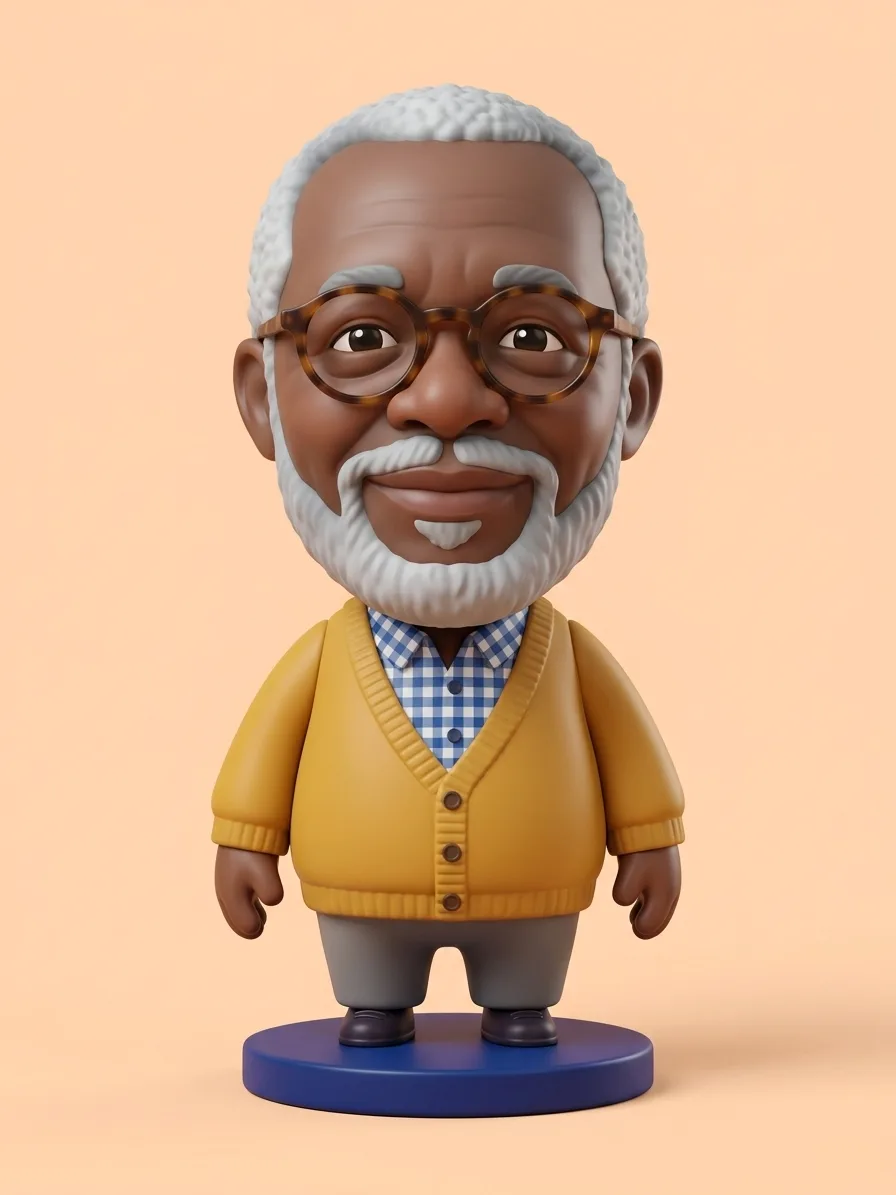
Transform the person in image 1 into a premium big-head designer vinyl toy. Identity first: keep the face shape, glasses, beard, hairstyle, skin tone and outfit details recognisable. Proportions: oversized head, small rounded body, stubby hands, about three heads tall. Material: smooth matte vinyl with a soft sheen and crisp painted details, never cheap shiny plastic. The figure stands on a small round cobalt-blue base against a clean pastel peach backdrop. Soft studio lighting, centred full-body product render, sharp focus.

Prompts stay in English, the language these models follow best. Copy it as it is, or change a few words.

Opens Nano Banana 2.1 with this prompt and the example photo. Swap in your own photo and you are ready.

91 tested Nano Banana prompts →

Settings

Mode
Image edit
Aspect ratio
3:4
Resolution
1k
Input pictures
Your own pictures
Price
From 48 credits

The exact price shows before you generate.

Make your own version

  1. keep the face shape, glasses, beard, hairstyle, skin tone and outfit details recognisable is the line that keeps your photo recognisable. Leave it in, whatever else you change.
  2. Change the material in smooth matte vinyl with a soft sheen and crisp painted details, never cheap shiny plastic and the rest of the scene follows it.
  3. The surprise is the size: oversized head, small rounded body, stubby hands, about three heads tall. Try another everyday thing at an impossible size.
  4. This is a fill-in template: swap the parts in braces, like {base}, in the boxes above and keep the rest word for word.

Where this template comes from

Adapted from a prompt by @Genematicai, collected in freestylefly/awesome-gpt-image-2 under MIT. PopNow rewrote it as a fill-in template and made the example above.

Photo edit prompt guide

Which photos work for this edit

A person from your photo becomes a premium big-head designer vinyl toy: oversized head, small rounded body, and a matte finish on a cobalt-blue base. Nano Banana 2.1 works well here because the prompt names the features to keep, such as glasses, beard and outfit, so the toy still looks like the same person.

This edit expects one clear photo of a single adult, with the face visible and turned toward the camera. The model uses that face and outfit as the identity to keep.

Works: a front-facing head-and-shoulders photo
The model can read the face shape, glasses and beard clearly, so those details carry over into the toy. Even, soft light on the face helps the features survive.
Works: one adult with glasses, a beard or a distinct hairstyle
The prompt asks the model to keep these features recognisable. Distinct features give the toy a clear likeness to the original person.
Avoid: group photos or several people in the frame
The prompt refers to 'the person in image 1', so the model may pick the wrong face or blend features from several people.
Avoid: sunglasses, hats or heavy shadow over the face
Hidden features cannot be kept recognisable, so the model may invent them. Harsh shadows also clash with the soft studio lighting the prompt asks for.

What each instruction does

  1. Core transformationTransform the person in image 1 into a premium big-head designer vinyl toy.

    Sets the whole change: a real person becomes a toy-style figure rather than a new character. Without it the model has no clear target and may only restyle the photo. Keep 'image 1' so it reads the right input.

  2. Identity lockIdentity first: keep the face shape, glasses, beard, hairstyle, skin tone and outfit details recognisable.

    Tells the model the face and clothing must survive the change. Remove it and the toy may come back as a generic figure with a different face, a common failure. Naming glasses, beard and outfit gives the model specific details to hold onto.

  3. Body proportionsProportions: oversized head, small rounded body, stubby hands, about three heads tall.

    Sets the body that makes this a big-head toy: a huge head on a small body with stubby hands. Changing 'about three heads tall' to 'four heads tall' gives a more realistic figure. Dropping it lets the body drift toward an ordinary adult build.

  4. Surface finishMaterial: smooth matte vinyl with a soft sheen and crisp painted details, never cheap shiny plastic.

    Decides whether the figure reads as premium collectible vinyl or as a cheap toy. The 'never cheap shiny plastic' clause blocks the glossy look many models default to. Dropping it often brings back a shiny, plastic-looking surface.

  5. Scene and lightingThe figure stands on a small round cobalt-blue base against a clean pastel peach backdrop. Soft studio lighting, centred full-body product render, sharp focus.

    Creates the product-shot setup: a figure on a round base against a plain pastel backdrop, under soft studio light. Swapping the peach for a darker colour changes the mood, and dropping 'centred full-body' can crop the feet or head.

Other edits in the same pattern

Winter Edition

Adds a red scarf and a winter backdrop, so use it for a seasonal post while keeping the face and outfit the same.

Prompt

Transform the person in image 1 into a premium big-head designer vinyl toy. Identity first: keep the face shape, glasses, beard, hairstyle, skin tone and outfit details recognisable, and add a red scarf. Proportions: oversized head, small rounded body, stubby hands, about three heads tall. Material: smooth matte vinyl with a soft sheen and crisp painted details, never cheap shiny plastic. The figure stands on a small round icy-blue base against a soft winter-white backdrop with snowflakes. Soft studio lighting, centred full-body product render, sharp focus.

Desk Shelf Scene

Moves the figure from a studio sweep to a desk shelf with warm light, so use it for a cosy, lifestyle-style shot.

Prompt

Transform the person in image 1 into a premium big-head designer vinyl toy. Identity first: keep the face shape, glasses, beard, hairstyle, skin tone and outfit details recognisable. Proportions: oversized head, small rounded body, stubby hands, about three heads tall. Material: smooth matte vinyl with a soft sheen and crisp painted details, never cheap shiny plastic. The figure stands on a small round wooden base in front of a soft blurred bookshelf. Warm desk-lamp light, centred full-body product render, sharp focus.

Mint and Lilac Pastel

Swaps only the base and backdrop colours, so use it when you want a softer pastel set that matches other products.

Prompt

Transform the person in image 1 into a premium big-head designer vinyl toy. Identity first: keep the face shape, glasses, beard, hairstyle, skin tone and outfit details recognisable. Proportions: oversized head, small rounded body, stubby hands, about three heads tall. Material: smooth matte vinyl with a soft sheen and crisp painted details, never cheap shiny plastic. The figure stands on a small square mint-green base against a clean pastel lilac backdrop. Soft studio lighting, centred full-body product render, sharp focus.

Model and settings

Keep the 3:4 ratio for this prompt, because a tall frame suits a full-body figure standing on its base with room above the head. Keep 1k resolution while you test, and raise it only when you need a sharper file for print. Use image-to-image mode with one input picture, the photo of the person. For a square or wide post, change the ratio and keep the rest of the prompt unchanged.

  • FLUX.2 ProChoose FLUX.2 Pro when the exact cobalt-blue base and pastel peach backdrop matter most, since its hex colour control suits this prompt's colour scheme.
  • GPT Image 2.5 SunburstChoose GPT Image 2.5 Sunburst when you want a higher-resolution final render of the toy with clean detail on the painted features.

When the edit misses

The face stops looking like the person in the photo.
Keep the identity sentence word for word, and start with a sharper, front-facing input photo where the glasses and beard are clearly visible.
The body stays adult-sized, so the big-head toy effect is weak.
Keep the Proportions sentence unchanged and add 'exaggerated' before 'oversized head' if the figure still looks like an ordinary adult.
The whole picture is repainted, so the background and colours drift from the cobalt and peach scene.
Keep the scene sentence word for word and remove any extra scene words you added, since extra detail invites the model to repaint the background.
The toy is cropped at the head or feet.
Keep the 3:4 ratio, or if you switch to a square ratio keep 'centred full-body product render' in the prompt so the feet stay in view.

Questions about this edit prompt

Why does the toy sometimes look like a different person?

The prompt asks the model to keep the face shape, glasses, beard, hairstyle, skin tone and outfit details. If the face drifts, start with a sharp, front-facing photo where those features are visible, because Nano Banana 2.1 has less to hold onto from a blurred or side-on shot.

Can I change the toy's outfit with this prompt?

Not with this wording, since 'outfit details recognisable' tells the model to keep the clothes from your photo. Add a new clause, like a red scarf, to the identity sentence to change one detail while keeping the rest.

Why does the prompt say never cheap shiny plastic?

Image models often default to a glossy, toy-store look when asked for a vinyl figure. The clause names the finish you do not want, so Nano Banana 2.1 leans toward a matte surface with a soft sheen and painted details.