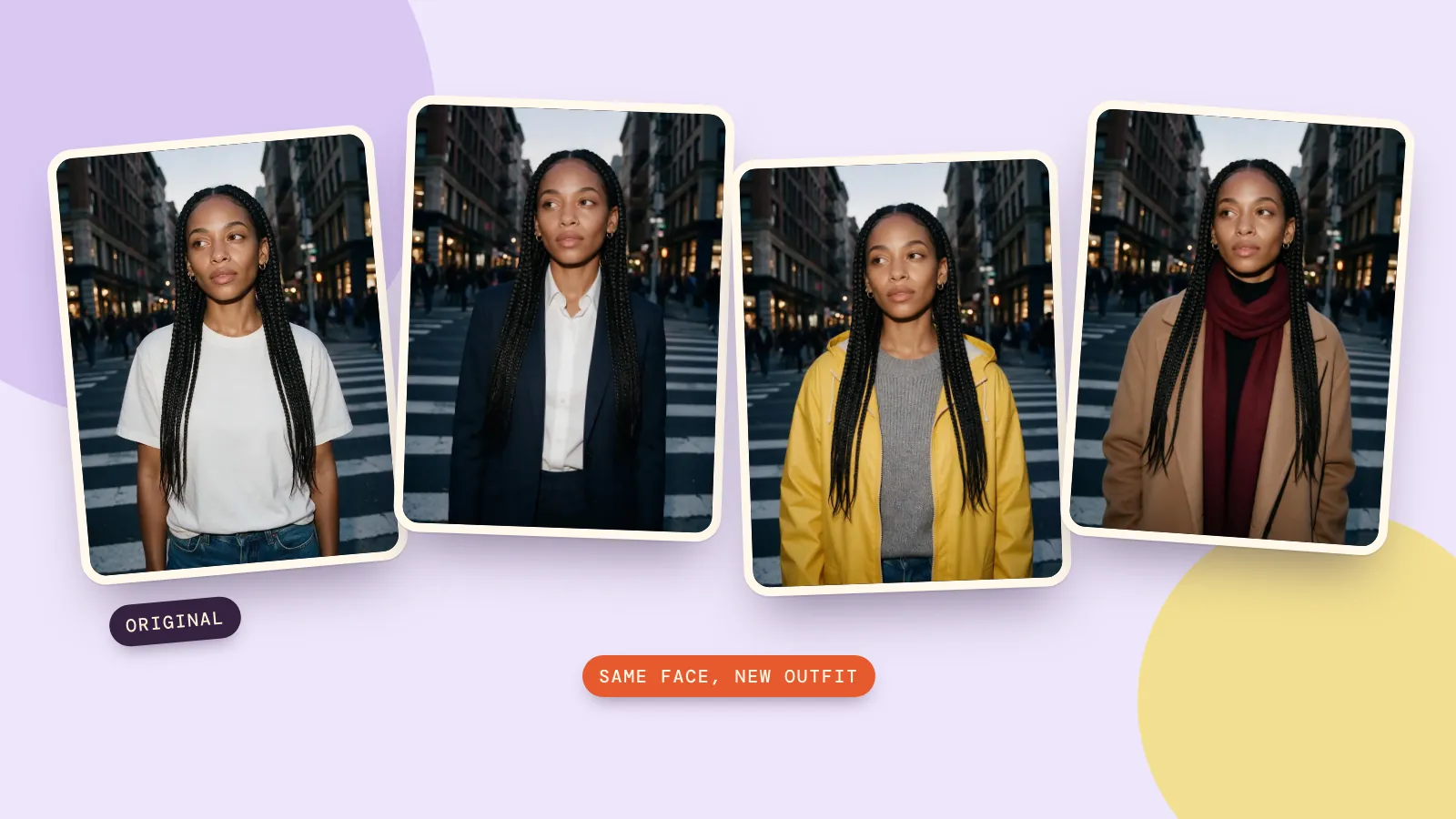
You can change what someone is wearing in a photo by uploading it and typing one sentence, for example "she now wears a camel wool coat over a black turtleneck". Today's image models redraw only the clothes and leave the face, hair, pose and background alone, as long as you tell them what has to stay the same.
We tested it on one street portrait with four outfits. Below are the original, every result, the exact prompts we used and the cost of each swap, plus the mistakes that make a model change the face along with the clothes.
The photo we started with
A clear, well-lit photo makes everything easier. Ours is a waist-up shot on a crosswalk at dusk: the face is turned slightly away, both shoulders are visible and the outfit (a plain white T-shirt and jeans) is easy to tell apart from the background.
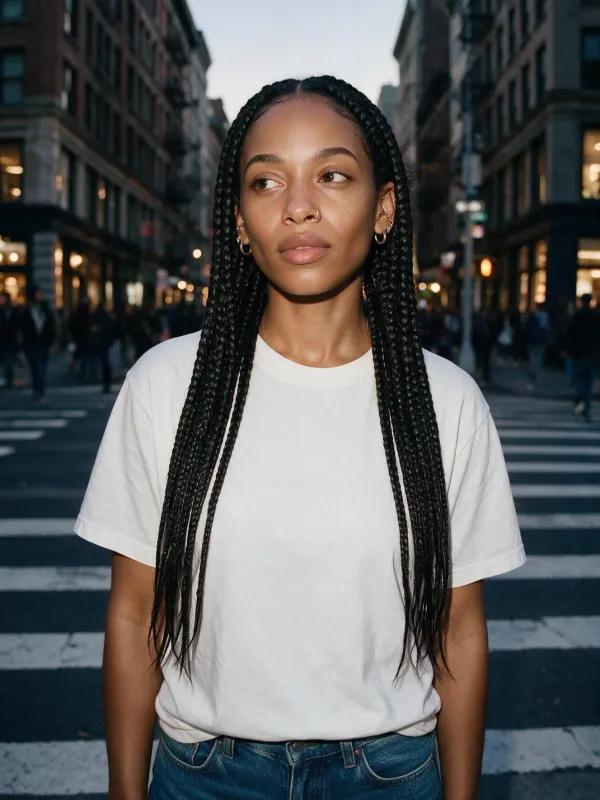
Photos that work less well: heavy motion blur, a face smaller than a thumbnail, arms crossed over the outfit, or a group shot where you only want to dress one person. You can still try them; expect to run the edit two or three times.
The prompt that keeps the face
Every result in this guide used the same two-part prompt. The first sentence says what she's wearing now. The second lists everything that must not change:
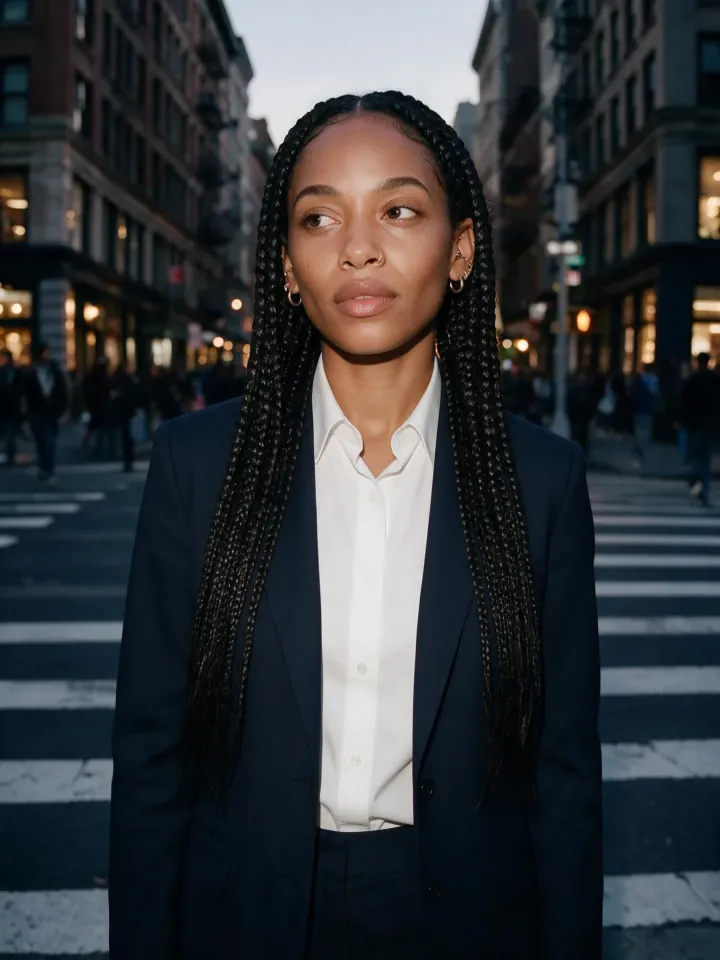
She now wears a tailored navy trouser suit with a crisp white shirt. Change only her clothes. Keep her face, braids, earrings, expression, body pose, camera angle, lighting and the busy crosswalk background exactly the same.
That second sentence is what does the work. A one-line prompt like "put her in a suit" leaves the model free to touch anything else in the picture too: the hair, the expression, the background. Spelling out the keep-list takes that freedom away. In our run, the only thing that changed was the suit.
To try it on your own photo, press Try this prompt, upload your picture in the editor and swap the outfit description for your own. One edit at 1K with Seedream 5.0 Pro costs 6 credits.
Four outfits, same person
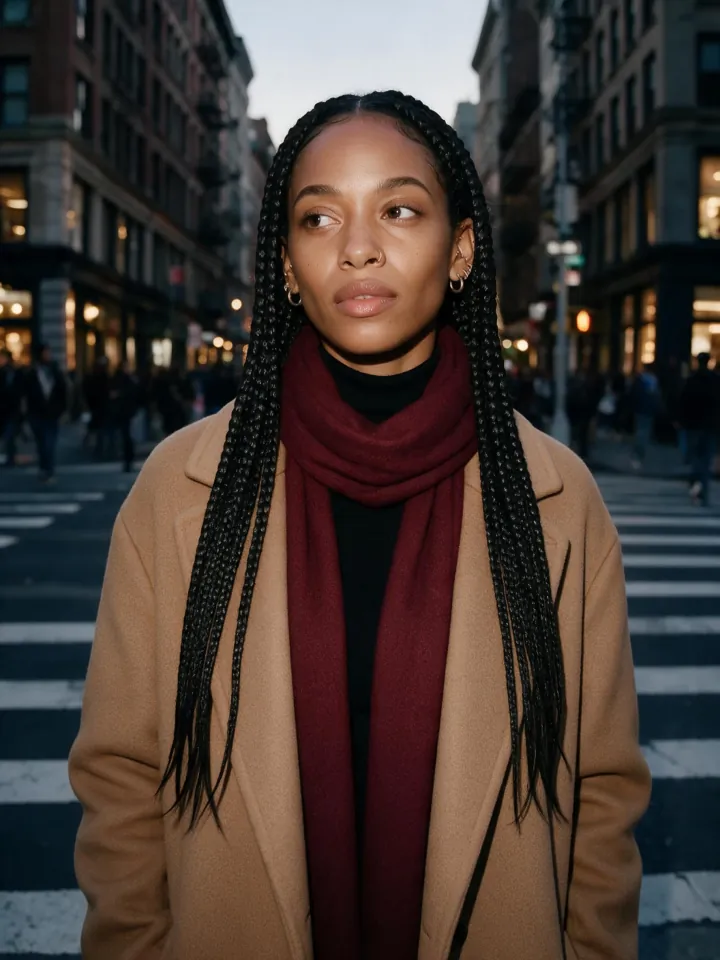
We changed only the first sentence each time. Everything else in the prompt stayed word for word the same. The three outfit sentences were:
- "She now wears a bright yellow hooded rain jacket, zipped halfway, over a grey knit sweater."
- "She now wears a camel wool overcoat over a black turtleneck, with a burgundy scarf."
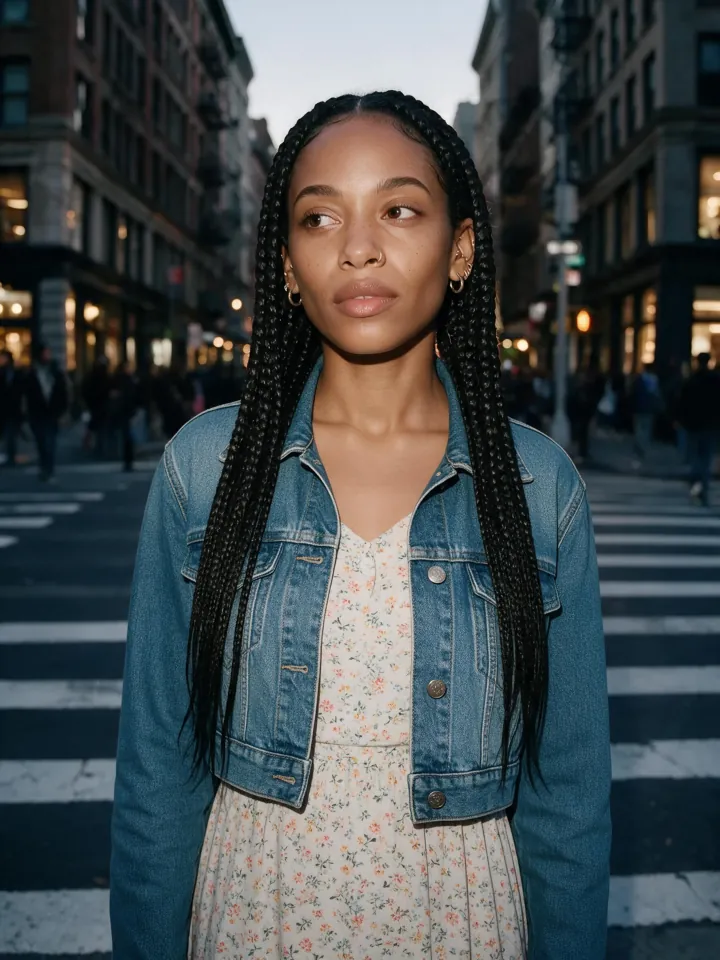
- "She now wears a light floral midi dress with a cropped denim jacket over it."
Original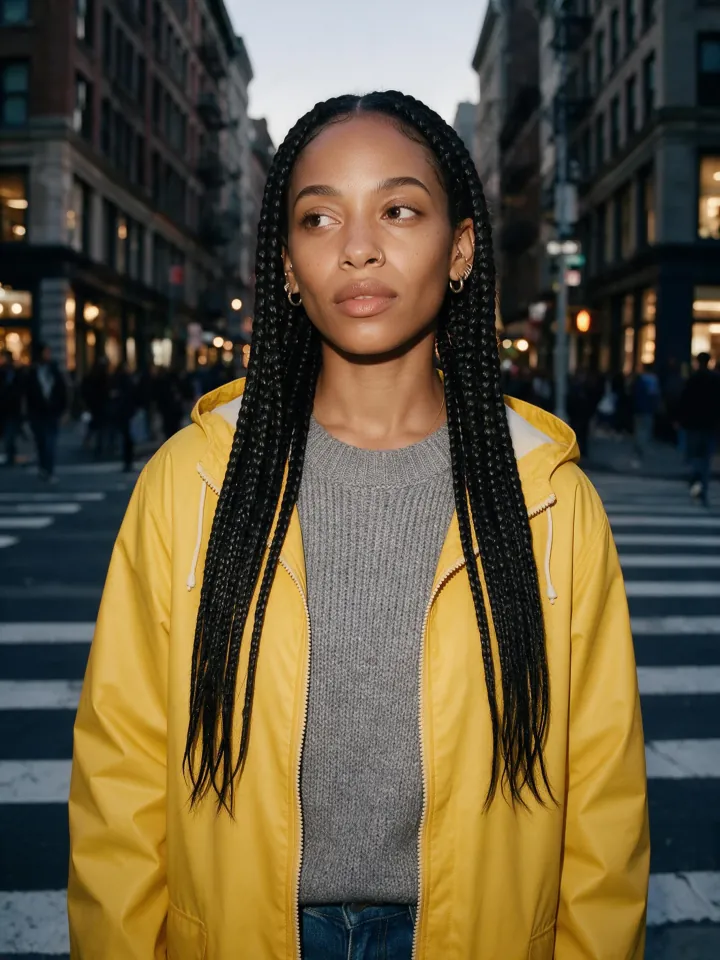 Rain jacket
 Wool coat
 Midi dress
What we noticed across the four:
- The face never drifted. Same eyes, same expression, same earrings in every shot.
- The light carried over. The new fabrics pick up the same cool dusk light as the original, so nothing looks pasted on.
- Layers worked. "Coat over a turtleneck, with a scarf" produced all three pieces in a believable order. So did the dress with a jacket.
- The framing stayed put. Because the original is waist-up, every outfit is shown waist-up. If you want to show shoes, start from a full-length photo.
Does the model matter?
We ran the suit prompt a second time on Nano Banana 2.1, the model the AI influencer page offers as its "best likeness" option:
Seedream 5.0 Pro · about a minute · larger image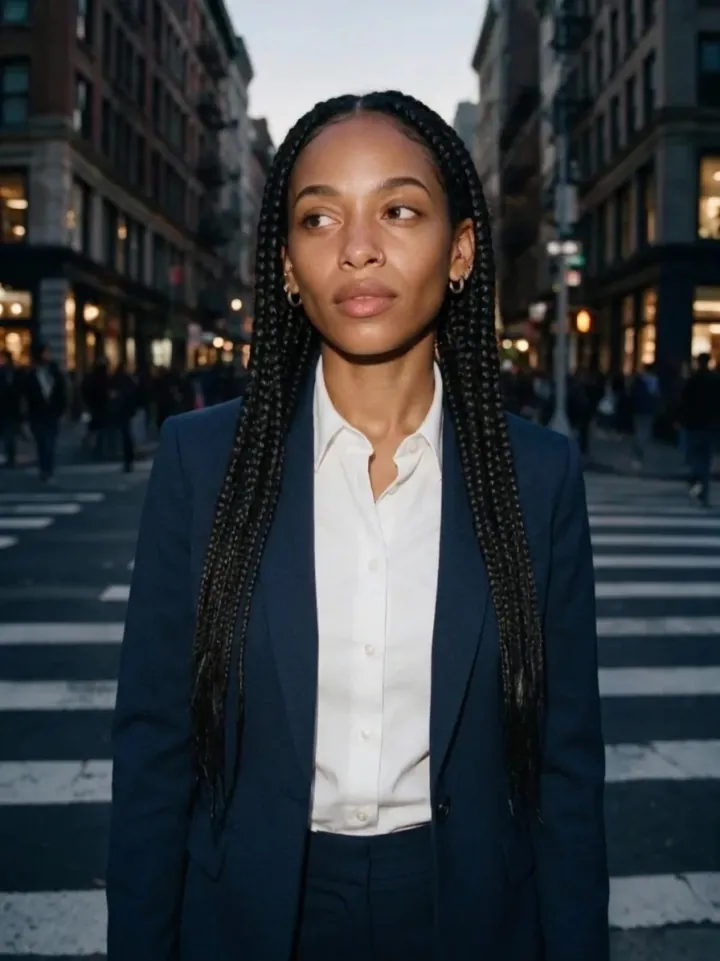 Nano Banana 2.1 · about 25 seconds · smaller image
Both did the job. Seedream 5.0 Pro returned a much larger image with crisper fabric texture and took about a minute. Nano Banana 2.1 came back in about 25 seconds at a smaller size and costs 8 credits per edit, against 6 credits for Seedream. Either is a good place to start; if one model misses an outfit, the same prompt on the other usually lands it. The model library lists every image model with examples if you want to compare more.
How to write outfit prompts that work
- Describe the garment like a shop listing. Color, fabric and cut: "camel wool overcoat", "cropped denim jacket", "tailored navy trouser suit". "Something stylish" gives the model nothing to aim for.
- Say how pieces are layered. "A coat over a turtleneck" beats a list of items.
- Always add the keep-list. Face, hair, accessories, pose, camera angle, lighting, background. Copy ours and edit it.
- One change per edit. If you also want a new background, do it as a second edit on the result. Two big changes at once is where faces start to drift.
- Keep it everyday. Coats, suits, dresses, sportswear and costumes for a party all work well. The editor is built for outfits you'd wear in public.
When the result isn't right
- The face changed a little: move "Keep her face exactly the same" to the start of the prompt and run it again, or switch to the other model.
- The old clothes show through: describe the new outfit more fully, including the parts that should cover the old one ("a long coat that reaches her knees").
- Hands or bags look odd: these are the hardest areas. Run it once more; fixes usually come on the second or third try.
- You want the same outfit in several photos: use the same outfit sentence for each photo, or make a matching set with Characters, which keeps one face across a whole series.
The Edit Image tool page explains the other edits the same editor can do, from new backgrounds to combining two photos.
FAQ
Can AI change the clothes in my own photo without changing my face?
Yes. Upload your photo, describe the new outfit, and add a sentence that lists what must stay the same: your face, hair, pose and background. In our four tests the face didn't change at all.
Which AI is best for clothes swapping?
The editing models that follow instructions closely. We got clean results from both Seedream 5.0 Pro and Nano Banana 2.1. Seedream gave larger, more detailed images; Nano Banana was about twice as fast.
How much does it cost to change an outfit?
One 1K edit costs 8 credits with Nano Banana 2.1 or 6 credits with Seedream 5.0 Pro on PopNow. New accounts get free credits, and the price is shown before you generate.
Can I change clothes on a photo of someone else?
Only if you have the right to use that photo and the person would be fine with it. Don't use real people's photos to make them look like they did or wore something they didn't, and don't post edits of someone without their permission.
Can I try on a specific item from a shop?
You can describe it in detail and get close. Some models also accept a second image, so you can upload the product photo next to your portrait and ask for "the jacket from the second image". Expect small differences in the pattern and logo.