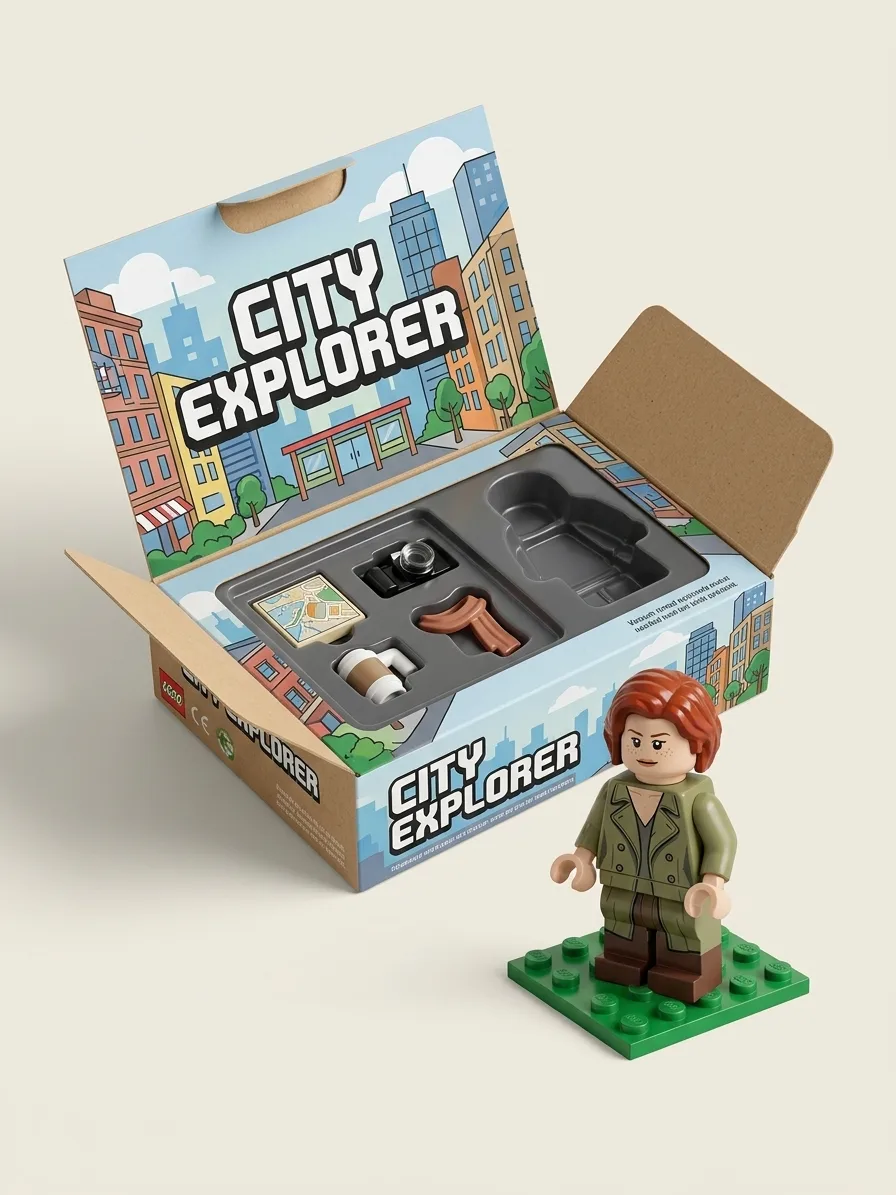
Brick Minifigure Box, made with Nano Banana 2.1
Example made with Nano Banana 2.1

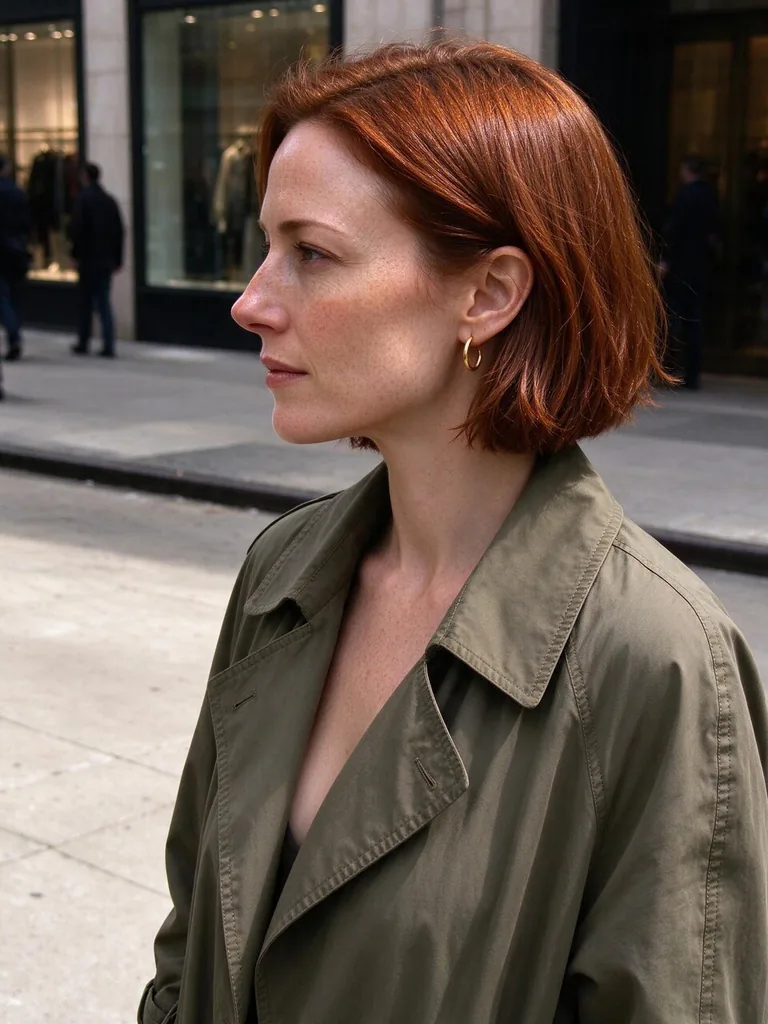
Example photo

Image edit3D & miniaturesUses your photo

Nano Banana 2.1 toy figure promptBrick Minifigure Box

An image-edit prompt for Nano Banana 2.1: you upload a picture and this text says what to change.

Fill in the blanks

Change any box and the prompt below updates. Copy it, or make one with your version.

Prompt

Turn the person in image 1 into a building-brick style minifigure with a cylindrical head, printed face and clip hands, keeping the hairstyle, hair colour and outfit from image 1. Show it in isometric view inside an open retail toy box titled "CITY EXPLORER", with the minifigure's everyday items as tiny brick accessories in molded slots: a coffee cup, a camera, a paper map and a scarf. Next to the box, the same minifigure stands unboxed on a small green baseplate. Clean product photo on a light background, crisp print on the box, no real toy brand logos.

Prompts stay in English, the language these models follow best. Copy it as it is, or change a few words.

Opens Nano Banana 2.1 with this prompt and the example photo. Swap in your own photo and you are ready.

91 tested Nano Banana prompts →

Settings

Mode
Image edit
Aspect ratio
3:4
Resolution
1k
Input pictures
Your own pictures
Price
From 48 credits

The exact price shows before you generate.

Make your own version

  1. keeping the hairstyle, hair colour and outfit from image 1 is the line that keeps your photo recognisable. Leave it in, whatever else you change.
  2. The layout is spelled out piece by piece: Next to the box, the same minifigure stands unboxed on a small green baseplate. Keep that structure and change only the content, or the model loses track of the page.
  3. This is a fill-in template: swap the parts in braces, like {items}, in the boxes above and keep the rest word for word.

Where this template comes from

Adapted from a prompt by @ZHO_ZHO_ZHO, collected in PicoTrex/Awesome-Nano-Banana-images under CC BY 4.0. PopNow rewrote it as a fill-in template and made the example above.

Photo edit prompt guide

Which photos work for this edit

A photo of a person becomes a brick-style minifigure with a cylindrical head, printed face and clip hands, keeping their hairstyle, hair colour and outfit, and sits in an open toy box labelled CITY EXPLORER with tiny brick versions of a coffee cup, camera, map and scarf. Nano Banana 2.1 suits this edit because its sharp text helps the CITY EXPLORER title stay legible on the box.

This edit expects one clear photo of a single adult, with the face, hair and outfit fully visible, because the prompt copies those details into the minifigure.

Works: one person, face towards the camera
The model needs a clear face, hairstyle and outfit to carry into the minifigure, so a front-facing portrait gives the best likeness.
Works: even, bright light
Even light lets the model read the hair colour and clothing colours, which the prompt asks it to keep.
Avoid: group photos
The prompt refers to the person in image 1, so with several people the model may pick the wrong one or blend them together.
Avoid: face hidden by a hat or sunglasses
Hidden hair or a face in deep shadow removes the details the prompt tells the model to keep, so the minifigure may look generic.

What each instruction does

  1. Core transformationTurn the person in image 1 into a building-brick style minifigure

    Sets the core change: a real person becomes a blocky brick-style figure with a round cylinder head. Removing it lets the model keep the photo looking like a person instead of a toy.

  2. Build and identity lockwith a cylindrical head, printed face and clip hands, keeping the hairstyle, hair colour and outfit from image 1

    The brick build terms set the toy style, and the identity clause keeps the person recognisable. Dropping the clause lets hair and clothing drift into generic toy versions.

  3. Camera angle and boxShow it in isometric view inside an open retail toy box titled "CITY EXPLORER"

    Sets the camera angle and the packaging: an isometric view of an open toy box. Changing it to a front view or dropping the CITY EXPLORER title turns it into a plain figure, not a boxed product shot.

  4. Brick props as storywith the minifigure's everyday items as tiny brick accessories in molded slots: a coffee cup, a camera, a paper map and a scarf

    Gives the box its story: the coffee cup, camera, map and scarf suggest a day out exploring the city. Removing the clause leaves the box empty, and swapping items changes the story the box tells.

  5. Second figure and finishminifigure stands unboxed on a small green baseplate. Clean product photo on a light background, crisp print on the box, no real toy brand logos

    Adds the second figure outside the box and the clean studio finish. Removing the baseplate sentence drops the second figure, and removing the lighting or print line leaves a busier picture that looks less like a product shot.

Other edits in the same pattern

Winter Snow Season

Swaps the setting to a snow theme with winter accessories, for a seasonal product shot.

Prompt

Turn the person in image 1 into a building-brick style minifigure with a cylindrical head, printed face and clip hands, keeping the hairstyle, hair colour and outfit from image 1. Show it in isometric view inside an open retail toy box titled "SNOW SEASON", with tiny brick accessories in molded slots: a knit hat, mittens, a thermos and skates. Next to the box, the same minifigure stands on a white baseplate. Clean product photo on a light background, crisp print on the box, no real toy brand logos.

Retro Arcade Night

Changes the theme to a retro arcade with game-style props, for a nostalgic gift-style image.

Prompt

Turn the person in image 1 into a building-brick style minifigure with a cylindrical head, printed face and clip hands, keeping the hairstyle, hair colour and outfit from image 1. Show it in isometric view inside an open retail toy box titled "ARCADE NIGHT", with tiny brick accessories in molded slots: a joystick, a token, a cassette and headphones. Next to the box, the minifigure stands on a small green baseplate. Clean product photo on a light background, crisp print on the box, no real toy brand logos.

Garden Crew

Switches the props to gardening tools, useful for a hobby-themed toy box.

Prompt

Turn the person in image 1 into a building-brick style minifigure with a cylindrical head, printed face and clip hands, keeping the hairstyle, hair colour and outfit from image 1. Show it in isometric view inside an open retail toy box titled "GARDEN CREW", with tiny brick accessories in molded slots: a watering can, a trowel and gloves. Next to the box, the minifigure stands on a small green baseplate. Clean product photo on a light background, crisp print on the box, no real toy brand logos.

Model and settings

Keep the 3:4 ratio, since it suits a tall toy-box product shot, and keep the 1k resolution used in the example. Use one input picture only, because the prompt refers to image 1 and a second picture would add confusion. For a wide banner, change the ratio, but check that the box title stays readable. For a different person, swap the input picture and keep the image edit mode.

  • GPT Image 2.5 SunburstPick it when the CITY EXPLORER box needs the cleanest lettering, since its tagline promises quality-first output with clean text up to 4K.
  • Nano Banana ProIt plans the layout first, so it suits this prompt when the box text and four small accessories need careful placement.

When the edit misses

The face or hairstyle changes and the figure looks like a generic toy.
Keep the phrase "keeping the hairstyle, hair colour and outfit from image 1" and add "keep the same face and facial features as image 1" after it.
The whole picture is repainted, so the background or the person's pose changes instead of only the figure.
Add "change only the person, keep the background and pose the same" to the first sentence.
The minifigure's shadows and lighting don't match the box, so the scene looks pasted together.
Add "soft studio lighting with matching shadows on the box and baseplate" to the clean product photo sentence.
The result comes out square or landscape, so the tall toy box is cropped.
Set the ratio to 3:4 in the settings, the value used in the example, instead of a wider ratio.

Questions about this edit prompt

Why does the prompt say image 1 instead of describing my hair?

Image 1 supplies the hairstyle, hair colour and outfit, so the text does not need to describe them. Keep the photo as the only input picture, since a second picture may leave the model unsure which person to copy.

Can I change the four accessories in the box?

Yes. Swap the coffee cup, camera, paper map or scarf for other everyday items, such as a water bottle or a sketchbook, and keep the words "tiny brick accessories in molded slots" so they still read as brick pieces. Four items keep the box uncluttered.

Why does the CITY EXPLORER text on the box sometimes come out blurred?

Nano Banana 2.1 is strong on sharp text, but small box lettering can still blur or misspell. Keep the title in capitals inside quotation marks, as the prompt does, and generate again if the lettering is off.