Template details
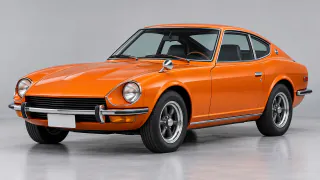
A low tracking shot of a car blasting out of a tunnel. Swap in your own car.
- Length
- 5 seconds
- Shape
- 16:9
- Mode
- Swap elements
- Swaps
- Product
- Default model
- MiniMax H3 Edit
- Price
- About 312 credits
What is AI video swap?
Video Swap keeps everything that makes a clip work, the moves, the camera and the timing, and replaces one thing: the person, the outfit, the product or the place. Add a video, add a photo of what should appear, and get the same shot with your version in it.
Transfer motion works the other way round: it takes only the movement from the video and plays it on the character in your photo, inside your photo’s own setting.
How to swap anything in a video
- Pick a videoOpen the Tunnel Racer template; the video is already loaded.
- Add your referenceAdd your photo or pick a saved character.
- SwapPress Swap and compare the result with the original.
Two modes
- Swap elements. Swap elements replaces only what you choose and keeps the rest of the shot, background included.
- Transfer motion. Transfer motion copies the moves onto your character and keeps the world from your photo.
Why swap here
- Same take. Motion, framing and timing come from the original clip.
- More than faces. Swap people, outfits, products or whole settings.
- Up to 10 references. Show the product or outfit from several angles.
- Price first. Lite costs a few cents a second, and the exact total is on the button.
What people make
- Product ads Put your product into a polished reveal shot without a studio.
- Lookbooks Show one runway walk in every outfit of the collection.
- Creator trends Join a trend with your own character in the lead.
- Localized versions Recut one shoot for different products, places or seasons.
Tips
- One continuous shot works best; hard cuts confuse the swap.
- Use a clean, well-lit reference with the item fully visible.
- Name what to replace in More options when several people are in shot.
- Shorter clips cost less: trim to the moment you need.
Use it responsibly
Only use photos and videos you own or have permission to use, and only put real people in a video with their consent. Never use anyone under 18, and don’t present results as real footage of someone.
Price
On Lite, swapping an outfit, product or place (MiniMax H3 Edit) costs about 312 credits for a 5-second clip, and swapping a person (MiniMax H3 Character Swap) about 620. Pro (Kling O3) costs about 626 and Max (Kling 4.0) about 1128. Transfer motion starts at about 265. The exact total is on the button before you start. Failed runs are refunded.
FAQ
How long can my video be?+
3 to 15 seconds on Lite, 3 to 10 seconds on Pro and up to 30 seconds on Max. Transfer motion takes up to 30 seconds.
What can I swap?+
A person, an outfit, a product, a place, or anything you describe. Add up to 10 reference photos and point at them as @Image1, @Image2 and so on.
How is this different from video face swap?+
Face swap changes only the face. Video Swap can replace the whole person, their clothes, the product in their hands or the entire setting.
Whose photos and videos can I use?+
Your own, or ones you have permission to use. Real people need to agree to appear, and never use anyone under 18.
How much does it cost?+
It’s priced per second, counting both your video and the result. A 5-second Lite swap of an outfit or product is about 312 credits; the button shows the exact total first.
Is the sound kept?+
Yes. Your clip’s original audio is kept on both Lite and Pro.



 @Image1