

 Create Image
 Edit Image
 Layer Splitter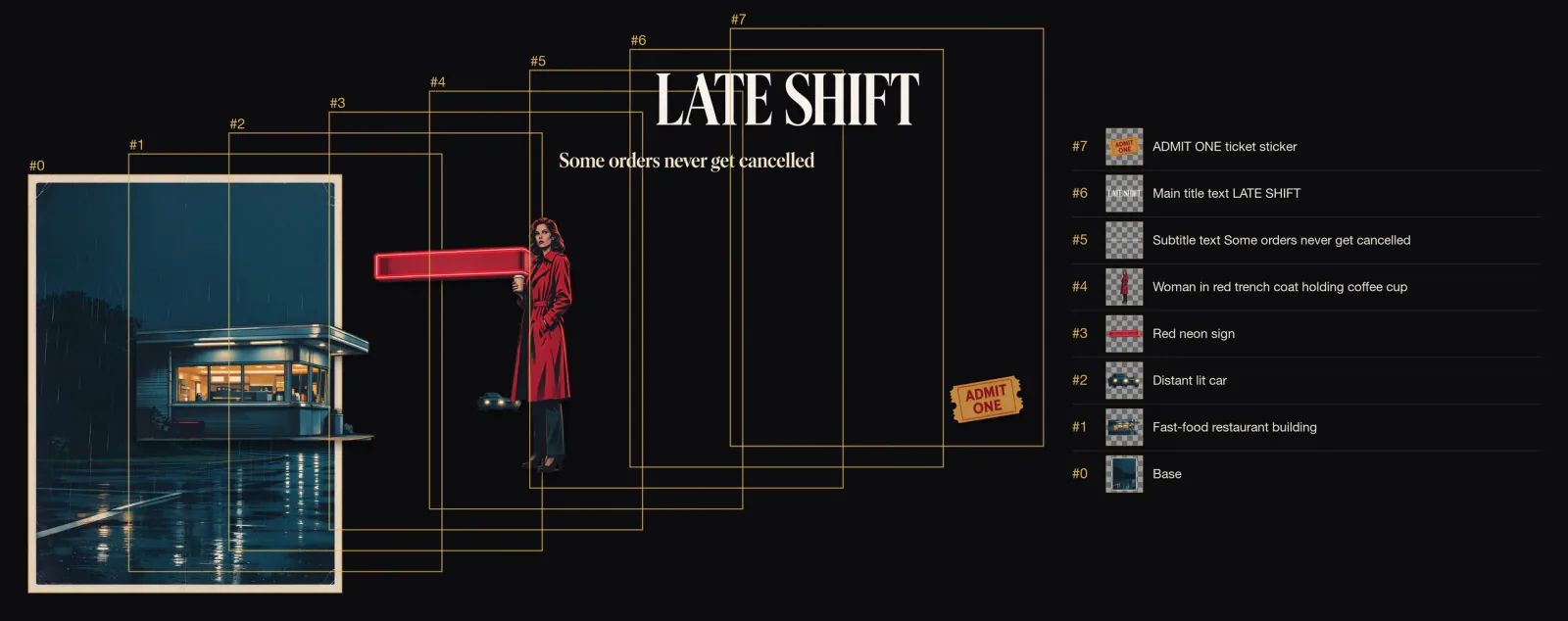
About Seedream 5.0 Flash
Seedream 5.0 Flash layer decomposition takes one image_url and returns a base plate plus up to sixteen transparent layers.
Call it with the model name bytedance/seedream-5.0-flash/layer-decomposition on POST /jobs/createTask, from 4 credits per image ($0.04). New accounts get 30 free credits to try it in the Playground first.
Introduction
Seedream 5.0 Flash Layer Decomposition splits one finished image into a base plate and up to sixteen transparent PNG layers, one per element, each with a name and its position in the original. Use it when you want reusable pieces: a headline you can rewrite, a person you can move into another design, a product you can put on a new background.
Developed by ByteDance (model ID dola-seedream-5-0-flash-260915).
Choose a Seedream 5.0 Flash mode by starting material
| Starting material | Mode |
|---|---|
| A written brief for a new picture | Seedream 5.0 Flash Text to Image |
| One to ten images to revise or combine | Seedream 5.0 Flash Image Editing |
| A finished image whose parts you need separately | Seedream 5.0 Flash Layer Decomposition |
Key features
Automatic or directed splitting
With no prompt the model picks the main elements itself. On our retro film poster that meant eight images: the base plate plus the diner, a distant car, the neon sign, the woman, the tagline, the LATE SHIFT title and the ADMIT ONE stub.
Layers that know where they belong
Every layer carries a short name and a bounding box in the base plate's pixels. Scale each PNG into its box over the base plate and the original comes back, so the pieces can go straight onto a canvas in their original arrangement.
A repaired base plate
The elements that were lifted out are removed and the background is filled in, so the base plate stands on its own. On the poster it was a clean rainy street; on the ballroom scene it was an empty hall.
Transparent layers, always PNG
Every layer is a transparent PNG. output_format only changes the base plate.
Request parameters
| Parameter | Required | Description |
|---|---|---|
image_url | Yes | The picture to start from. |
output_format | No | File type of the result. jpeg · png · Default: jpeg |
prompt | No | Optional: name the elements to separate. Leave empty to let the model pick the main elements. |
resolution | No | Output size. Bigger sizes look sharper and cost more. auto · 1k · 1.5k · 2k · Default: auto |
Pricing
Prices are in credits, the same credits you use on the website (1 credit = $0.01). The hold is taken when the task is accepted and settled to the actual charge when it finishes; failed tasks are refunded.
| Option | Credits per image | ≈ USD |
|---|---|---|
| Standard | 3.9 | $0.039 |
Each task is rounded up to whole credits, so one run at the lowest tier costs 4 credits per image ($0.04).
For an exact number before you run, send the same body to POST /jobs/quote.
Use cases
Rewrite a poster headline
Take the title layer out, redraw it in your design tool, and place it back at its box over the base plate.
Reuse a subject in new templates
Lift the person or product as a transparent PNG and drop it into another layout.
Clean scenes for compositing
Keep the base plate as an empty set and add your own elements.
Prompt guide & pro tips
Start with no prompt
Leave prompt out and see what the model separates.
Name what you want
When you write a prompt it must be at least 3 characters. Point at the elements you care about: "the dancing couple and the chandelier" returned exactly those two layers plus the base plate on the ballroom scene.
Circle an element with a bounding box
Add <bbox>x1 y1 x2 y2</bbox> after the element's name, using 0-1000 coordinates from the top-left corner.
Separate the title text <bbox>179 58 809 197</bbox> and the parrot <bbox>330 274 641 991</bbox> into independent layersPut layers back with their boxes
Each boundingBox is [x1, y1, x2, y2] in the base plate's pixels. The PNG is often delivered larger than its box, so scale it to the box's width and height rather than pasting it at its own size.
API quick start
Call the Seedream 5.0 Flash API in three steps
- Create an API key. Sign in to PopNow and create a key in the API console. Keys start with sk-popnow- and use the same credits as the website.
- Send the request. POST /jobs/createTask with model bytedance/seedream-5.0-flash/layer-decomposition and an input object that follows the parameter table. The response returns a task ID straight away.
- Get the result. Poll GET /jobs/recordInfo with the task ID, or pass a callBackUrl and we post the result to it. Download the output links when the task succeeds.
# 1. Create the task. Keep the Idempotency-Key if you retry after a network error.
export IDEMPOTENCY_KEY="$(uuidgen)"
curl -X POST https://api.popnow.ai/api/v1/jobs/createTask \
  -H "Authorization: Bearer $POPNOW_API_KEY" \
  -H "Content-Type: application/json" \
  -H "Idempotency-Key: $IDEMPOTENCY_KEY" \
  -d '{
  "model": "bytedance/seedream-5.0-flash/layer-decomposition",
  "input": {
    "image_url": "https://media.popnow.ai/influencer/examples/marco.webp",
    "resolution": "auto",
    "output_format": "jpeg"
  }
}'

# 2. Copy data.taskId from the response, then poll until state is succeeded, failed, canceled or expired.
TASK_ID="TASK_ID_FROM_RESPONSE"
curl "https://api.popnow.ai/api/v1/jobs/recordInfo?taskId=$TASK_ID" \
  -H "Authorization: Bearer $POPNOW_API_KEY"
Replace the prompt and any links with your own. The API tab has the response, polling and callback reference.
About the Seedream 5.0 Flash Layer Splitter endpoint
Each layer comes with a short English name, its stacking order and a bounding box in the base plate's pixel space, which makes it straightforward to rebuild the composition in a canvas editor.
It is priced lower than Seedream 5.0 Pro's layer endpoint and suits drafts and high volume.
The request needs only image_url, plus output_format and resolution, so it slots into an upload flow without extra UI.
Seedream 5.0 Flash API questions
How much does the Seedream 5.0 Flash API cost?
Seedream 5.0 Flash starts at 4 credits ($0.04) per image with Layer Splitter, its cheapest task. Credits are the same as on the website (1 credit = $0.01), new accounts get 30 free credits, and failed tasks are refunded.
What are the limits of the Seedream 5.0 Flash · Layer Splitter API?
Resolutions: auto · 1K · 1.5K · 2K; Prompt length (characters): 5,000; Largest upload: 30 MB. Requests outside these limits are rejected before anything is charged.