
Endpoint edycji Ideogram 4.6: jeden image_url, opcjonalny mask_url, do trzech referencji i edit_precision=high do zmian tekstu w 1K–4K.
Ideogram 4.6: generator obrazów AI online- Do 4K
- Do 3 obrazów referencyjnych
- Proporcje obrazu: 7
- Utwórz obraz
- Edytuj obraz
 Utwórz obraz
 Edytuj obraz
Wywołujesz go nazwą modelu ideogram/4.6/edit w POST /jobs/createTask, od 0,0096 USD.
ideogram/4.6/editPOST https://api.popnow.ai/api/v1/jobs/createTask# 1. Create the task. Keep the Idempotency-Key if you retry after a network error.
export IDEMPOTENCY_KEY="$(uuidgen)"
curl -X POST https://api.popnow.ai/api/v1/jobs/createTask \
-H "Authorization: Bearer $POPNOW_API_KEY" \
-H "Content-Type: application/json" \
-H "Idempotency-Key: $IDEMPOTENCY_KEY" \
-d '{
"model": "ideogram/4.6/edit",
"input": {
"prompt": "A ceramic teapot on a linen cloth, soft window light, muted palette",
"edit_precision": "regular",
"resolution": "1k",
"quality": "medium",
"image_url": "https://media.popnow.ai/influencer/examples/marco.webp"
}
}'
# 2. Copy data.taskId from the response, then poll until state is succeeded, failed, canceled or expired.
TASK_ID="TASK_ID_FROM_RESPONSE"
curl "https://api.popnow.ai/api/v1/jobs/recordInfo?taskId=$TASK_ID" \
-H "Authorization: Bearer $POPNOW_API_KEY"// Node 18+ (or any runtime with fetch). Keep the API key on your server.
const BASE = "https://api.popnow.ai/api/v1";
const headers = { Authorization: `Bearer ${process.env.POPNOW_API_KEY}` };
const sleep = (ms) => new Promise((r) => setTimeout(r, ms));
async function call(path, init = {}) {
const res = await fetch(BASE + path, { ...init, headers: { ...headers, ...init.headers } });
const body = await res.json();
if (body.code !== 200) throw new Error(`${body.code} ${body.msg}`);
return body.data;
}
const { taskId } = await call("/jobs/createTask", {
method: "POST",
headers: { "Content-Type": "application/json", "Idempotency-Key": crypto.randomUUID() },
body: JSON.stringify({
"model": "ideogram/4.6/edit",
"input": {
"prompt": "A ceramic teapot on a linen cloth, soft window light, muted palette",
"edit_precision": "regular",
"resolution": "1k",
"quality": "medium",
"image_url": "https://media.popnow.ai/influencer/examples/marco.webp"
}
}),
});
// Poll with backoff. A finished task may still be copying files: wait while an asset is pending.
let task;
for (let delay = 2000; ; delay = Math.min(delay * 1.5, 15000)) {
await sleep(delay);
task = await call(`/jobs/recordInfo?taskId=${taskId}`);
const copying = (task.output?.assets ?? []).some((a) => a.pending && !a.unavailable);
if (["succeeded", "failed", "canceled", "expired"].includes(task.state) && !copying) break;
}
if (task.state !== "succeeded") throw new Error(`${task.state}: ${task.errorMessage ?? "no detail"}`);
// Each asset has a signed url (no API key needed) that expires at expiresAt: save the file.
for (const asset of task.output.assets) console.log(asset.url);import os, time, uuid, requests
BASE = "https://api.popnow.ai/api/v1"
HEADERS = {"Authorization": f"Bearer {os.environ['POPNOW_API_KEY']}"}
def call(method, path, **kwargs):
body = requests.request(method, BASE + path, headers={**HEADERS, **kwargs.pop("headers", {})}, timeout=30, **kwargs).json()
if body["code"] != 200:
raise RuntimeError(f'{body["code"]} {body["msg"]}')
return body["data"]
task_id = call(
"POST",
"/jobs/createTask",
headers={"Idempotency-Key": str(uuid.uuid4())}, # reuse it if you retry
json={
"model": "ideogram/4.6/edit",
"input": {
"prompt": "A ceramic teapot on a linen cloth, soft window light, muted palette",
"edit_precision": "regular",
"resolution": "1k",
"quality": "medium",
"image_url": "https://media.popnow.ai/influencer/examples/marco.webp"
}
},
)["taskId"]
# Poll with backoff. A finished task may still be copying files: wait while an asset is pending.
delay = 2.0
while True:
time.sleep(delay)
task = call("GET", "/jobs/recordInfo", params={"taskId": task_id})
assets = (task.get("output") or {}).get("assets") or []
copying = any(a.get("pending") and not a.get("unavailable") for a in assets)
if task["state"] in ("succeeded", "failed", "canceled", "expired") and not copying:
break
delay = min(delay * 1.5, 15.0)
if task["state"] != "succeeded":
raise RuntimeError(f'{task["state"]}: {task.get("errorMessage", "no detail")}')
# Each asset has a signed url (no API key needed) that expires at expiresAt: save the file.
for asset in assets:
print(asset["url"])input jest zbudowany ze schematu poniżej, więc przechodzi walidację bez zmian. Zamień prompt i linki na własne.
Cena
| Opcja | USD za obraz |
|---|---|
quality very lowresolution 1K | 0,0096 USD |
quality very lowresolution 2K | 0,0096 USD |
quality lowresolution 1K | 0,036 USD |
quality lowresolution 2K | 0,036 USD |
quality lowresolution 4K | 0,072 USD |
quality mediumresolution 1K | 0,072 USD |
quality mediumresolution 2K | 0,072 USD |
quality mediumresolution 4K | 0,24 USD |
quality very lowresolution 4K | 0,24 USD |
quality highresolution 1K | 0,264 USD |
quality highresolution 2K | 0,264 USD |
quality highresolution 4K | 0,72 USD |
Rozliczenie w USD · Wszystkie opcje i ceny: GET /models/ideogram/4.6/edit
Limity
- Rozdzielczości
- 1K · 2K · 4K
- Proporcje obrazu
- 1:1 · 4:3 · 3:4 · 3:2 · 2:3 · 16:9 · 9:16
- Obrazy referencyjne
- 3
- Długość promptu (znaki)
- 10,000
Parametry
Te pola pochodzą z tego samego schematu, którym sprawdzamy każde żądanie. Pola spoza listy są odrzucane.
image_urlstringWymaganeObraz, od którego zaczynasz.
promptstringWymaganeOpisz, co chcesz stworzyć.
edit_precisionstringOpcjonalnehigh lepiej dopasowuje zmiany do twoich wskazówek; regular to wartość domyślna.
aspect_ratiostringOpcjonalneKształt kadru: szeroki, kwadratowy albo pionowy.
resolutionstringOpcjonalneZmienia cenęWybierz dostępny rozmiar wyniku.
qualitystringOpcjonalneZmienia cenęWybierz jedno z ustawień jakości modelu.
reference_image_urlsarray<string>OpcjonalneObrazy osób, ubrań lub miejsc, które wynik ma zachować.
mask_urlstringOpcjonalneZamaluj obszar, który ma się zmienić.
Surowy JSON Schema
{
  "additionalProperties": false,
  "properties": {
    "aspect_ratio": {
      "description": "Target width-to-height framing ratio for the output image.",
      "enum": [
        "1:1",
        "4:3",
        "3:4",
        "3:2",
        "2:3",
        "16:9",
        "9:16"
      ],
      "type": "string"
    },
    "edit_precision": {
      "default": "regular",
      "description": "Controls how closely edits preserve the source image geometry (regular or high).",
      "enum": [
        "regular",
        "high"
      ],
      "type": "string"
    },
    "image_url": {
      "contentMediaType": [
        "image/jpeg",
        "image/png",
        "image/webp",
        "image/gif"
      ],
      "description": "Primary source image URL to modify.",
      "format": "uri",
      "type": "string"
    },
    "mask_url": {
      "contentMediaType": [
        "image/jpeg",
        "image/png",
        "image/webp",
        "image/gif"
      ],
      "description": "Optional binary mask image URL restricting edits to the masked area.",
      "format": "uri",
      "type": "string"
    },
    "prompt": {
      "description": "Text instructions describing the image to generate or the edit to apply.",
      "maxLength": 10000,
      "minLength": 1,
      "type": "string"
    },
    "quality": {
      "default": "medium",
      "description": "Rendering quality tier controlling visual refinement and per-image rate.",
      "enum": [
        "very_low",
        "low",
        "medium",
        "high"
      ],
      "type": "string"
    },
    "reference_image_urls": {
      "description": "Optional visual reference image URLs guiding palette, subject, or layout.",
      "items": {
        "contentMediaType": [
          "image/jpeg",
          "image/png",
          "image/webp",
          "image/gif"
        ],
        "format": "uri",
        "type": "string"
      },
      "maxItems": 3,
      "type": "array"
    },
    "resolution": {
      "default": "1k",
      "description": "Output resolution tier controlling pixel dimensions and per-image billing.",
      "enum": [
        "1k",
        "2k",
        "4k"
      ],
      "type": "string"
    }
  },
  "required": [
    "prompt",
    "image_url"
  ],
  "type": "object"
}
Prawdziwy wynik z Ideogram 4.6
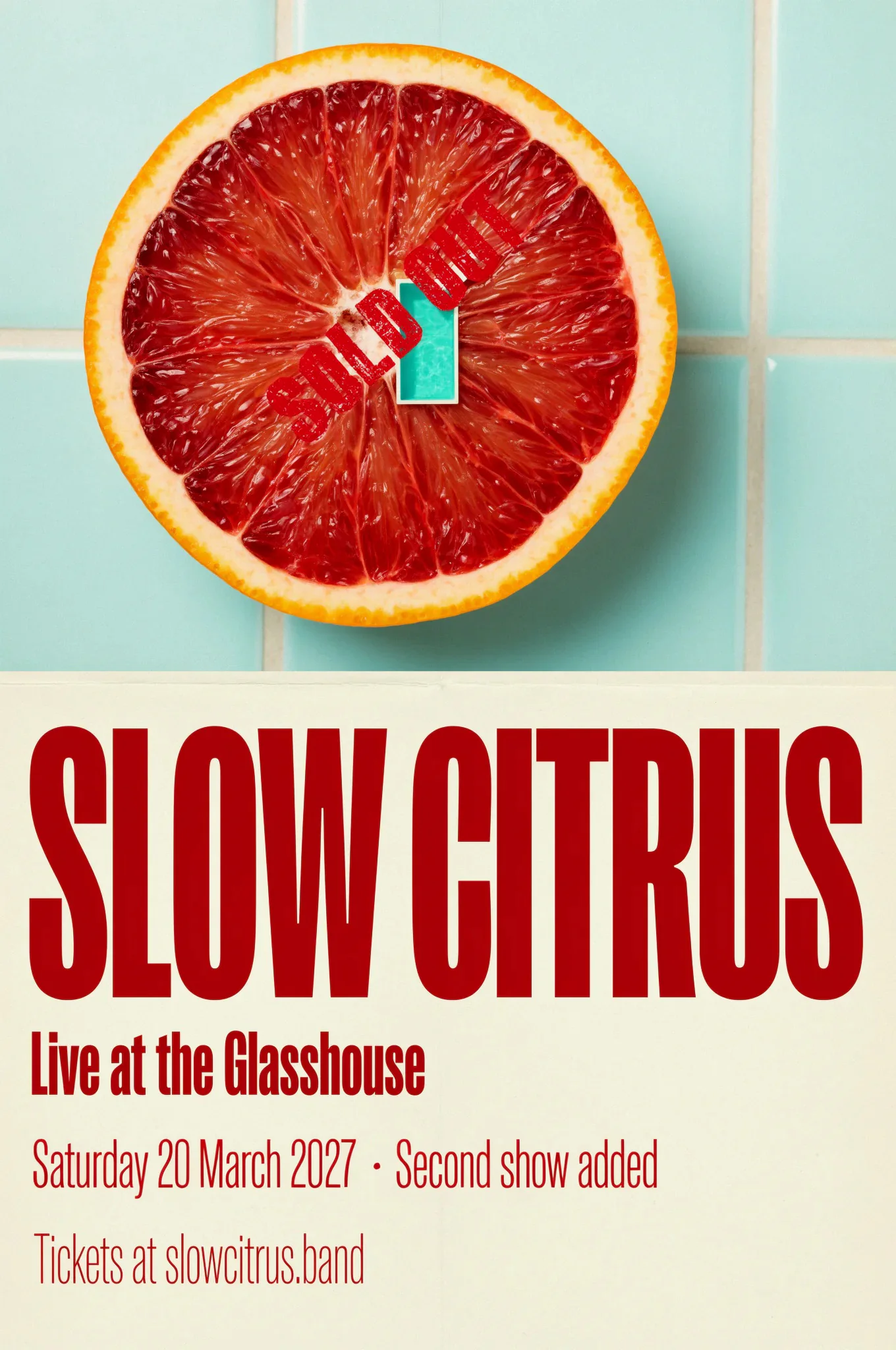
Keep the whole poster design exactly as it is. Change only the date line to "Saturday 20 March 2027 · Second show added" in the same red typeface, and stamp the words "SOLD OUT" diagonally across the orange in red rubber-stamp ink.
{
  "model": "ideogram/4.6/edit",
  "input": {
    "prompt": "Keep the whole poster design exactly as it is. Change only the date line to \"Saturday 20 March 2027 · Second show added\" in the same red typeface, and stamp the words \"SOLD OUT\" diagonally across the orange in red rubber-stamp ink.",
    "edit_precision": "high",
    "resolution": "2k",
    "quality": "medium",
    "image_url": "https://media.popnow.ai/influencer/examples/marco.webp",
    "aspect_ratio": "2:3"
  }
}
Ten wynik powstał z przesłanego pliku: wstaw własny link w miejsce przykładowego.
Odpowiedzi, odpytywanie i callbacki
Wszystkie modele działają tak samo: utwórz zadanie, a potem odpytuj je albo poczekaj na callback.
Najpierw cena
curl -X POST https://api.popnow.ai/api/v1/jobs/quote \
  -H "Authorization: Bearer $POPNOW_API_KEY" \
  -H "Content-Type: application/json" \
  -d '{
  "model": "ideogram/4.6/edit",
  "input": {
    "prompt": "A ceramic teapot on a linen cloth, soft window light, muted palette",
    "edit_precision": "regular",
    "resolution": "1k",
    "quality": "medium",
    "image_url": "https://media.popnow.ai/influencer/examples/marco.webp"
  }
}'
Przed uruchomieniem wyślij tę samą treść żądania do POST /jobs/quote, aby zobaczyć szacowaną i maksymalną opłatę w USD. Wycena nie uruchamia zadania ani nie obciąża salda.
Przyjęte
HTTP/1.1 202 Accepted

{
  "code": 200,
  "msg": "success",
  "data": {
    "taskId": "task_01k3m8x9q2z4v7n5p6r8s0t1w3",
    "state": "queued"
  },
  "request_id": "req_example_create"
}
HTTP 202 oznacza przyjęcie zadania: maksymalna kwota w USD pozostaje zarezerwowana do rozliczenia. Po przyjęciu zadania rezerwujemy maksymalną kwotę wyceny na saldzie PopNow. Po zakończeniu naliczamy opłatę za rzeczywiste użycie, nie wyższą niż rezerwacja, i zwalniamy resztę. Jeśli zadanie się nie powiedzie, rezerwacja zostaje zwolniona.
Sprawdź status
curl "https://api.popnow.ai/api/v1/jobs/recordInfo?taskId=$TASK_ID" \
  -H "Authorization: Bearer $POPNOW_API_KEY"
Odpytuj co kilka sekund, stopniowo wydłużając odstęp, i przestań, gdy state ma wartość succeeded, failed, canceled lub expired.
Gotowe zadanie
{
  "code": 200,
  "msg": "success",
  "data": {
    "taskId": "task_01k3m8x9q2z4v7n5p6r8s0t1w3",
    "model": "ideogram/4.6/edit",
    "state": "succeeded",
    "output": {
      "assets": [
        {
          "url": "https://cdn.popnow.ai/tasks/task_01k3m8x9q2z4v7n5p6r8s0t1w3/output.png?signature=FROM_RESPONSE",
          "expiresAt": "2026-10-17T12:20:00Z",
          "mime": "image/png",
          "width": 1024,
          "height": 1024
        }
      ]
    },
    "settled": true
  },
  "request_id": "req_example_record"
}
Pobierz plik z url przed expiresAt. Potrzebujesz później nowego linku? Poproś o niego przez POST /common/download-url.
Weryfikacja callbacku
import { createHash, createHmac, timingSafeEqual } from "node:crypto";
import express from "express";

const app = express();
// express.raw keeps the exact bytes that were signed; express.json would not match.
app.post("/hooks/popnow", express.raw({ type: "application/json" }), (req, res) => {
  const timestamp = req.header("X-Webhook-Timestamp");
  const signature = req.header("X-Webhook-Signature") ?? "";
  const body = JSON.parse(req.body.toString("utf8"));
  const taskId = body.data?.taskId ?? body.task_id;
  const digest = createHash("sha256").update(req.body).digest("hex");
  const expected = createHmac("sha256", process.env.POPNOW_WEBHOOK_SECRET)
    .update(`${taskId}.${timestamp}.${digest}`)
    .digest("base64");
  const ok = expected.length === signature.length && timingSafeEqual(Buffer.from(expected), Buffer.from(signature));
  // Check the signature first, then reject anything older than five minutes.
  if (!ok || Math.abs(Date.now() / 1000 - Number(timestamp)) > 300) return res.status(401).end();
  res.status(200).end(); // answer fast, then fetch the task and store its files
});
Gdy ustawisz callBackUrl, wyślemy ci ukończone zadanie. Przed przetworzeniem zweryfikuj podpis na oryginalnej treści żądania.
Wysyłanie pliku lokalnego
curl -X POST https://api.popnow.ai/api/v1/common/upload-url \
  -H "Authorization: Bearer $POPNOW_API_KEY" \
  -H "Content-Type: application/json" \
  -d '{"contentType": "image/png", "bytes": 482113}'

# PUT the file bytes to data.uploadUrl with every header in data.headers, then commit it:
curl -X POST https://api.popnow.ai/api/v1/files/$FILE_ID/commit \
  -H "Authorization: Bearer $POPNOW_API_KEY"
# The commit returns a popnow://f/... reference. Put it in any image, video or
# audio field of the task input instead of a public https URL.
Publiczne linki https działają bez zmian. Pliki lokalne przechodzą najpierw przez upload-url i commit.