

 Create Image
 Edit Image
 Layer Splitter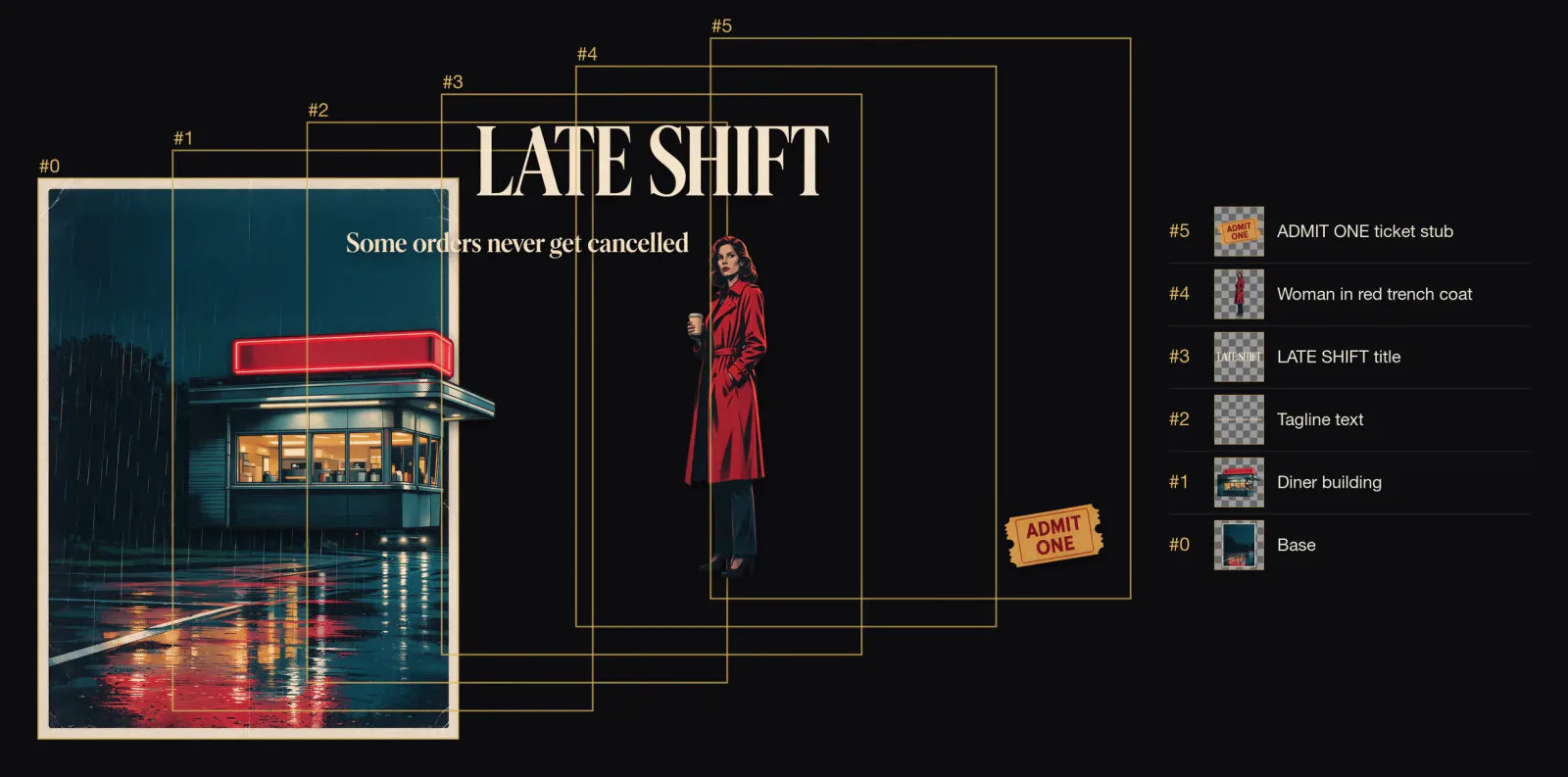
About Seedream 5.0 Pro
Seedream 5.0 Pro layer decomposition takes one finished image in image_url and returns a base plate plus separate transparent layers.
Call it with the model name bytedance/seedream-5.0-pro/layer-decomposition on POST /jobs/createTask, from 7 credits per image ($0.07). New accounts get 30 free credits to try it in the Playground first.
Introduction
Seedream 5.0 Pro Layer Decomposition splits one finished image into a base plate and up to sixteen transparent PNG layers. Each layer comes with a position box and a name, so you can rebuild the original composition or rearrange it on a canvas.
Developed by ByteDance (model ID dola-seedream-5-0-pro-260628). Use it when the layers need to go back exactly where they came from.
Choose a mode by starting material
| Starting material | Mode |
|---|---|
| A finished image whose parts you need separately | Seedream 5.0 Pro Layer Decomposition |
| A written art direction or design brief | Seedream 5.0 Pro Text to Image |
| An approved source image to revise | Seedream 5.0 Pro Image Editing |
Pro or Flash for layers
Both tiers return boundingBox and name for every layer. On the same film poster, run without a prompt, Pro returned nine images and Flash eight. Neither was reliably faster in our runs.
Key features
Position boxes and names
Every layer returns boundingBox as [x1, y1, x2, y2] in base-plate pixels and a name such as "Woman in red trench coat". In our poster run, stacking the layers back at their boxes reproduced the original poster. A layer PNG is often larger than the box it occupies (a 671 by 139 box came with a 1233 by 256 PNG), so scale it into the box when you put it back.
Clean base plate
The separated elements are removed and the background is completed. Splitting the perfume ad left an empty black marble surface where the bottle, ribbon and lettering had been.
Steer it with words or coordinates
Name the elements, or pin them down with <bbox> coordinates. With no prompt, the model chooses the main elements itself.
Transparent PNG layers
Layers are always transparent PNG, whatever output_format you choose. That setting only changes the base plate.
Request parameters
| Parameter | Required | Description |
|---|---|---|
image_url | Yes | The picture to start from. |
output_format | No | File type of the result. jpeg · png · Default: jpeg |
prompt | No | Optional: name the elements to separate. Leave empty to let the model pick the main elements. |
resolution | No | Output size. Bigger sizes look sharper and cost more. auto · 1k · 1.5k · 2k · Default: 1.5k |
Pricing
Prices are in credits, the same credits you use on the website (1 credit = $0.01). The hold is taken when the task is accepted and settled to the actual charge when it finishes; failed tasks are refunded.
| Option | Credits per image | ≈ USD |
|---|---|---|
| resolution 1.5K | 6.3 | $0.063 |
| resolution 1K | 6.3 | $0.063 |
| resolution 2K | 12.6 | $0.13 |
| resolution auto | 12.6 | $0.13 |
Each task is rounded up to whole credits, so one run at the lowest tier costs 7 credits per image ($0.07).
For an exact number before you run, send the same body to POST /jobs/quote.
Use cases
Change the words on a poster
Pull the title layer out, replace or restyle it, and stack everything back at the returned boxes.
Swap a product background
Lift the product and its lettering off an ad, keep the base plate or replace it, and re-compose for a new campaign.
Isolate a person from a scene
Ask for the person only and get one transparent layer plus the scene without them.
Prompt guide & pro tips
Name the pieces you want
For a poster, list them in plain words: "Separate the diner building, the tagline, the LATE SHIFT title, the woman in the red trench coat and the ADMIT ONE ticket stub." That run returned six images: the base plate and exactly those five layers.
Circle an element with a bounding box
Add <bbox>x1 y1 x2 y2</bbox> after the element's name. Coordinates are 0-1000 normalized from the top-left corner, so they do not depend on the image's pixel size.
Separate the title text <bbox>179 58 809 197</bbox> and the parrot <bbox>330 274 641 991</bbox> into independent layersPick a resolution
Use 1k or 1.5k when you only need a working split.
API quick start
Call the Seedream 5.0 Pro API in three steps
- Create an API key. Sign in to PopNow and create a key in the API console. Keys start with sk-popnow- and use the same credits as the website.
- Send the request. POST /jobs/createTask with model bytedance/seedream-5.0-pro/layer-decomposition and an input object that follows the parameter table. The response returns a task ID straight away.
- Get the result. Poll GET /jobs/recordInfo with the task ID, or pass a callBackUrl and we post the result to it. Download the output links when the task succeeds.
# 1. Create the task. Keep the Idempotency-Key if you retry after a network error.
export IDEMPOTENCY_KEY="$(uuidgen)"
curl -X POST https://api.popnow.ai/api/v1/jobs/createTask \
  -H "Authorization: Bearer $POPNOW_API_KEY" \
  -H "Content-Type: application/json" \
  -H "Idempotency-Key: $IDEMPOTENCY_KEY" \
  -d '{
  "model": "bytedance/seedream-5.0-pro/layer-decomposition",
  "input": {
    "image_url": "https://media.popnow.ai/influencer/examples/marco.webp",
    "resolution": "1.5k",
    "output_format": "jpeg"
  }
}'

# 2. Copy data.taskId from the response, then poll until state is succeeded, failed, canceled or expired.
TASK_ID="TASK_ID_FROM_RESPONSE"
curl "https://api.popnow.ai/api/v1/jobs/recordInfo?taskId=$TASK_ID" \
  -H "Authorization: Bearer $POPNOW_API_KEY"
Replace the prompt and any links with your own. The API tab has the response, polling and callback reference.
About the Seedream 5.0 Pro Layer Splitter endpoint
The base plate has the background filled in behind lifted elements, so you can move or remove a headline, product or person without leaving a hole.
Use it in design tools to turn a generated poster into editable pieces, or to swap one prop without regenerating the whole image.
It is billed per input image at its own tiers; there is no prompt field to tune.
Seedream 5.0 Pro API questions
How much does the Seedream 5.0 Pro API cost?
Seedream 5.0 Pro starts at 7 credits ($0.07) per image with Layer Splitter, its cheapest task. Prices by option: 1.5K 6.3 credits per image, 1K 6.3 credits per image, 2K 12.6 credits per image, auto 12.6 credits per image. Credits are the same as on the website (1 credit = $0.01), new accounts get 30 free credits, and failed tasks are refunded.
What are the limits of the Seedream 5.0 Pro · Layer Splitter API?
Resolutions: auto · 1K · 1.5K · 2K; Prompt length (characters): 5,000; Largest upload: 30 MB. Requests outside these limits are rejected before anything is charged.