
Appelez popnow/openai/gpt-image-2.6-flare/edit pour des éditions rapides jusqu'à 16 références avec masque ou annotation et variantes d'ambiance.
GPT Image 2.6 Flare : générateur d’images IA en ligne- Jusqu’à 4K
- Jusqu’à 16 images de référence
- 15 formats d’image
- Jusqu’à 10 par génération
- Créer une image
- Modifier une image
 Créer une image
 Modifier une image
Appelez-le avec le nom de modèle openai/gpt-image-2.6-flare/edit sur POST /jobs/createTask, à partir de 0,03357 $US.
openai/gpt-image-2.6-flare/editPOST https://api.popnow.ai/api/v1/jobs/createTask# 1. Create the task. Keep the Idempotency-Key if you retry after a network error.
export IDEMPOTENCY_KEY="$(uuidgen)"
curl -X POST https://api.popnow.ai/api/v1/jobs/createTask \
-H "Authorization: Bearer $POPNOW_API_KEY" \
-H "Content-Type: application/json" \
-H "Idempotency-Key: $IDEMPOTENCY_KEY" \
-d '{
"model": "openai/gpt-image-2.6-flare/edit",
"input": {
"prompt": "A ceramic teapot on a linen cloth, soft window light, muted palette",
"image_urls": [
"https://media.popnow.ai/influencer/examples/marco.webp"
],
"resolution": "1k",
"quality": "medium",
"num_outputs": 1,
"background": "auto",
"output_format": "png"
}
}'
# 2. Copy data.taskId from the response, then poll until state is succeeded, failed, canceled or expired.
TASK_ID="TASK_ID_FROM_RESPONSE"
curl "https://api.popnow.ai/api/v1/jobs/recordInfo?taskId=$TASK_ID" \
-H "Authorization: Bearer $POPNOW_API_KEY"// Node 18+ (or any runtime with fetch). Keep the API key on your server.
const BASE = "https://api.popnow.ai/api/v1";
const headers = { Authorization: `Bearer ${process.env.POPNOW_API_KEY}` };
const sleep = (ms) => new Promise((r) => setTimeout(r, ms));
async function call(path, init = {}) {
const res = await fetch(BASE + path, { ...init, headers: { ...headers, ...init.headers } });
const body = await res.json();
if (body.code !== 200) throw new Error(`${body.code} ${body.msg}`);
return body.data;
}
const { taskId } = await call("/jobs/createTask", {
method: "POST",
headers: { "Content-Type": "application/json", "Idempotency-Key": crypto.randomUUID() },
body: JSON.stringify({
"model": "openai/gpt-image-2.6-flare/edit",
"input": {
"prompt": "A ceramic teapot on a linen cloth, soft window light, muted palette",
"image_urls": [
"https://media.popnow.ai/influencer/examples/marco.webp"
],
"resolution": "1k",
"quality": "medium",
"num_outputs": 1,
"background": "auto",
"output_format": "png"
}
}),
});
// Poll with backoff. A finished task may still be copying files: wait while an asset is pending.
let task;
for (let delay = 2000; ; delay = Math.min(delay * 1.5, 15000)) {
await sleep(delay);
task = await call(`/jobs/recordInfo?taskId=${taskId}`);
const copying = (task.output?.assets ?? []).some((a) => a.pending && !a.unavailable);
if (["succeeded", "failed", "canceled", "expired"].includes(task.state) && !copying) break;
}
if (task.state !== "succeeded") throw new Error(`${task.state}: ${task.errorMessage ?? "no detail"}`);
// Each asset has a signed url (no API key needed) that expires at expiresAt: save the file.
for (const asset of task.output.assets) console.log(asset.url);import os, time, uuid, requests
BASE = "https://api.popnow.ai/api/v1"
HEADERS = {"Authorization": f"Bearer {os.environ['POPNOW_API_KEY']}"}
def call(method, path, **kwargs):
body = requests.request(method, BASE + path, headers={**HEADERS, **kwargs.pop("headers", {})}, timeout=30, **kwargs).json()
if body["code"] != 200:
raise RuntimeError(f'{body["code"]} {body["msg"]}')
return body["data"]
task_id = call(
"POST",
"/jobs/createTask",
headers={"Idempotency-Key": str(uuid.uuid4())}, # reuse it if you retry
json={
"model": "openai/gpt-image-2.6-flare/edit",
"input": {
"prompt": "A ceramic teapot on a linen cloth, soft window light, muted palette",
"image_urls": [
"https://media.popnow.ai/influencer/examples/marco.webp"
],
"resolution": "1k",
"quality": "medium",
"num_outputs": 1,
"background": "auto",
"output_format": "png"
}
},
)["taskId"]
# Poll with backoff. A finished task may still be copying files: wait while an asset is pending.
delay = 2.0
while True:
time.sleep(delay)
task = call("GET", "/jobs/recordInfo", params={"taskId": task_id})
assets = (task.get("output") or {}).get("assets") or []
copying = any(a.get("pending") and not a.get("unavailable") for a in assets)
if task["state"] in ("succeeded", "failed", "canceled", "expired") and not copying:
break
delay = min(delay * 1.5, 15.0)
if task["state"] != "succeeded":
raise RuntimeError(f'{task["state"]}: {task.get("errorMessage", "no detail")}')
# Each asset has a signed url (no API key needed) that expires at expiresAt: save the file.
for asset in assets:
print(asset["url"])L’input est construit à partir du schéma ci-dessous : il passe la validation tel quel. Remplacez le prompt et les liens par les vôtres.
Prix
| Option | USD par image |
|---|---|
quality lowresolution 1K | 0,02232 $US |
quality mediumresolution 1K | 0,03915 $US |
quality lowresolution 2K | 0,04131 $US |
quality highresolution 1K | 0,04743 $US |
quality mediumresolution 2K | 0,07299 $US |
quality lowresolution 4K | 0,07479 $US |
quality xhighresolution 1K | 0,08433 $US |
quality highresolution 2K | 0,08847 $US |
quality mediumresolution 4K | 0,13221 $US |
quality xhighresolution 2K | 0,15723 $US |
quality highresolution 4K | 0,16011 $US |
quality maxresolution 1K | 0,18972 $US |
Facturation en USD · Toutes les options et leur prix : GET /models/openai/gpt-image-2.6-flare/edit
La facturation suit les tokens réellement utilisés par chaque requête : 4,50 $US par million de tokens de texte en entrée, 7,20 $US par million de tokens d’image en entrée et 27,00 $US par million de tokens d’image en sortie. Le tableau indique le prix d’une image carrée pour chaque niveau ; les autres formats coûtent généralement moins cher. Avec plusieurs images en sortie, les tokens d’entrée comptent pour chaque image.
Limites
- Résolutions
- 1K · 2K · 4K
- Formats d’image
- 1:1 · 16:9 · 9:16 · 4:3 · 3:4 · 3:2 +9
- Résultats par appel
- 1–10
- Images de référence
- 16
- Longueur du prompt (caractères)
- 5,000
- Taille maximale d’envoi
- 10 MB
Paramètres
Ces champs viennent du schéma avec lequel nous vérifions chaque requête. Les champs qui n’y figurent pas sont refusés.
Certains champs dépendent les uns des autres (par exemple, au moins une référence). Le schéma brut en bas de page donne les règles exactes.
promptstringObligatoireDécrivez ce que vous voulez créer.
image_urlsarray<string>ObligatoireModifie le prixLes photos à retoucher ou combiner. Dites dans le prompt ce que chacune apporte.
mask_urlstringFacultatifModifie le prixPeignez la zone qui doit changer.
markup_urlstringFacultatifModifie le prixImportez une copie de la photo avec des cercles ou des flèches qui montrent quoi changer. Utilisez ceci ou un masque, pas les deux.
aspect_ratiostringFacultatifLa forme du cadre : large, carrée ou verticale.
resolutionstringFacultatifModifie le prixChoisissez une taille de sortie disponible.
qualitystringFacultatifModifie le prixChoisissez un réglage de qualité de ce modèle.
reasoning_effortstringFacultatifLe raisonnement consomme des tokens de sortie.
num_outputsintegerFacultatifModifie le prixCombien de résultats en une fois.
backgroundstringFacultatifGarder, supprimer ou remplacer l’arrière-plan.
output_formatstringFacultatifLe type de fichier du résultat.
output_qualityintegerFacultatifCompression JPEG et WebP. Une valeur plus élevée conserve davantage de détails et produit des fichiers plus volumineux.
Schéma JSON brut
{
  "additionalProperties": false,
  "properties": {
    "aspect_ratio": {
      "description": "Output aspect ratio. Leave it unset to keep the first image's shape (1k only); pick a ratio for 2k or 4k.",
      "enum": [
        "1:1",
        "16:9",
        "9:16",
        "4:3",
        "3:4",
        "3:2",
        "2:3",
        "21:9",
        "9:21",
        "2:1",
        "1:2",
        "3:1",
        "1:3",
        "5:4",
        "4:5"
      ],
      "type": "string"
    },
    "background": {
      "default": "auto",
      "description": "Background treatment. Transparent needs PNG or WebP output.",
      "enum": [
        "auto",
        "transparent",
        "opaque"
      ],
      "type": "string"
    },
    "image_urls": {
      "description": "One to 16 source images, in the order your prompt refers to them. Each one adds a small charge.",
      "items": {
        "contentMediaType": [
          "image/jpeg",
          "image/png",
          "image/webp",
          "image/gif"
        ],
        "format": "uri",
        "minLength": 1,
        "type": "string"
      },
      "maxItems": 16,
      "minItems": 1,
      "type": "array"
    },
    "markup_url": {
      "description": "Optional transparent PNG with circles, sketches or notes drawn over the first image to show what to change, same size as that image. Cannot be combined with mask_url.",
      "format": "uri",
      "type": "string"
    },
    "mask_url": {
      "contentMediaType": [
        "image/jpeg",
        "image/png",
        "image/webp",
        "image/gif"
      ],
      "description": "Optional PNG mask: transparent pixels mark the area to repaint in the first image, same size as that image. Cannot be combined with markup_url.",
      "format": "uri",
      "type": "string"
    },
    "num_outputs": {
      "default": 1,
      "description": "How many images to return, each billed separately.",
      "maximum": 10,
      "minimum": 1,
      "type": "integer"
    },
    "output_format": {
      "default": "png",
      "description": "File format of the returned images.",
      "enum": [
        "png",
        "jpeg",
        "webp"
      ],
      "type": "string"
    },
    "output_quality": {
      "description": "Compression quality for JPEG and WebP output, from 0 to 100.",
      "maximum": 100,
      "minimum": 0,
      "type": "integer"
    },
    "prompt": {
      "description": "Say what to change and what must stay the same. Refer to the images as Image 1, Image 2 and so on.",
      "maxLength": 5000,
      "minLength": 1,
      "type": "string"
    },
    "quality": {
      "default": "medium",
      "description": "Rendering quality. Higher tiers add detail, time and cost.",
      "enum": [
        "low",
        "medium",
        "high",
        "xhigh",
        "max"
      ],
      "type": "string"
    },
    "reasoning_effort": {
      "description": "How much the model plans the picture before drawing. Higher helps dense text and complex layouts and takes longer; the price does not change. Leave it unset for the model default (high).",
      "enum": [
        "low",
        "medium",
        "high"
      ],
      "type": "string"
    },
    "resolution": {
      "default": "1k",
      "description": "Output size tier: 1k is about 1 megapixel, 2k about 3.7, 4k about 8.3.",
      "enum": [
        "1k",
        "2k",
        "4k"
      ],
      "type": "string"
    }
  },
  "required": [
    "prompt",
    "image_urls"
  ],
  "type": "object",
  "allOf": [
    {
      "if": {
        "required": [
          "background"
        ],
        "properties": {
          "background": {
            "const": "transparent"
          }
        }
      },
      "then": {
        "properties": {
          "output_format": {
            "enum": [
              "png",
              "webp"
            ]
          }
        }
      }
    },
    {
      "if": {
        "not": {
          "required": [
            "aspect_ratio"
          ]
        }
      },
      "then": {
        "properties": {
          "resolution": {
            "enum": [
              "1k"
            ]
          }
        }
      }
    }
  ]
}
Un vrai résultat de GPT Image 2.6 Flare
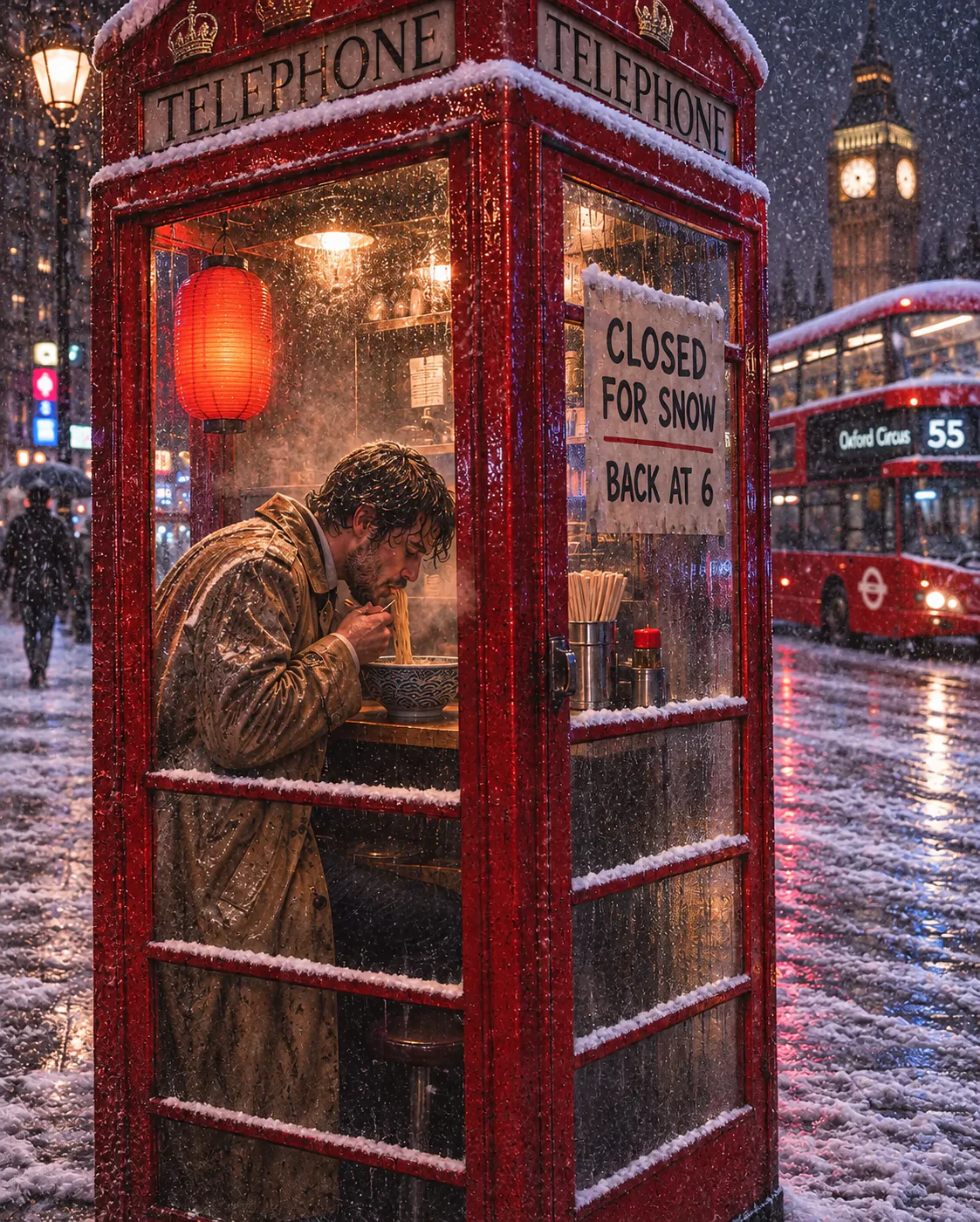
Make it a snowy night instead of rain: snow settling on the roof of the phone box and on the street, steam and breath in the cold air. Replace the paper menu with one that reads "CLOSED FOR SNOW — BACK AT 6" and make the red paper lantern plain with no lettering. Keep the man, the bus and the composition.
{
  "model": "openai/gpt-image-2.6-flare/edit",
  "input": {
    "prompt": "Make it a snowy night instead of rain: snow settling on the roof of the phone box and on the street, steam and breath in the cold air. Replace the paper menu with one that reads \"CLOSED FOR SNOW — BACK AT 6\" and make the red paper lantern plain with no lettering. Keep the man, the bus and the composition.",
    "image_urls": [
      "https://media.popnow.ai/influencer/examples/marco.webp"
    ],
    "resolution": "1k",
    "quality": "medium",
    "num_outputs": 1,
    "background": "auto",
    "output_format": "png"
  }
}
Ce résultat part d’un fichier envoyé : mettez votre propre lien à la place du lien d’exemple.
Réponses, suivi des tâches et callbacks
Tous les modèles fonctionnent de la même façon : créez une tâche, puis interrogez-la ou attendez le callback.
Connaître le prix d’abord
curl -X POST https://api.popnow.ai/api/v1/jobs/quote \
  -H "Authorization: Bearer $POPNOW_API_KEY" \
  -H "Content-Type: application/json" \
  -d '{
  "model": "openai/gpt-image-2.6-flare/edit",
  "input": {
    "prompt": "A ceramic teapot on a linen cloth, soft window light, muted palette",
    "image_urls": [
      "https://media.popnow.ai/influencer/examples/marco.webp"
    ],
    "resolution": "1k",
    "quality": "medium",
    "num_outputs": 1,
    "background": "auto",
    "output_format": "png"
  }
}'
Avant l’exécution, envoyez le même corps de requête à POST /jobs/quote pour connaître les frais estimés et leur plafond en USD. Le devis ne lance aucune tâche et ne débite pas votre solde.
Acceptée
HTTP/1.1 202 Accepted

{
  "code": 200,
  "msg": "success",
  "data": {
    "taskId": "task_01k3m8x9q2z4v7n5p6r8s0t1w3",
    "state": "queued"
  },
  "request_id": "req_example_create"
}
HTTP 202 signifie que la tâche est acceptée : le plafond en USD reste réservé jusqu’au décompte final. À l’acceptation d’une tâche, le montant maximal du devis est réservé sur votre solde PopNow. À la fin, la facturation suit l’usage réel, sans dépasser ce montant, et le reste est libéré. En cas d’échec, le montant réservé est libéré.
Vérifier l’état
curl "https://api.popnow.ai/api/v1/jobs/recordInfo?taskId=$TASK_ID" \
  -H "Authorization: Bearer $POPNOW_API_KEY"
Interrogez le statut à quelques secondes d’intervalle en espaçant progressivement les appels. Arrêtez dès que state vaut succeeded, failed, canceled ou expired.
Tâche terminée
{
  "code": 200,
  "msg": "success",
  "data": {
    "taskId": "task_01k3m8x9q2z4v7n5p6r8s0t1w3",
    "model": "openai/gpt-image-2.6-flare/edit",
    "state": "succeeded",
    "output": {
      "assets": [
        {
          "url": "https://cdn.popnow.ai/tasks/task_01k3m8x9q2z4v7n5p6r8s0t1w3/output.png?signature=FROM_RESPONSE",
          "expiresAt": "2026-10-17T12:20:00Z",
          "mime": "image/png",
          "width": 1024,
          "height": 1024
        }
      ]
    },
    "settled": true
  },
  "request_id": "req_example_record"
}
Téléchargez le fichier depuis url avant la date indiquée par expiresAt. Pour obtenir un nouveau lien, appelez POST /common/download-url.
Vérifier un callback
import { createHash, createHmac, timingSafeEqual } from "node:crypto";
import express from "express";

const app = express();
// express.raw keeps the exact bytes that were signed; express.json would not match.
app.post("/hooks/popnow", express.raw({ type: "application/json" }), (req, res) => {
  const timestamp = req.header("X-Webhook-Timestamp");
  const signature = req.header("X-Webhook-Signature") ?? "";
  const body = JSON.parse(req.body.toString("utf8"));
  const taskId = body.data?.taskId ?? body.task_id;
  const digest = createHash("sha256").update(req.body).digest("hex");
  const expected = createHmac("sha256", process.env.POPNOW_WEBHOOK_SECRET)
    .update(`${taskId}.${timestamp}.${digest}`)
    .digest("base64");
  const ok = expected.length === signature.length && timingSafeEqual(Buffer.from(expected), Buffer.from(signature));
  // Check the signature first, then reject anything older than five minutes.
  if (!ok || Math.abs(Date.now() / 1000 - Number(timestamp)) > 300) return res.status(401).end();
  res.status(200).end(); // answer fast, then fetch the task and store its files
});
Si vous renseignez callBackUrl, nous vous envoyons la tâche une fois terminée. Vérifiez la signature à partir du corps brut de la requête webhook avant d’en traiter le contenu.
Envoyer un fichier local
curl -X POST https://api.popnow.ai/api/v1/common/upload-url \
  -H "Authorization: Bearer $POPNOW_API_KEY" \
  -H "Content-Type: application/json" \
  -d '{"contentType": "image/png", "bytes": 482113}'

# PUT the file bytes to data.uploadUrl with every header in data.headers, then commit it:
curl -X POST https://api.popnow.ai/api/v1/files/$FILE_ID/commit \
  -H "Authorization: Bearer $POPNOW_API_KEY"
# The commit returns a popnow://f/... reference. Put it in any image, video or
# audio field of the task input instead of a public https URL.
Les liens https publics fonctionnent tels quels. Les fichiers locaux passent d’abord par upload-url et commit.